
How to build a master resume. Write it once, then cut every application from it.
If you rewrite your resume for every application, or can't remember last year's numbers, a master resume fixes both. You write everything down once and keep it current a few lines a week. Each job's resume then becomes a matter of choosing lines. Here's how, with templates to copy.

The short answer
- A master resume is one long, private document with every job, project, skill and result you could put on a resume. You never send it.
- For each application, copy it and cut it down to the one or two pages that fit the job. Tailoring becomes choosing lines, not writing them.
- Keep it current with a brag document, a few lines a week about what you did and what changed, moved into the master once a month.
On this page
Why one resume for everything stops working, and what a master resume fixes.
Three common frustrations, and what a master resume does about each.
“I rewrite my resume for every job.”
Starting from a blank page, or from the last job's version, is slow. CareerOneStop, a career site sponsored by the US Department of Labor, says a master resume makes targeted resumes easier, since you cut and paste from lines you've already written.
Fix: Write each line once. Then each application is a cut, not a rewrite.
“I can never remember what I did last year.”
Time passes, and results get hard to recall. Alberta's government career site calls a master resume “an external memory bank of your career” and says to add to it each time you do or learn something new.
Fix: Write wins down the week they happen. That's what a brag document is for. How to keep one is below.
“I have five versions and none of them is complete.”
Each version gets edits the others don't, so your best line can end up stuck in an old file. A master keeps one complete copy of everything.
Fix: Keep one source. Every version you send is a copy of it, cut down.
What a master resume is, and how it's different from the resume you send.
CareerOneStop describes a master resume as one that “lists and completely describes your skills, work experience, accomplishments, and training (gained through paid and unpaid channels) all in one place.” Every job, internship and volunteer role goes in, whether or not you'd use it again.
The resume you send is a different document. Alberta's career site says a targeted resume “should only be 1 to 2 pages”, while your master resume “can be much longer.” The targeted one is aimed at a single job. The master is the source you cut it from.
There's no right length. CareerOneStop says a master “can be many pages long”. MOAA, an association for military officers, suggests one “10, 15, even 20 pages long.” In our reading, page count doesn't matter, because you're its only reader. The real test is whether you can find a line in a minute.
You never send it. 4 Corner Resources, a staffing firm, warns that sending it “can make you appear unfocused”. An employer gets the cut, never the whole thing.
How to build a master resume, in six steps.
In our experience, the first pass takes an evening or two, and after that it's a few minutes a week.
Gather what you already have
Old resumes, performance reviews, LinkedIn, offer letters for exact titles and dates, and any praise you saved. If you're stuck, Indeed suggests asking your supervisors, colleagues and relatives what they know about you. MOAA's questions help too. Did you save time? Did you spot a problem others didn't?
List every role, with its title and dates
Every job, internship, apprenticeship and volunteer position, as CareerOneStop lists them, newest first. Promoted at the same company? Give each title its own dates, as our guide to showing a promotion on your resume explains.
Under each role, write every result as a resume line
Don't write notes to tidy up later. Write each line the way it would sit on a resume, with what you did, what changed and the real number. CareerOneStop's advice is to highlight STAR statements in the master, then cut and paste them into each targeted resume. Our guide to resume bullet points shows how to word them. If wording them is the slow part, Blynk can turn what you tell it into clear, specific bullet points built from what you told it.
Add skills, tools, certifications and education
Add every skill and tool you've really used, plus training, degrees, certifications and awards. Alberta's career site also records each course you've taken. Add freelance and volunteer work too, and keep anything you could talk about in an interview.
Tag each line with the kind of job it fits
Our advice. Add a short tag in brackets at the end of each line, such as [email], [team] or [budget]. When a posting asks for team leadership, you search for [team] and every line that proves it comes up.
Date it, and never edit it to fit one job
Put the date of the last update at the top, and keep one copy where you'll find it. Teal, a resume tool, lists overwriting the master copy as a common mistake. Copy it first, every time, then cut the copy.
A master resume template, to copy and fill in.
Plain text, so it pastes into Google Docs, Word or Notes. It isn't a designed resume. For the one you send, use a free ATS resume template.
Master resume template
One file for your whole career. Add to it, never cut it.
MASTER RESUME (never send this file)
Last updated [Month Year]

[Your name]
[City, State] | [Email] | [Phone] | [LinkedIn URL]

SUMMARIES, ONE FOR EACH KIND OF ROLE
[Kind of role 1]
[Two lines with your strongest proof for it]
[Kind of role 2]
[Two lines with your strongest proof for it]

EXPERIENCE, EVERY ROLE, NEWEST FIRST
[Job title], [Employer], [City or Remote]
[Start month year] to [End month year, or now]
- [What you did], [what changed], [the real number] [tag]
- [Another result line] [tag]
- [Keep going. There's no limit here.]

[Earlier title at the same employer]
[Start month year] to [End month year]
- [Result line] [tag]

PROJECTS, FREELANCE AND VOLUNTEER WORK
[Project or role], [Who it was for], [Dates]
- [Result line] [tag]

SKILLS AND TOOLS
[Skill or tool], [how you've used it, in a few words]

CERTIFICATIONS AND TRAINING
[Name], [Issuer], [Year]

EDUCATION
[Degree or program], [School], [Year]
- [Courses, projects or honors worth keeping]

AWARDS AND PRAISE
[Award or quote], [From whom], [Date]
A master resume example, and the cut for one job, line by line.
A made-up person, company and job. [number] marks where your real numbers go. We don't invent any, and neither should you.
The master entry, in full
One role from the master, with all seven lines and their tags.
Marketing Manager, Fernhill Goods, [Year] to now
1. Ran [number] email campaigns a year for [number] subscribers, lifting the open rate from [number]% to [number]%. [email]
2. Managed a $[number] yearly paid search budget on Google Ads. [paid] [budget]
3. Hired and trained [number] marketing coordinators. [team]
4. Rebuilt the product launch checklist with sales and design, cutting launch prep from [number] weeks to [number]. [launch]
5. Wrote the brand style guide that [number] teams now use. [brand]
6. Ran the company's booth at [number] trade shows a year. [events]
7. Led the move of [number] contacts from Mailchimp to HubSpot in [number] weeks. [email] [tools]The job posting, an excerpt
An Email Marketing Manager role at Northwind, a made-up company.
Requirements. Plan and run email campaigns from start to finish. Hands-on HubSpot experience. Experience managing a small team.
Preferred. Paid search experience a plus.Mark what it requires, and what it only prefers
Must-haves decide what goes first. Nice-to-haves go last, or go. Postings often split the two. In 190 job postings Blynk read line by line in November 2026, mostly for senior product roles, 7 in 10 mark at least one ask as only preferred or a plus. That count is from our guide to tailoring your resume to a job description.
Must-haves. Email campaigns, HubSpot, managing a team. Search the master for [email], [tools] and [team].
Nice-to-have. Paid search. Search for [paid].Keep the lines the posting asks for, must-haves first
Four lines stay and three go. Three prove a must-have, and the paid search line covers the nice-to-have, so it goes last. Nothing is reworded yet, and nothing is added. The numbers show which master line is which. The tags come off in the copy you send.
Kept, in the new order
1. Ran [number] email campaigns a year for [number] subscribers, lifting the open rate from [number]% to [number]%.
7. Led the move of [number] contacts from Mailchimp to HubSpot in [number] weeks.
3. Hired and trained [number] marketing coordinators.
2. Managed a $[number] yearly paid search budget on Google Ads.
Cut for this job, still in the master
4. The launch checklist, 5. the style guide and 6. the trade shows. Northwind's posting doesn't ask for them. The next job might.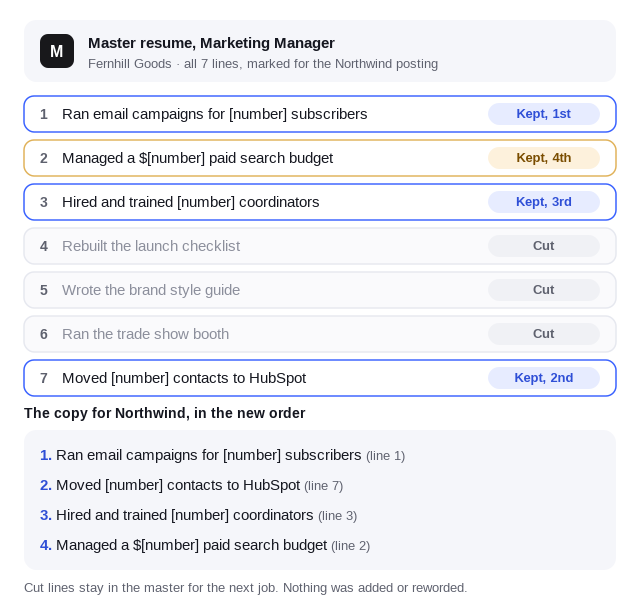
An illustration of the cut, with the lines shortened. The person and the companies are made up. Reword for the posting, trim to length and save the copy
Now use the posting's own words for each kept line, where they're true. That step is in our guide to tailoring a resume. Then cut the whole copy to one or two pages, as resume length explains, and save it with the job it went to. Indeed estimates that once you have a primary resume, tailoring “typically takes 10 to 20 minutes”.

How to track accomplishments at work, with a brag document.
A brag document is a running list of what you did at work and what changed because of it. Julia Evans popularised the name in a 2019 post. She wrote it for performance reviews, so you don't rely on memory and can share it with your manager. Some people update theirs every 2 weeks. She prefers one long session every 6 months or so.
Why it belongs with your master resume. Her post doesn't mention resumes, and none of the master resume guides we read mention a brag document. Together they fix the forgetting problem. Penn Career Services makes the same link. A ready list of your wins makes updating your resume faster.
Five minutes a week. Our advice is to pick one day, say Friday, and write a line or two. Penn's advice is to note each win when it happens, with the date. Write down what happened, what you did, what changed and where the proof lives, so you can find the number later.
Once a month, move the best lines into the master. Teal suggests a light monthly or quarterly check-in. By then the brag document has done the remembering, so moving a line in takes seconds.
Leave out what isn't yours to share. Teal lists storing confidential or sensitive information as a mistake. Client names under an agreement and internal figures you couldn't say in an interview stay out of both documents.
A brag document template, one entry a week.
Copy it into a note or document you'll open every week. The last line is the one that moves into your master resume.
Brag document entry
Once a week, or the day something goes well.
Week of [date]

What happened
[The problem, project or request, in one line]

What I did
[Your part, in one line]

What changed
[The result, with the real number if you have one]

Where the proof is
[The dashboard, email, report or review that shows it]

Resume line
[The same win, written the way it would sit on your resume]
How many resumes should you have? Multiple, all cut from one master.
The straight answer. One master resume. One base resume for each kind of role you apply for. And one tailored copy for each application, saved with the job it went to.
How many bases? One for each kind of role, not for each job. If every job you apply for is the same kind of role, one base is enough. If you're applying for two different kinds, say email marketing and marketing operations, keep two. Replying to a Reddit thread about tailoring, one recruiter said three base resumes plus a 5 to 10 minute edit for each job counts as tailoring.
Same experience, two angles. Monster suggests keeping two versions of your key bullets when you're aiming at more than one kind of role. In the master, that's two lines with different tags.
Only one master, though. Our advice. Two masters drift apart the same way five resumes do. Changing fields? Keep the same master and start a new base, as our career change resume guide shows.
Keep your master resume useful, do this, not that.
What keeps a master quick to cut from, and honest.
Do
- Write every line the way it would sit on a resume.
- Keep real numbers and dates, and note where the proof lives.
- Add to it the week something happens.
- Copy it before you cut it, every time.
- Save each copy you send with the job it went to.
Don't
- Send the master to an employer.
- Park a stretched or made-up line in it “for later”.
- Guess a number you can't check.
- Store client names or internal figures you can't share.
- Edit the master to fit one job.
Questions about master resumes, answered.
What is a master resume?
A master resume is one long, private document with every job, project, skill and result you could put on a resume. A regular, targeted resume is a copy of it cut down to the one or two pages that fit one job. You send the targeted one and keep the master.
How do you write a master resume?
Gather your old resumes and reviews, then list every role with its title and dates. Under each, write every result as a ready-to-use resume line with its real number. Add skills, tools, certifications and education, tag each line with the kind of job it fits, and date the file. The six steps and a template to copy are above.
How long should a master resume be?
As long as it needs to be. CareerOneStop says it “can be many pages long”, and MOAA suggests 10 to 20 pages. In our reading, length doesn't matter because only you read it. What matters is finding a line fast, which is what the tags are for. The copy you send stays at one or two pages.
Should I send my master resume to an employer?
No. It's too long and covers too much, and 4 Corner Resources warns it “can make you appear unfocused”. Send a copy cut down for that job.
Is a master resume the same as a CV?
No. Cornell's Graduate School describes a CV as “a longer synopsis of your educational and academic background”, used “when applying for academic, scientific, or research positions”. A CV is a document you send. A master resume never leaves your computer. If you need a CV, your master is a good place to build it from.
Can LinkedIn be my master resume?
Not on its own, in our view. Your LinkedIn profile is public, so it's closer to a resume you send than to a private master. Keep the master as your own file, and update LinkedIn from it.
What file format should a master resume be?
Our advice is anything you can search and copy from easily, such as a Google Doc, a Word file or a plain note. Keep it plain, without columns or design, so lines paste cleanly into the copy. The file you send is a separate choice. Our ATS-friendly resume guide covers it.
Do I need more than one master resume?
No, in our view. Keep one master and one base resume for each kind of role you apply for. Two masters drift apart, and your best line ends up in only one of them.
What is a brag document, and isn't it just bragging?
It's a running list of what you did at work and what changed because of it, a name Julia Evans popularised in 2019. When her post was discussed on Hacker News, some commenters said brag lists feel desperate, and others answered that it's simply an honest record. It's private unless you choose to share it, and it's facts, not a pitch.
How often should I update my master resume?
Monster says every 3 to 6 months. Teal says to add to it close to the work, after a big project, result or promotion. Our advice is a few lines a week in a brag document, moved into the master once a month, so nothing waits until you're job hunting.
Where these facts come from.
Checked in November 2026. The advice is ours, and we say where; facts about other organizations come from their own pages. The 7 in 10 figure is Blynk's own, first published in our tailoring guide. It comes from 190 job postings, mostly senior product roles, read line by line between November 2 and 11, 2026, each line labelled required, preferred or neither by the posting's own words.
- How to tailor your resume to a job description
- How to write resume bullet points
- How to show a promotion on your resume
- Freelance and contract work on a resume
- CareerOneStop, your master resume
- alis (Government of Alberta), how to create your master resumé
- MOAA, making a master résumé
- Indeed, how to tailor your resume to a job description
- Indeed Canada, what is a master resume
- Julia Evans, get your work recognized by writing a brag document (2019)
- Hacker News, discussion of the brag document post
- Penn Career Services, how and why to track accomplishments at work
- Teal, what is a master resume
- Monster, how to create a master resume
- 4 Corner Resources, what is a master resume
- Reddit r/jobsearchhacks, the "tailor your resume for every job" advice is exhausting
- Cornell Graduate School, resumes and CVs
- Blynk, Resume Builder
- Blynk, Find Jobs
- Blynk, tailoring (homepage)
