
The ATS-friendly resume, explained. So the software reads it and a recruiter finds it.
If you've heard your nicely designed resume might be invisible to hiring software, and every site tells you something different, here's the plain version, from the hiring systems' own help pages: what's myth, PDF or Word, the formatting that matters, a template to copy, and a quick way to check yours.

The short answer
- An ATS-friendly resume is one hiring software can read and a recruiter can find. Real text in one column, standard section headings, and the job description's own words for what you've really done.
- PDF or Word both work. Images don't. Send the type the upload form asks for. If it says nothing, a .docx file or a PDF whose text you can highlight is accepted by every hiring system that publishes a list.
- Check it before you send it: paste it into a plain text editor to see if it still reads in order, then compare it with a real job description.
On this page
Five things you've heard about ATS, and what's really true.
A lot of ATS advice repeats the same scary claims. Here's what a hiring system's own help center says instead.
“The ATS will auto-reject my resume.”
In Greenhouse, automatic rejection rules are built on your answers to the application's own questions, not on your resume text. In a small study by a resume company, Enhancv, 23 of 25 US recruiters said their system doesn't reject for formatting, content or design. The filter they named most was the screening questions: work authorization, degree, location.
Instead: Answer the screening questions carefully and honestly. A careless click there can end an application before anyone reads your resume.
“Most resumes are thrown out by software before a person sees them.”
The figure you'll see most often is 75%. Nobody has found a study behind it, and Enhancv, which went looking, says it gets repeated “without a single source”. Hiring systems describe something more ordinary: they read your file into a profile, and recruiters search those profiles by keywords.
Instead: Make sure you come up in a search. Use the job description's own words for skills you really have.
“An ATS can't read PDFs.”
Greenhouse, Lever and Oracle Taleo all list PDF among the files they accept. What fails is a picture of a resume: a scan, a photo, or a PDF flattened into an image. More on this below.
Instead: Send the file type the upload form asks for. If it doesn't say, a Word file or a PDF whose text you can highlight is a safe choice.
“I need a plain, ugly resume.”
Readable isn't the same as ugly. What causes trouble is structure a parser can't follow: columns, tables, text boxes, graphics, and contact details tucked into a header or footer.
Instead: Keep the design, lose the structure. One column, real text and clear headings. A clean font, good spacing and a touch of colour are fine.
“I should stuff in every keyword.”
A person reads whatever the search turns up. A block of buzzwords, or skills you don't have, falls apart on the first read or in the first interview. MIT's career office puts it plainly: you must be able to account for everything on your resume.
Instead: Use the job's words where they're true. Put them in your bullet points, next to a result, not only in a skills list. Workday, for one, doesn't fill in its skills field from your resume.
What an ATS does, and what recruiters do in it.
An applicant tracking system (ATS) is the software employers use to collect and manage applications. Workday, Greenhouse, Lever and iCIMS are a few you'll see behind company careers pages. When you apply on an employer's site, you're often filling in its ATS's form.
Almost every large employer uses one. Jobscan, which checks the careers pages of the Fortune 500 each year, found an applicant tracking system behind 487 of the 2026 list (97.4%), so nearly all of the largest US companies. Workday ran over 40% of them. The “98%” you'll see elsewhere is an earlier edition of the same count; the “99%” usually comes with no source at all.
You usually can't pick the system, so follow the rules they share. In Blynk's own count of 716 job postings from our product-role searches where the application link showed the employer's hiring system, there were 24 different ones. Workday, Ashby and Greenhouse carried about two in three (68%), and the other 21 shared the rest. So advice for “a resume for Workday” is beside the point. What applicant tracking systems agree on is what to follow.
First, it reads your file. Greenhouse's help center says it scans the resume you upload and auto-fills the profile fields it detects. If it can't, the resume is only attached, and the details have to be typed in by hand. Some fields can also be skipped while others fill in.
Then, a recruiter looks for people. In Greenhouse, recruiters can turn on full-text search and look for keywords across resumes and profiles, and set rules that reject applications based on answers to the application's questions. In Lever, they can filter by company, job title, school, and years of experience worked out from the dates on your resume.
So an ATS-friendly resume does two jobs. It reads cleanly, so your profile comes through the way you wrote it. And it uses the job description's own words, so you come up when recruiters or hiring managers search.
PDF or Word for an ATS? What the systems' own help pages say.
Both are accepted. Greenhouse takes .doc, .docx, .pdf, .rtf and .txt files. Lever takes Word, PDF, RTF and a few more. Oracle Taleo lists .doc, .docx, .pdf, .rtf, .txt and others, and each employer chooses which to offer. Workday's help doesn't publish a list.
What fails is a picture of a resume. Lever says it can't parse image files like JPG or PNG. Greenhouse lists resumes uploaded as an image among the causes of a failed parse, and Workday says it works best with resumes that don't have images or image-based styles. A scan or a phone photo of a printed resume is an image, even inside a PDF.
The highlight test. Open your PDF and try to select a line of text. If you can't highlight it, Lever's help says, it likely can't be parsed. Save a new PDF from the original document instead.
Made it in Canva? Leave “Flatten PDF” off. Canva's Advanced Settings on PDF download include a “Flatten PDF” option, which converts the file into a static image. Download without it, then do the highlight test.
Where to look: the upload box, not the job description. Blynk read 1,204 job postings with a full description, and none said which resume file to send. The rule sits on the application form: a real Greenhouse form prints “Accepted file types: pdf, doc, docx, txt, rtf” next to the resume box. If the form says nothing, a .docx or a PDF made from a document is accepted by every system that publishes a list.
Why the advice online disagrees. Much of it is old, or comes from sites that sell one format. The systems' own pages today accept both.
The ATS formatting that matters, and what to leave out.
Greenhouse, Lever and Workday's help pages list what trips up their parsers. Here it is as a checklist.
Do
- One column, read top to bottom.
- Standard section headings: Work Experience (or Experience), Skills, Education.
- Your name and contact details in the body of the page.
- Real text you can select and copy.
- Your full job title and the company's full name.
- Skills in your bullet points, not only in a skills list.
- A .docx or a PDF whose text you can highlight, unless the form asks for something else.
- A small file: Greenhouse can't parse resumes over 2.5MB.
Don't
- Two columns, or a sidebar for skills and contact details.
- Tables or text boxes to line things up.
- A headshot, icons, skill bars or word art.
- Contact details only in the header or footer.
- Creative headings that hide what a section is.
- A scan, a photo of your resume, or a flattened PDF.
- Keywords hidden in white text, or skills you don't have.
- Heavy shading, borders or background colors behind text.
Fonts, dates and acronyms an ATS reads, and how long to make it.
Fonts: a common one, 10pt or larger. MIT's career office names Arial, Calibri, Cambria, Georgia, Helvetica and Times New Roman, at 10pt or more, and says to skip fancy fonts. Pick one and use it throughout.
Dates: Month Year to Month Year, newest job first. No hiring system we read publishes a date rule, but two facts point the same way. Lever works out years of experience from the dates it reads on your resume, and in Blynk's count about 6 in 10 job postings (708 of 1,204) ask for a number of years. So write “Mar 2021 – Present”, not “'21 – now”.
Acronyms: write both. “Search Engine Optimization (SEO)” comes up whichever one a recruiter types. Greenhouse's keyword search matches what's typed: to catch other words for the same thing, the recruiter has to add them with OR, and its help doesn't say it matches an acronym to its full name. MIT adds one more: don't let a line break split a keyword with a hyphen.
Length: one page early on, two if your work experience needs it. No ATS help page we read sets a page limit; the limit is the person reading. Illinois' career office tells students to keep it to a single page, and Harvard Law School's admissions advice speaks of a page or two.
Bullets and symbols: keep them plain. Round bullets or hyphens, no arrows, emoji or decorative characters. That's our advice rather than any system's rule, and it costs nothing.
A free ATS-friendly resume template, blank and filled in.
Copy either one into Word or Google Docs, keep it in one column, and save it as a .docx or a PDF you made from the document.
ATS-friendly resume template (blank)
Works in Word or Google Docs. Fill in the brackets.
[Your Name]
[City, State] · [email] · [phone] · [linkedin.com/in/you]

SUMMARY
[Two lines on who you are and the result you're best known for, in the job description's words.]

WORK EXPERIENCE
[Job Title], [Company Name] · [City] · [Mon Year] – [Mon Year or Present]
- [What you did and the result, with a number if you have one.]
- [What you did and the result.]
- [What you did and the result.]

[Job Title], [Company Name] · [City] · [Mon Year] – [Mon Year]
- [What you did and the result.]
- [What you did and the result.]

SKILLS
[Skill], [Tool], [Full Name (Acronym)], [Language]

EDUCATION
[Degree], [School] · [Year]
Filled-in example, a product manager
What the blank template looks like filled in. The person and companies are made up.
Maya Chen
New York, NY · maya@example.com · (555) 010-0142 · linkedin.com/in/your-name

SUMMARY
Product lead who grows self-serve revenue through careful experiments and clear teams. 7 years in analytics software for business customers.

WORK EXPERIENCE
Product Lead, Lumen Analytics · New York · Mar 2021 – Present
- Ran 60 pricing and onboarding A/B tests, lifting paid conversion from 4% to 7%.
- Repriced the Pro plan after win-loss interviews, lifting average deal size from $9K to $14K.
- Owned the analytics roadmap for 40,000 business customers.
- Hired and coached a team of 5 product managers.

Senior Product Manager, Fieldnote · New York · Jan 2018 – Feb 2021
- Launched self-serve onboarding that cut time to first value from 9 days to 2.

SKILLS
A/B testing, Pricing, Product roadmaps, SQL, Software as a Service (SaaS), Hiring

EDUCATION
BS, Economics, University of Michigan · 2014
Check your resume for ATS problems in about ten minutes.
Do it once for your main resume, then again for each job you really want.
Pick one real job
Use a posting you'd actually take. A general check can't tell you which of its words you're missing.
Paste your resume into a plain text editor
Open your file, select everything, and paste it into Notes or Notepad. If the order jumps around, words run together or your contact details disappear, a parser may struggle with it too. If you can't highlight the text in your PDF at all, it's an image; see PDF or Word above.
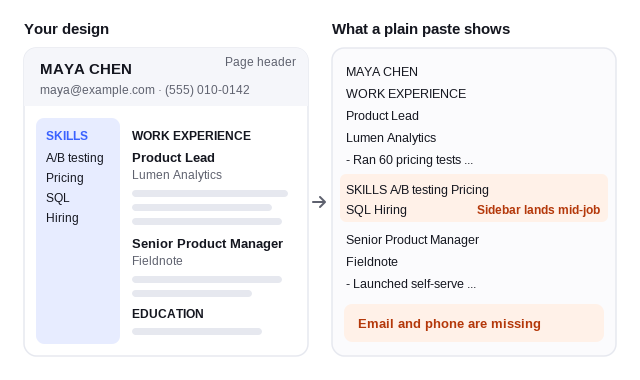
An illustration of what can go wrong: columns and a page header are two of the things Greenhouse's help lists as causes of a failed parse. The person is made up. Check the top and the headings
Your name, email and phone should sit in the body of the page. Your section headings should be something plain, like Work Experience, Skills and Education.
Compare it with the job description
Mark the skills, tools and qualifications the job description names, especially the ones it repeats. For each one you really have, make sure it appears in a bullet point, in the job's own words, next to a result.
The job description: “Experience running A/B tests on pricing.”
Before: “Improved conversion through testing.”
After: “Ran 60 pricing and onboarding A/B tests, lifting paid conversion from 4% to 7%.”Run a free check
An ATS checker does steps 2 to 4 for you. Choose one that shows what it read from your file and which of the job's relevant keywords you're missing. Ignore the score itself: each checker makes up its own, and no employer sees it. We compared the free ones in our round-up of ATS resume checkers.

ATS-friendly and still no interviews? What decides who gets a call.
A readable resume gets you read. It doesn't decide who's called. As one post on Reddit's r/recruitinghell put it, “I've tailored my resume, optimized it for ATS ... still no interview calls.” If that's you, three things decide what happens next.
The screening questions. They're the filter recruiters named most in Enhancv's study (work authorization, degree, location), and Greenhouse's automatic rejection rules are built on answers like these. A live Ashby form we checked asks about work authorization and sponsorship before you submit. Answer each one carefully and honestly.
Filters people set. In a 2021 study of employers in the US, UK and Germany by Harvard Business School and Accenture, more than 90% used their system to filter or rank candidates. The rules were the employers' own, such as a required degree or a six-month gap in work. You can't change those rules, but you can make your dates and qualifications easy to read.
Fit, in the job description's own words. Recruiters search for the words of the job they're filling. A resume that fits the job, and says so in its words, comes up; a general one may not. Ten jobs you really fit, each with a resume tailored to it, beat a hundred sent as is.
Where to go next. Our guide on how to find the words a job is looking for covers the wording, and the one on how to reach a person, not just the system covers what to do after you apply.
Questions about ATS-friendly resumes, answered.
Do ATS systems automatically reject resumes?
Rarely for the resume itself. In Greenhouse, automatic rejection rules are built on your answers to the application's own questions, not on your resume. The quieter risk is being missed: if your resume doesn't use the words a recruiter searches for, it may not come up.
How do I know if my resume is ATS-friendly?
Paste it into a plain text editor and see if it still reads in order, and try to highlight the text in your PDF. Then compare it with a real job description. Or run a free check: Blynk's ATS Check shows what the software reads from your file, checked against the job you paste.
Should I send my resume as a PDF or a Word file?
Send what the upload form asks for. If it says nothing, either works: Greenhouse and Lever both accept .docx and PDF. Make sure a PDF is real text you can highlight, and never send a scan or a photo of your resume, which can't be read as text.
Are Canva resumes ATS-friendly?
They can be. A Canva PDF can hold real text; the risks are the layout (columns, text boxes, icons) and the “Flatten PDF” setting, which turns the file into a static image. Pick a one-column design, leave Flatten off, then do the highlight and paste tests. The same check works for Google Docs and LaTeX or Overleaf templates, which MIT's career office says to use with caution.
Should I put a photo on an ATS-friendly resume?
In the US, leave it off. Harvard's career office lists a photo as a don't, Harvard Law suggests saving it for LinkedIn, and Greenhouse lists photos among the causes of a failed parse. If you're applying somewhere photos are expected, follow the local norm and keep everything that matters in text.
How do I make an ATS-friendly resume with no experience?
Use the same rules and lead with what you have: Education first, then projects, volunteer work and student groups under plain headings. Illinois' career office suggests headings like “Coding Projects”, a single page, and one column, since an ATS struggles with several.
Can I use ChatGPT to make my resume ATS-friendly?
It can help reword your bullet points in the job description's words. But people on Reddit warn it can “make up or exaggerate parts of your resume”, so check every line is true: MIT's career office says you must be able to account for everything on your resume. Then check the layout is still one column, with plain section headings, before you send it.
Is it OK to use a resume template?
Yes, if it's one column with standard section headings and real text. Many designed templates use sidebars, columns or text boxes, so paste a filled-in copy into a plain text editor before you rely on it. The free template above is built that way, and Blynk's free Resume Builder uses one column and the headings hiring software expects in all four of its looks.
Are two-column resumes bad for ATS?
They're a risk. Greenhouse's help lists a columned layout among the formatting its parser can misread (our reading: the text may come out in the wrong order), and Workday says its results vary with a resume's format and word order. One column is the safe choice.
Is there a real ATS score?
Not a universal one. Each checker makes up its own, and none of the hiring systems' help pages we read describes one. In Enhancv's study, 44% of recruiters had a fit score in their system, and most used it only as a guide. Use a checker for what it shows, what it read and the job's words you're missing, not for its number.
Every fact, from the source.
Checked in November 2026. Facts about hiring systems come from their own help pages and from live Greenhouse and Ashby application forms; the advice is ours. The posting counts are Blynk's own: 1,477 job postings from our searches for product roles, most of them senior, first seen between October 31 and November 11, 2026. For the 716 whose application link showed the employer's hiring system, we counted the systems (24). The 1,204 with a full description were read for a resume file type and for years of experience. One person's searches over 12 days, not a market survey.
- The best free ATS resume checkers
- Resume keywords: how to find the right ones
- How to tailor your resume to a job description
- A free ATS resume template you can edit
- What an ATS score really means
- Greenhouse help: unsuccessful resume parse
- Greenhouse help: accepted file types
- Greenhouse help: application rules overview
- Greenhouse help: search resumes for keywords
- Greenhouse help: Boolean search
- Lever help: understanding resume parsing
- Lever help: advanced search and rediscovery
- Workday docs: resume parsing
- Oracle Taleo docs: attachment formats
- Canva help: flattened PDF
- Jobscan: Fortune 500 ATS usage, 2026
- Enhancv: do ATS reject resumes (25 recruiters)
- Harvard Business School: Hidden Workers
- Accenture: Hidden Workers report (PDF)
- MIT CAPD: make your resume ATS-friendly
- Harvard Extension career services: resumes
- Harvard Law School: real talk, the resume
- Illinois LAS career services: resumes
- Blynk ATS Check
