
A free ATS resume template, plain on purpose, and ready to fill in.
If your resume is a pretty two-column design and you're not sure hiring software can read it, or every “free” template asks you to pay at download, start here. Below is a plain template to copy, why each part is there, and a two-minute test for any template.

The short answer
- An ATS resume template is plain on purpose. One column, standard headings (Experience, Education, Skills), a common font, and your name and contact details in the body of the page, not the header.
- Skip what hiring software misreads: tables, text boxes, a second column, photos, icons and skill bars.
- Test any free template before you rely on it. Highlight the text and paste it into a plain text editor. If it reads in order, send it as the file type the upload form asks for.
On this page
Four problems with free ATS resume templates, and how to avoid each.
Most pages that offer a free ATS template are galleries. Here's what tends to go wrong, from what we saw on the pages Google shows for this search.
“It was free, until I tried to download it.”
It's a common complaint about template sites on Reddit: an hour of typing, then a fee to download. When we checked in November 2026, 5 of the 8 template pages on Google's first page for this search mixed free and paid templates, or asked for an account along the way.
Do this: Find out what the download costs before you type a word. Or start in a tool you may already have: Word or Google Docs.
“It says ATS-friendly, but it has two columns.”
A label isn't proof. Several template sites call their designs “ATS-tested”, but none of the pages we read shows what was tested or the result. We also found templates labelled ATS with a photo placeholder, a QR code or a second column. Greenhouse, a hiring system, lists columned layouts and photos among the causes of a failed resume parse.
Do this: Judge the template, not the label. One column, real text, no photo. The test further down takes two minutes.
“I'd have to retype my whole resume.”
Most galleries hand you a blank file. You don't have to start from nothing: your words can move into a new template. Only the layout stays behind.
Do this: Move your words, not your design. Paste your current resume into a plain text editor, then copy each part into the template below.
“Will this template get me past the ATS?”
No template can promise that. Teal, which makes ATS templates itself, says a template can't guarantee a pass. In a small study by a resume company, Enhancv, 23 of 25 US recruiters said their system doesn't reject for formatting, content or design. The filter they named most was the screening questions. Our guide to ATS-friendly resumes explains what the software really does.
Do this: Let the template get you read. What gets you a call is fit: the job's words, for things you've really done.
What makes a resume template ATS-friendly, part by part.
Here's the template, top to bottom, and why each part is there. The rules come from the hiring systems' own help pages, not from other template sites.
One column, read top to bottom
Every part sits in a single column, in the order a person reads it. Greenhouse lists columned layouts and complex tables among the causes of a failed resume parse. Workday says its results can vary with a resume's format and the order of its words. For the font, MIT's career office names Arial, Calibri, Cambria, Georgia, Helvetica and Times New Roman, at 10pt or more.
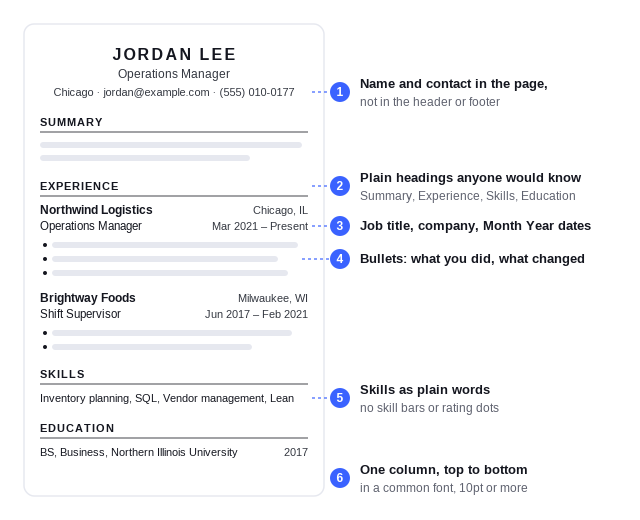
An illustration of the template, labelled. The person and companies are made up. Your name and contact line, in the page itself
Put your name, city, phone, email and LinkedIn on the first lines of the page. Greenhouse names contact details in a header, footer or text box as a cause of a failed parse. Check this first in any template you download: a page header looks like part of the page, so it's easy to miss.
Plain headings: Summary, Experience, Skills, Education
Use the words everyone uses. Greenhouse lists “no clear sections” among its parse problems, and, in our experience, a recruiter skimming the page looks for the same words. A two-line summary at the top is optional.
Each job: company, title, then Month Year dates
Write your full job title and the company's full name: Greenhouse lists incomplete job titles among its parse problems. Dates matter more than they look. Lever lets recruiters filter by years of experience, worked out from the dates it reads on your resume. Of 1,204 postings from Blynk's searches for product roles, about 6 in 10 (708) ask for a number of years. So write “Mar 2021 – Present”, newest job first.
Bullets: what you did, and what changed
Three to five bullets for a recent job, fewer for older ones. Start with what you did, then say what changed because of it. Keep each one to a line or two.
Before: “Responsible for rebuilding customer onboarding, which cut setup time from 9 days to 2.”
After: “Rebuilt customer onboarding, cutting setup time from 9 days to 2.”Skills as plain words
A simple list, separated by commas. No skill bars or rating dots: Greenhouse lists graphics among its parse problems, and a bar has no words in it. Where the job description names a skill you really have, use its words.
Education, and when it goes first
Degree, school and year on one line. Early in your career, put Education first (our advice). Illinois' career office tells students to keep it to a single page. No hiring system's help page we read sets a page limit, so two pages are fine when your experience needs them.

Copy the free ATS resume template, blank or for your first job.
Paste either one into Word or Google Docs, set a common font, and fill in the brackets. Delete any line you don't need.
Free ATS resume template (blank)
For most people. Fill in the brackets, newest job first.
[YOUR NAME]
[Job title you're going for]
[City, State] · [phone] · [email] · [linkedin.com/in/you]

SUMMARY
[Two lines on who you are and the result you're best known for.]

EXPERIENCE
[Company Name] · [City, State]
[Job Title] · [Mon Year] – [Mon Year or Present]
- [What you did, and what changed because of it.]
- [What you did, and what changed because of it.]
- [What you did, and what changed because of it.]

[Company Name] · [City, State]
[Job Title] · [Mon Year] – [Mon Year]
- [What you did, and what changed because of it.]
- [What you did, and what changed because of it.]

SKILLS
[Skill], [Skill], [Tool], [Full Name (Acronym)], [Language]

EDUCATION
[Degree], [School] · [Year]
Free ATS resume template for a first job or a career change
Education and projects first, for when your work history is short or in another field.
[YOUR NAME]
[Job title you're going for]
[City, State] · [phone] · [email] · [linkedin.com/in/you]

EDUCATION
[Degree], [School] · [Year or Expected Mon Year]
- [Relevant course, award or result.]

PROJECTS
[Project Name] · [Mon Year] – [Mon Year]
- [What you built or did, and what came of it.]
- [The tools you used, in the job description's words where true.]

EXPERIENCE
[Company Name] · [City, State]
[Job Title] · [Mon Year] – [Mon Year]
- [What you did, and what changed because of it.]

SKILLS
[Skill], [Skill], [Tool], [Language]
ATS-friendly templates in Word, Google Docs or Canva, and when to save a PDF.
Google Docs. Paste the template above into a new document and set a common font. To send it, choose File, then Download, and pick PDF or Word. Harvard's career office also offers a free bullet-point template as a Word file or a Google Docs copy. Run the test below on it, as you would on any template.
Word. Microsoft has a free collection of ATS templates for Word, which you can edit in Word for the web. Whichever one you pick, check it doesn't put your name and contact details in the page header.
Canva. Pick a one-column design with no icons or sidebar. When you download it as a PDF, leave “Flatten PDF” off in the advanced settings: Canva's help says it converts the file into a static image. MIT's career office says to use Canva and online builders with caution, so test the file before you send it.
PDF or Word: send what the upload box asks for. Greenhouse accepts .doc, .docx, .pdf, .rtf and .txt files. Lever reads Word and PDF, but can't read image files like JPG or PNG. Blynk read 1,204 job postings with a full description, and none said which resume file to send, so look at the form, not the posting. Our ATS-friendly resume guide covers PDF or Word in more depth.
ATS resume template mistakes, and what to use instead.
What to look for before you trust any template, from the hiring systems' own lists of what trips up their parsers.
Use
- One column, top to bottom.
- Your name and contact details as the first lines of the page.
- Headings anyone would recognize: Experience, Skills, Education.
- A full job title, the company's name and Month Year dates for each job.
- Skills as a plain list of words.
- Text you can highlight and copy.
- A small file: Greenhouse can't parse resumes over 2.5MB.
Avoid
- A sidebar or second column for skills and contact details.
- Skill bars, rating dots or charts.
- A photo, or a space for one.
- Contact details in the page header or footer, or in a text box.
- Icons in place of the words phone, email or LinkedIn.
- Tables to line up job titles and dates.
- Creative section names, like “My journey”.
- A QR code, a logo or word art.
Test any template before you send it, in two minutes.
Do this with the file you'll actually upload, after you've filled it in.
Highlight the text
Open the PDF and try to select a line. Lever's help says that if you can't highlight the text, it likely can't be parsed. That usually means the file is an image. Make a new PDF from the original document.
Paste it into a plain text editor
Select everything, copy it, and paste it into Notes or Notepad. Your name and contact line should come first, then each section in order. If words jump around or your email disappears, the template is the problem. MIT's career office suggests a similar check: save the resume as a .txt file and look at it.
Check the file type and size
Match the file type the upload box lists. Keep the file under 2.5MB, the most Greenhouse can parse.
Compare it with one real job
A clean template gets you read. Fit decides who gets a call. Mark the skills and tools the job description names, and use its words for the ones you really have. Our guide to resume keywords shows how, or you can check it against a job with Blynk's ATS Check. Our advice: ten jobs you really fit, each with a resume made for it, beat a hundred sent as is.
Questions about free ATS resume templates, answered.
Is there a truly free ATS resume template, with no sign-up?
Yes. Copy the template on this page into Word or Google Docs: there's nothing to sign up for or download. Harvard's career office also offers a free bullet-point template as a Word file or a Google Docs copy. On any template site, check what the download costs before you start typing.
Can I convert my current resume to an ATS format for free?
Yes, by hand: paste your resume into a plain text editor, then copy each part into the template above, section by section. Or upload it to Blynk's Resume Builder, which reads it into a one-column resume for you. It takes a PDF, PNG or JPG; save a Word file as a PDF first. AI reads the upload, so check every line in the editor before you use it.
Can an ATS read a two-column resume template?
It's a risk. Greenhouse lists columned layouts among the causes of a failed resume parse, and Workday says its results vary with a resume's format and word order. One column is the safe choice for online forms. A two-column design is less of a worry when you email it to a person.
Is there a free ATS template in Word or Google Docs?
Yes. Microsoft has a free collection of ATS templates for Word, and the template on this page pastes straight into Google Docs. Blynk's Resume Builder doesn't make Word or Google Docs files; its editor has Download PDF. If a form asks for Word, use the template above in Word.
Does a PDF work for ATS?
Yes, if it's real text. Greenhouse and Lever both accept PDF. What fails is a picture of a resume: a scan, a phone photo, or a PDF flattened into an image. If you can highlight the text, it's real text; then check it reads in order with the paste test above.
Is Canva ATS friendly?
It can be. A Canva PDF can hold real text. The risks are designs with columns, icons or text boxes, and the “Flatten PDF” setting, which Canva's help says converts the file into a static image. Pick a one-column design, leave Flatten off, then do the highlight and paste tests.
Does an ATS resume template need a photo?
No, not in the US. Harvard's career office lists a photo as a don't, and Greenhouse lists photos among the causes of a failed parse. Of 1,204 job postings Blynk read, none asked for a photo on the resume. If you apply somewhere photos are expected, follow the local norm.
Will an ATS-friendly template get me past the ATS?
No template can promise that, and Teal, which makes them, says so too. A plain template helps the software read what you wrote. Whether you're called depends on the screening questions and on how well you fit the job.
Should an ATS resume be one page?
One page is a good rule early in your career; Illinois' career office tells students to keep it to a single page. No hiring system's help page we read sets a limit, and Harvard Law School's advice speaks of a page or two.
What font should an ATS resume template use?
A common one, at 10pt or more. MIT's career office names Arial, Calibri, Cambria, Georgia, Helvetica and Times New Roman. Pick one and use it throughout.
Every fact, from the source.
Checked in November 2026. Facts about hiring systems come from their own help pages; the advice is ours. The count of template pages is ours too: the 8 template pages on Google's first page for “ats resume template free” on November 11, 2026 (a Reddit thread aside). The posting counts are Blynk's own: 1,204 job postings with a full description, from Blynk's searches for product roles, mostly senior, first seen between October 31 and November 11, 2026, read for a resume photo, a resume file type and years of experience. One person's searches over 12 days, not a market survey.
- The ATS-friendly resume, explained
- The best free ATS resume checkers
- The best AI resume builders
- Resume keywords: how to find the right ones
- Product manager resume examples
- Resume templates in Google Docs
- Greenhouse help: unsuccessful resume parse
- Greenhouse help: accepted file types
- Lever help: understanding resume parsing
- Lever help: advanced search and rediscovery
- Workday docs: resume parsing
- MIT CAPD: make your resume ATS-friendly
- Canva help: flattened PDF
- Google Docs help: download a file
- Harvard Mignone Center: bullet-point resume template
- Microsoft: ATS resume templates for Word
- Harvard Extension career services: resumes
- Harvard Law School: real talk, the resume
- Illinois LAS career services: resumes
- Enhancv: do ATS reject resumes (25 recruiters)
- Teal: ATS resume templates
- Blynk Resume Builder
- Blynk pricing
