
How to use Claude for your job search. One project, seven prompts, and a check for anything it made up.
If you have Claude open and a pile of job postings, the hard part is knowing what to ask and what's safe to paste in. Here's how to set up a project, seven prompts in order, written to keep Claude to your facts, and what Anthropic says Claude can and can't do when you apply.

The short answer
- Check Claude's privacy settings, then set up one project with your resume (phone and address taken out) and instructions to use only your facts. Incognito chats don't work inside projects, so pick one or the other.
- Work one job at a time, in order. Read the posting, match it to your resume, tailor, write the letter, then ask Claude what it added. Check every line yourself.
- Claude can help you apply, and the sending is yours. It can search job listings, and Claude in Chrome can fill in forms on paid plans, but Anthropic says it's prohibited from bypassing captchas and inputting sensitive data. Read every answer, then send it yourself.
On this page
Why Claude job search help goes wrong, and what fixes each one.
Four things people run into when they hand their job search to Claude, and what this page does about each.
“It added things that matched the job exactly.”
A line copied from the posting reads well, and it may not be yours. Anthropic's own help page says Claude "can write things that might look correct but are very mistaken". It says users "should not rely on Claude as a singular source of truth".
Fix: Have it quote your resume for every change. A change with no quote behind it gets cut.
“I told it to stick to my resume. It still guessed.”
A rule helps, but it isn't a promise. Anthropic's guide to reducing made-up answers says its methods "significantly reduce hallucinations", but "don't eliminate them entirely".
Fix: Let it say it doesn't know. The prompts below tell Claude to write [ask me] instead of guessing, and the last check is yours.
“Everything it writes sounds like everyone else.”
Asking for polish gets polish. CareerOneStop, the US Department of Labor's career site, says employers sometimes get near-identical AI resumes from different people, and reject them right away.
Fix: Feed it your real results, then the posting's wording. Specific facts from your own work are what make it yours.
“Is my resume private if I paste it in?”
That depends on settings most people never open. Anthropic says that if you rate a reply with a thumbs up or down, it keeps the whole conversation for up to 5 years. And incognito chats don't work inside projects.
Fix: Check four settings first. They're below, in Anthropic's own words.
Before you paste your resume into Claude, four privacy settings to check.
Every setting here comes from Anthropic's help and privacy pages, checked on November 12, 2026.
Take out your phone number and home address
The prompts don't need them. Anthropic's help page asks you to be careful sharing highly sensitive personal details, like financial information, health records, passwords or confidential documents. That includes anything your current employer would call confidential.
Choose whether your chats help train Claude
On the web, open Settings, then Privacy, and find "Help Improve our AI models". In the phone app, tap your name, then Settings, then Privacy. With it off, Anthropic says it won't use new chats for future model training, though chats already in training stay there. Anthropic asked Free, Pro and Max users to make this choice, and says you're "always in control" of it. One catch is that a thumbs up or down keeps the whole chat for up to 5 years.
Pick a project or an incognito chat, because you can't have both
A project keeps your resume on hand in every chat inside it. An incognito chat isn't saved to your chat history, doesn't use or create memory, and isn't used to train Claude, even with that setting on. Anthropic still keeps it for 30 days by default. But Anthropic says incognito is "currently only available for chats outside of projects". Our reading is to use a project for the search, with training off, and an incognito chat for a one-off question.
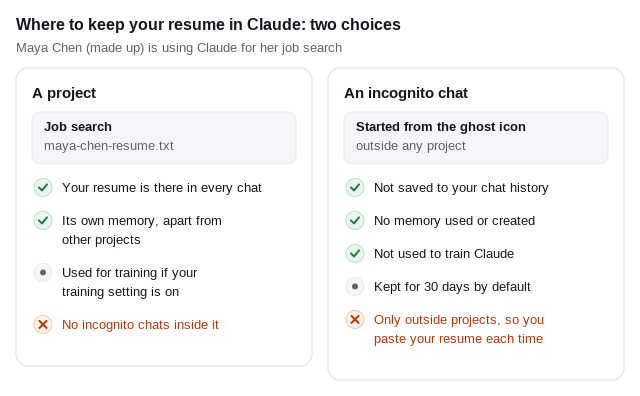
Based on Anthropic's help and privacy pages, checked November 12, 2026. An illustration, not Claude's own screen, and the name is made up. Decide what Claude's memory keeps
Memory is on by default on Free, Pro, Max and Ultra. Each project has its own memory. Inside a project, Claude also uses your account memory from chats outside projects, unless you turn off "Use account memory" for that project. To see or change it, open Settings, then Your Claude, then Manage next to Your memory. You can pause or reset it there.

How to use Claude for your job search, step by step.
One project holds what every job needs, your resume and your rules. Each job then gets its own chat inside it. The steps follow Anthropic's help pages on projects and files.
Create a project for your job search
Open Projects in the sidebar, or go to claude.ai/projects, and click "+ New Project". Give it a name and a short description. Anthropic notes that Claude can't see these, so they're just for you. Free plans can have up to 5 projects. If your projects look different, Anthropic is moving some paid accounts to a new version, so the buttons may differ.
Add your resume to the project
Click "+" to add files to the project's knowledge. PDF, DOCX and TXT all work, up to 30MB a file. Claude takes only the text from project files, apart from some PDFs, so it won't read charts or images in a Word file. A plain-text copy is the easiest to check later. If you have results that never made it onto a resume, add them as a second file, as our guide to a master resume shows.
Paste in the project instructions
Click "Set project instructions", paste the instructions from the prompts below, and click "Save instructions". Anthropic says they apply to every chat in the project, so you don't repeat your rules each time.
Start a new chat for each job
Paste the job posting into the chat, not into the project's files. That's our advice, so one job's words don't leak into the next. Then run the prompts in order. When Claude asks you a question, answer it. Your answers are facts it can use.
Can Claude find jobs for you? Yes, with web search and job connectors.
Web search is on every plan, Free included, Anthropic's pricing page shows. Click "+" in the lower left, then Web search, though newer versions of Claude have no switch and search when it helps. Anthropic says every answer that uses it includes citations, "so you can easily verify sources yourself". On Team and Enterprise plans, an owner has to switch it on first. So older posts saying Claude can't search the web are out of date.
Three job sites have connectors in Anthropic's directory. Indeed's listing says it can search job listings, pull the full description and requirements, and give you direct job links. You sign in with Indeed, and it was added in November 2025.
ZipRecruiter's searches live jobs, with filters for salary, distance and remote or hybrid work. It says "After reviewing a listing, jump to ZipRecruiter to apply." Dice's searches active tech jobs. We didn't find one there for LinkedIn job search.
You don't need a paid plan for them. Anthropic says web connectors "are available to all users", and Free users can add one custom connector. It also says "Only connect services you trust and need", because connected services handle your data "on their own infrastructure, under their own terms". And it says it "cannot verify" that the tools developers add "will work as intended".
Then read the job yourself. Our advice is to open each posting on the employer's own site before you spend an evening on it, and to check it's real. Our guide to job scams lists the signs. For the tools built for this step, see the best AI tools for your job search.
Seven AI prompts for your job search, written for a Claude project.
Paste the project instructions once. Then copy each prompt into the same chat, in order, and fill in the [square brackets]. They're written to Anthropic's own advice for reducing made-up answers, and they're plain text, so you can paste them into any AI chat.
Project instructions. Paste these once, into Set project instructions
Every chat in the project follows them, so the prompts below can stay short. They tell Claude to use only your facts and to ask instead of guessing.
You're helping me with my job search. My resume is in this project's files.

Follow these rules in every chat.
- Use only facts from my resume, my other files and my answers in this chat. Don't add skills, tools, titles, employers, dates or numbers.
- Keep my job titles, employers, dates and numbers exactly as they are.
- If you aren't sure something is true of me, say you don't know and ask me. Write [ask me] where a fact is missing.
- When you change a line, quote the line of my resume it comes from.
- If a job asks for something I don't have, list it under Gaps. Never write it in.
- Use plain words. No buzzwords like passionate, dynamic or results-driven.
- Don't praise my resume or your own work. Tell me what's missing instead.
Prompt 1. Read the posting first, and sort what it asks for
In a new chat in the project, one per job. It's built to sort what the job asks for by the posting's own words.
Here is a job posting I'm thinking of applying to. Don't write anything for me yet.

List every skill, tool, qualification and kind of experience it asks for, in three groups.
- Says required (the posting uses words like required or must)
- Says preferred (words like preferred, a plus or nice to have)
- Not marked (the posting doesn't say)

Quote the posting's own words for each one. If it doesn't say how much something matters, put it under Not marked. Don't guess.

Then tell me in two or three lines what this role spends most of its time on, quoting the posting.

The job posting
[Paste it here]
Prompt 2. Match the job to your resume, and list what's missing
Right after prompt 1. It asks Claude to show the line behind every match, and to ask you about the rest.
Go through the list you just made, one item at a time, and check each against my resume.

For each one, write one of these.
- Shown, and quote the line of my resume that shows it
- Partly shown, and quote the line, then say what's missing
- Not shown

Don't count something as shown because it sounds close. If you'd have to guess, mark it Partly shown.

Then ask me up to 5 questions about the Partly shown and Not shown items, one at a time. My answers are facts you can use. Anything I can't answer stays a gap.
Prompt 3. Tailor your resume, with a source for every change
After you've answered its questions. It's built to reword and reorder your real lines, and to leave the gaps out.
Now tailor my resume to this job, using only the Shown and Partly shown items and my answers.
- Reorder and reword my real bullets so the ones this job cares about come first.
- Use the posting's exact words only where my resume or my answers back them up.
- Under every bullet you change, put the line it came from, in quotes.
- Leave every Not shown item out of the resume. List them under Gaps at the end.
- Where a bullet needs a number I didn't give you, write [ask me].

Give me the bullets for each role, then a skills line, then Gaps.
Prompt 4. Write the cover letter from the same facts
Once the resume is tailored, so the letter tells the same story. It asks for a list of claims you can check.
Write a cover letter for this job, from the tailored resume above.
- Open with the role and the one result of mine that fits it best.
- Use two results from my resume as proof. Don't add any.
- If I'm missing something the job requires, don't claim it. Name the closest thing I've really done in one honest sentence, or leave it out.
- Keep it under 250 words, in plain sentences.
- Under the letter, list each claim it makes and the line of my resume behind it.

Who it's going to
[Company name, and the hiring manager's name if you know it]
Prompt 5. Have Claude find a source for every fact
Before you check it yourself. It uses Anthropic's own method. Every fact needs a quote, or it's listed as Not supported for you to cut.
Check the tailored resume and the cover letter against my original resume in this project. Don't rewrite anything.

For every job title, employer, date, number, skill and tool in the new versions, find a quote in my original that supports it. If you can't find one, list it under Not supported and say where it appears.

Then list any sentence that repeats the posting's wording with no fact of mine behind it.

If everything is supported, say so. Don't praise the writing.
Prompt 6. Get ready for the interview
When you get the call. It's built to point you to your own experience, not to write stories for you.
Using the job posting and my resume, list the 8 questions I'm most likely to be asked for this role. For each one, quote the part of the posting it comes from.

For each question, point me to the experience on my resume that could answer it. Don't write the answer for me. Where my resume has nothing to answer with, say so.

Then ask me the questions one at a time. Wait for my answer, and tell me what was unclear or missing in it.
Prompt 7. A short note to the hiring manager
After you apply, if you know who's hiring. Our guide to finding the hiring manager shows how to find them.
Write a short note I can send to the hiring manager for this role, after I apply.
- Under 100 words.
- Say which role I applied for, and one result of mine that fits it, from my resume.
- Ask one clear question, such as whether a short call would help.
- No flattery, and nothing about me that isn't in my resume.
- Give me two versions, one for email and a shorter one for a LinkedIn message.

Who it's to
[Their name and title]
How these Claude prompts are built to keep to your facts, and where the method comes from.
Claude is allowed to say it doesn't know. Anthropic's guide to reducing made-up answers starts there. The project instructions tell Claude to write [ask me] instead of guessing a fact.
It's told to work only from your documents. The same guide says to tell Claude to use only information from the documents you give it. Here, that's your resume, your other files and your answers.
It's asked for a quote behind every change. Anthropic suggests asking for a supporting quote for each claim. Its guide adds, "If it can't find a quote, it must retract the claim". Prompts 2, 3 and 5 are built on that.
It reads the job before it writes. Prompt 1 sorts each ask by what the posting itself says. That matters because in 190 job postings Blynk read line by line, only about half (96) marked anything as required in so many words.
Want a second opinion? Run prompt 5 twice. Anthropic's guide also suggests running the same prompt more than once and comparing. Where two answers disagree, look closer.
None of this makes it perfect. Anthropic says these methods don't remove made-up answers entirely, and adds "Always validate critical information". That's why the next step is yours.
Check what Claude wrote, line by line, before you send it.
Prompt 5 gives you a list to start from. But Claude checking its own work isn't proof, and Anthropic says not to rely on Claude as a singular source of truth. So do this part yourself, with your original open beside the new version.
Job titles, employers and dates
These should match your original exactly. Look for a title that's grown a level, or a date that's moved by a year.
Years of experience
If the job asks for 8 years and you have 6, the new version should still say 6.
Every number
Every percentage, dollar figure and count should come from you. A new one is a guess, even when it looks right.
Skills and tools
Read the skills line and every bullet for a tool you haven't used. Watch the job's must-haves most, since Claude has just read them.
Lines that sound like the posting
The posting's words help when the work behind them is yours. If a line reads like the posting and you can't name the fact behind it, put your own line back. Our guide to tailoring your resume to a job description goes further.
The interview test
Pick any line and ask whether you could talk about it for two minutes in an interview. If you couldn't, cut it or put your own words back.
Can Claude apply to jobs for you? What Anthropic says it will and won't do.
Anthropic's pages don't describe Claude applying for you on its own. We read them on November 12, 2026. None of the job connectors above says it applies, and ZipRecruiter's sends you to its own site to do it.
Claude in Chrome can fill in forms, on paid plans. It's on Pro, Max, Ultra, Team and Enterprise, and it acts on the page you're on, "reading, clicking, typing, navigating, and filling forms". It works only in Google Chrome, not in other Chromium browsers or on phones.
Anthropic also lists what it won't do. It says Claude is "prohibited from" bypassing captchas and inputting sensitive data. It asks you to confirm some high-risk actions, like entering sensitive information. Anthropic advises "a separate browser profile without access to sensitive accounts", and says of attacks hidden in web pages, "The risk is not zero."
So it can help with a form, and the rest is yours. That's our reading. A captcha, anything sensitive and the final read stay with you. Our advice is to let it fill in what it can, then read every answer and press submit yourself.
Applying "automatically" means someone else's tool. Skills are, in Anthropic's words, "folders of instructions, scripts, and resources that Claude loads dynamically". They're on every plan, with code execution switched on. But the job search skills, GitHub projects and auto-apply services you'll find for Claude are made by other people, not Anthropic. Some of the GitHub ones run in Claude Code, which needs a paid plan.
Our rule for any of them. Connect only what you trust, as Anthropic says, and don't use anything that sends an application you haven't read.
Claude prompts that backfire in a job search, and what to ask instead.
Some common prompts ask for the very thing that goes wrong. Here's what to say instead.
Ask for this
- "Use only my resume, my files and my answers."
- "Quote the line of my resume behind each change."
- "If you don't know, say so and ask me."
- "List what I'm missing under Gaps."
- "Find a quote for every fact in the new version, or list it as Not supported."
- One project, and a new chat for each job.
Not this
- "Make me sound more senior." It asks for a bigger title, not your real one.
- "Fill in the gaps." That's asking it to write in experience you don't have.
- "Add numbers to every bullet." If you didn't give it any, it has to invent them.
- "Write my application and send it." Anthropic's own advice is to check what matters.
- "Is this good?" Asking a chatbot to grade its own work tells you little.
Is ChatGPT or Claude better for resume writing? What each company's own pages say.
We found no study that compares them for resumes. The head-to-head articles we found are opinions, or one or two tries. Our reading is that your facts and your prompt matter more than which chatbot you use.
Both companies warn you about accuracy. OpenAI says ChatGPT "can produce incorrect or misleading outputs". Anthropic says Claude "can write things that might look correct but are very mistaken". Either way, the check above is yours.
Their privacy settings work differently. OpenAI says sharing your chats to improve its models is on by default on Free, Plus and Pro, and its Temporary chats may be kept for up to 30 days. Anthropic asked its users to choose, and keeps incognito chats for 30 days, but you can't use them inside a project.
Both free plans have limits. OpenAI's help page says Free users can upload 3 files a day. Anthropic's pricing page says Claude's Free plan has limited usage every 5 hours and every week.
You can use the prompts on this page in either. They're written for a Claude project, but they're plain text. For versions written for ChatGPT, see our ChatGPT resume prompts and ChatGPT cover letter prompts.
Is it OK to use Claude for job applications? What employers' own rules say.
Anthropic has a rule for its own candidates. Its guidance, last updated July 10, 2025, says "Please create your first draft yourself, then use Claude to refine it". It encourages using Claude to practice your answers and prepare questions, but for live interviews it says "no AI assistance unless we indicate otherwise". It also warns against "Generic content with experiences you haven't actually had". That's Anthropic's rule for jobs at Anthropic, not everyone's.
Most employers don't say. In 1,272 job postings from Blynk's searches (mostly product roles, first seen October 31 to November 11, 2026), 8 employers set a rule about candidates using AI. Seven of the 8 rules are about interviews. One covers the application too.
So read each posting. If it sets a rule, that rule beats any advice on this page. Our guide to whether employers can tell you used AI has the rules in their own words.
Questions about using Claude for your job search, answered.
Is it safe to put my resume in Claude?
Safer with a few settings. Take out your phone number and address, then check "Help Improve our AI models" under Settings, then Privacy. With it off, Anthropic says new chats aren't used for future training. Deleted chats leave its back-end storage within 30 days. If you rate a reply with a thumbs up or down, Anthropic keeps the whole conversation for up to 5 years, so skip that if you'd rather it didn't.
Can Claude apply to jobs for me?
Not on its own, from what Anthropic's pages describe. Its job connectors search listings, and ZipRecruiter's sends you to its own site to apply. Claude in Chrome, on paid plans, can fill in forms, but Anthropic says it's prohibited from bypassing captchas and inputting sensitive data. Tools that apply automatically are made by other companies, not Anthropic. Our advice is to read every answer and press submit yourself.
Does Claude remember my resume?
Inside a project, yes, because Anthropic says Claude uses a project's files in the chats inside it. Memory is separate, and it's on by default on Free, Pro, Max and Ultra, and each project has its own. You can see, pause or reset it under Settings, then Your Claude. To keep one chat out of it, turn memory off from the "+" menu before your first message. Incognito chats don't use or create memory.
Do I need Claude Pro for my job search?
Not for the steps on this page. Anthropic's pricing page, checked November 12, 2026, lists projects (up to 5), web search, connectors and memory on the Free plan, with usage limits. Claude in Chrome, Claude Code and Research need a paid plan. Pro is $20 a month, or $17 a month billed yearly.
Can employers tell if I used Claude?
Usually not from the words alone. TopResume, a resume-writing company, showed 600 US hiring managers four resumes in May 2025, and just over a third (33.5%) spotted the ones written by AI. What gets noticed is sameness. CareerOneStop says employers sometimes get near-identical AI resumes from different people, and reject them right away. Our guide to whether employers can tell you used AI has more.
Can Claude tell me what salary to ask for?
It can look for pay data with web search, and Anthropic says every answer that uses it includes citations, so you can check where each number came from. Anthropic also advises using authoritative sources for critical decisions. Our advice is that a pay range in the posting itself beats any estimate. Our guide to negotiating salary covers what to say.
Is it fine to use Claude for interview prep?
For getting ready, usually yes. Anthropic itself tells its own candidates to use Claude to practice their answers and prepare questions. Live interviews are different. Anthropic says "no AI assistance unless we indicate otherwise", and 7 of the 8 employer rules in Blynk's postings are about interviews. Prompt 6 above is built to point you to your own experience, not to write answers for you.
Can I use Claude for my job search on an iPhone?
Yes. Anthropic's pages say memory and connectors work in Claude's phone app (Claude Mobile, iOS and Android). Its privacy page says to tap your name, then Settings, then Privacy, to choose whether your chats help train Claude. Claude in Chrome doesn't work on mobile devices, so filling in forms with it is a computer task. Our advice is to do the check on a computer too, where your original and the new version fit side by side.
How do I stop Claude making things up on my resume?
You can't stop it completely. Anthropic says its own methods don't remove made-up answers entirely. But you can make them easy to catch. Tell Claude to use only your files and answers, to say when it doesn't know, and to quote the line behind each change. Then have it list anything it can't support, and check every title, date, number and skill yourself.
Can I automate my job search with a Claude skill or a GitHub project?
You can find them, but they aren't Anthropic's. Anthropic describes skills as folders of instructions that Claude loads, and says to connect only services you trust. The job search skills and GitHub projects for Claude are made by other people. Before you use one, check what it sends, and where. Our rule is to use nothing that sends an application you haven't read.
Where the facts come from.
Checked on November 12, 2026. Every fact about Claude comes from Anthropic's own pages, and most of its help pages show only how recently they were updated, so the date each was read is the date here. The prompts and the advice are ours. They're written to Anthropic's guidance, and we describe what each is built to do, not results from running them. OpenAI's facts were checked on November 11, 2026. The job-posting counts are Blynk's own. The rules count is from 1,272 job postings from Blynk's searches with more than 200 characters of text, mostly product roles, first seen October 31 to November 11, 2026, read by eye and counted by employer, the same count as our guide to whether employers can tell you used AI. The required count is from 190 job postings, mostly senior product roles, read line by line between November 2 and 11, 2026.
- ChatGPT resume prompts that don't make things up
- ChatGPT cover letter prompts that use your real experience
- How to tailor your resume to a job description
- Can employers tell if you used AI?
- The best AI tools for your job search
- Blynk vs ChatGPT
- Claude pricing (checked November 12, 2026)
- Claude Help: what are projects?
- Claude Help: how can I create and manage projects?
- Claude Help: upload files to Claude (July 23, 2026)
- Anthropic Privacy Center: model improvement settings (August 3, 2026)
- Anthropic Privacy Center: is my data used for model training? (March 16, 2026)
- Anthropic Privacy Center: how long do you store my data? (July 1, 2026)
- Anthropic: updates to consumer terms and privacy policy (August 28, 2025)
- Claude Help: inputting sensitive data, and who can view your chats
- Claude Help: use incognito chats
- Claude Help: chat search and memory
- Claude Help: enable and use web search
- Claude Help: use connectors
- Claude connectors: Indeed (added November 2025)
- Claude connectors: ZipRecruiter (added May 2026)
- Claude connectors: Dice (added January 2026)
- Claude Help: get started with Claude in Chrome
- Claude Help: use Claude in Chrome safely
- Claude Help: what are skills?
- Claude Help: incorrect or misleading responses (March 16, 2026)
- Anthropic: reduce hallucinations
- Anthropic: guidance on candidates' AI usage (July 10, 2025)
- OpenAI Help: does ChatGPT tell the truth?
- OpenAI Help: data controls in ChatGPT
- OpenAI Help: Temporary Chat in ChatGPT
- OpenAI Help: uploading files to ChatGPT
- CareerOneStop: write your resume for current hiring practices
- TopResume: AI in hiring survey, 2025
- Blynk: find jobs and tailor your resume
