
ChatGPT resume prompts that don't make things up. Seven to copy, in order, and how to check them.
If you've asked ChatGPT to fix your resume and got back skills you don't have, or the same lines everyone sends, the prompt is usually the problem. Here are seven prompts, in the order you'd use them for one job, each written to keep ChatGPT to your facts.

The short answer
- Give it the job, your real resume and the rules: use only my facts, keep my titles, dates and numbers as they are, and list gaps instead of filling them.
- Use a few short prompts in order, not one big one: read the job, tailor, turn duties into results, write the summary and cover letter, then ask what it added.
- Then check every line yourself against your original. OpenAI says ChatGPT can sound confident even when it's wrong.
On this page
Why ChatGPT resume prompts go wrong, and what fixes each one.
Four things people run into when they paste a resume into ChatGPT, and what the prompts on this page do about each.
“I told it not to make things up, and it did anyway.”
A rule in the prompt helps, but it isn't a promise. OpenAI's own help page says ChatGPT "can produce incorrect or misleading outputs" and "may express high confidence even in incorrect answers".
Fix: Make it show its source for every change. A line it can't point to in your resume is a line to cut.
“It made me sound like everyone else.”
Prompts like "make it impressive" ask for polish, not proof. CareerOneStop, the US Department of Labor's career site, says employers sometimes get near-identical AI resumes from different people and reject them right away.
Fix: Give it your real results and the job's own words. Your own facts don't sound like anyone else's.
“It added numbers I never gave it.”
A prompt that says "add metrics to every bullet" leaves ChatGPT two choices: ask you, or guess. A guessed number is one you can't explain in an interview.
Fix: Tell it to mark the gap and ask. Prompts 1 and 4 below tell it to write [needs number] and ask you, instead of making one up.
“Is it even safe to paste my resume in?”
OpenAI says that on Free, Plus and Pro, sharing your chats to improve its models is turned on by default. You can turn it off, or use a chat that isn't used for training.
Fix: Take out your contact details and set it up first. Four quick steps, below.
Before you paste your resume into ChatGPT, four things to check.
Each one takes a minute. The settings come from OpenAI's own help pages, checked on November 11, 2026.
Take out your phone number and address
The prompts don't need them. Paste your resume as text rather than uploading the file, so it's easy to see what you're sharing. Text also saves your uploads: OpenAI's help page says Free users can upload 3 files a day.
Turn off training, or use a Temporary chat
On the web, open Settings, then Data controls, and turn off "Improve the model for everyone" (OpenAI's page on this was updated November 10, 2026). Or start a Temporary chat. OpenAI says those aren't used to train its models, though it may keep a copy for up to 30 days for safety. One catch: if you rate a reply with a thumbs up or down, the whole conversation may be used for training, even after you've turned it off.
Choose Unpersonalized, so memory stays out of it
When Memory is on, ChatGPT can remember details from your chats. A Temporary chat set to Unpersonalized doesn't use memory or custom instructions, and OpenAI says Temporary chats don't create memories. You pick Personalized or Unpersonalized before your first message.
Use plain ChatGPT, not a resume GPT
OpenAI's help page on GPTs, updated in early November 2026, says custom GPTs are being retired, with standard retirement scheduled for December 11, 2026. It also says a GPT that uses outside apps may send parts of what you type to another company. OpenAI "does not audit or control" what that company does with it. A prompt you keep in a note works in any chat.
How to use ChatGPT to write or tailor a resume, one job at a time.
Use one chat per job. Start a new Temporary chat for each job, so nothing from the last one carries over. Paste the job description first, then your resume. That way everything ChatGPT writes is about this job.
Run the prompts in order. Each one does one thing and builds on the last: read the job, tailor, turn duties into results, write the summary, write the cover letter, then list what changed. One big prompt hands you everything to check at once; short ones show you which step went wrong. When ChatGPT asks you a question, answer it. Your answers are facts it's allowed to use.
Starting from nothing? Use prompt 1 first. It has ChatGPT interview you before it writes, as CareerOneStop's own sample prompts do. The prompt tells it to build the first draft from your answers, not its guesses.
Then finish it yourself. ChatGPT gives you text, not a finished file, as Coursera's guide also points out. Paste it into a simple one-column template and save the version you send with the job it went to. To see how it reads to hiring software, an ATS check compares it with the job.
The tailoring prompt (prompt 3) is the one from our guide to tailoring your resume to a job description, set up to follow prompt 2.
Seven ChatGPT resume prompts to copy, in the order you use them.
Copy each one into the same chat, in order, and fill in the [square brackets]. Prompt 1 is only for starting from scratch; with a resume, start at prompt 2.
Prompt 1. No resume yet? Have it interview you first
Only if you're starting from scratch. It asks before it writes, and tells it to use only what you said.
I need a resume and I'm starting from scratch. Don't write anything yet.

Interview me first. Ask me one question at a time about my jobs, what I did in each, my results, the tools I use, my education and the kind of job I want. Wait for my answer before you ask the next one. Ask up to 12 questions.

When you're done, write my resume using only what I told you.
- Don't add skills, tools, titles, dates or numbers I didn't give you.
- Where a bullet would be stronger with a number I didn't give, write [needs number] instead of guessing.
- Use plain section names, like Summary, Experience, Skills and Education.
- Write it as plain text in one column, so I can paste it into my own template.

The kind of job I want
[Job title, and the field or industry]
Prompt 2. Read the job before anything else
Paste the job description where it says. It sorts what the job asks for by the posting's own words.
Read the job description below. Don't rewrite anything yet.

List every skill, tool, qualification and kind of experience it asks for. Put each one in one of three groups.
- Says required (the posting uses words like "required" or "must")
- Says preferred (words like "preferred", "a plus" or "bonus")
- Not marked (the posting doesn't say)

Quote the posting's own words for each one. Don't decide for yourself which ones matter most. If the posting doesn't say, put it under Not marked.

Then list the words and phrases the posting uses more than once.

The job description
[Paste it here]
Prompt 3. A ChatGPT prompt to tailor your resume to the job
Right after prompt 2, in the same chat. It tells ChatGPT to list what's missing instead of making it up.
Now tailor my resume to this job, using the list you just made.

Follow these rules.
- Use only facts from my resume and my answers to your questions. Don't add skills, tools, titles, dates or numbers.
- Keep my job titles, employers, dates and numbers exactly as they are.
- If the job asks for something my resume doesn't show, don't write it in. List it under Gaps instead.
- For every bullet you change, quote the line of my resume or my answer it comes from.
- Before you start, ask me up to 5 questions about my experience.

Then give me these three things.
1. My bullets, reordered and reworded for this job
2. A skills line, using the job's exact terms where I really have them
3. Gaps

My resume
[Paste it here, without your phone number or address]
Prompt 4. Turn duties into results
For the bullets that only say what you were responsible for.
Rewrite the bullets below so each one shows a result, not just a duty.

Put each bullet in this order. The problem or goal, then what I did, then what happened.
- Use only what the bullet already says, or what I tell you when you ask.
- Never invent a number. If a result has no number, write [needs number] and ask me for it.
- Keep each bullet to one or two lines.
- Start each one with a plain, strong verb, and don't use the same verb twice.
- Show my original next to your version, so I can compare them.

My bullets
[Paste 3 to 6 bullets from one role]
Prompt 5. Write the summary for this job
After the bullets are done, so the summary uses your strongest real proof.
Write a summary for the top of my resume, for this job.
- Keep it to 2 or 3 lines.
- Start with the exact job title from the posting if my experience fits it. If it doesn't, use my own title.
- Use only facts from my resume. Pick the strongest proof I have for what this job asks for.
- Don't use words like passionate, dynamic, results-driven or proven track record.
- Give me 3 versions to choose from.

The job title
[Paste it exactly as the posting writes it]
Prompt 6. Write the cover letter
Once the resume is tailored, so the letter tells the same story.
Write a cover letter for this job, using my tailored resume above.
- Open with the role and my strongest match for it, not with "I am writing to apply".
- Use one or two results from my resume as proof. Don't add any I didn't give you.
- If I'm missing something the job requires, don't hide it and don't claim it. Name my nearest real experience in one honest sentence, or leave it out.
- Keep it under 250 words, in plain sentences that sound like a person.
- End with one line asking for a conversation.

Who it's going to
[Company name, and the hiring manager's name if you know it]
Prompt 7. Ask ChatGPT what it added
Last, before you check it yourself. Paste both versions where it says.
Compare the new version of my resume with my original, below. Don't rewrite anything.

List every job title, employer, date, number of years, number, skill and tool that appears in the new version but not in my original, word for word. For each one, say where it is.

Then list any sentence that uses the job description's wording without a fact from my original behind it.

If you find nothing, say so. Don't praise the resume.

My original resume
[Paste it here]

The new version
[Paste it here]
What the best ChatGPT resume prompts have in common, and why these seven are built this way.
Your facts, not its ideas. Every prompt that writes says to use only what you gave it. That follows Anthropic's guide to reducing made-up answers, written for its own model, Claude. It says to have the model use only the documents you provide, and to let it say it doesn't know.
It shows its source. Prompt 3 quotes the line of your resume behind each change. Anthropic's guide suggests the same: ask for a supporting quote, and drop any claim that has none.
It asks before it adds a number. Where a result has no number, prompts 1 and 4 have ChatGPT write [needs number] and ask you. You fill in the real one, or leave the bullet as it is.
Gaps get listed, not filled. If the job asks for SQL and you've never written it, prompt 3 tells it to put SQL under Gaps instead of in your skills. That's something to speak to honestly in a cover letter or interview.
It reads the job before it writes. Prompt 2 sorts each ask by what the posting itself says: required, preferred or not marked. That matters because in 190 job postings Blynk read line by line, only about half (96) marked anything as required in so many words. Where a posting doesn't say, prompt 2 says so instead of deciding for you.
The summary leads with the posting's title, when it's true. In Jobscan's test of its own prompts, on one sample resume, a summary with the exact job title raised its match score the most, from 37% to 61%. That's Jobscan's own scanner, not a hiring result. Recruiters in the 2018 Ladders study also looked at job titles more than anything else.
No prompt stops every mistake. OpenAI's advice is to use ChatGPT "as a first draft, not a final source". That's why the last step is a check you do yourself.
Check ChatGPT's resume yourself, line by line, before you send it.
Prompt 7 gives you a list to start from. But a chatbot checking its own work isn't proof. OpenAI's help page puts it plainly: "Confidence isn't reliability." So do this part yourself.
Put the two versions side by side
Open your original and the new version next to each other. Go through the new one line by line, looking for anything that isn't in the old one.
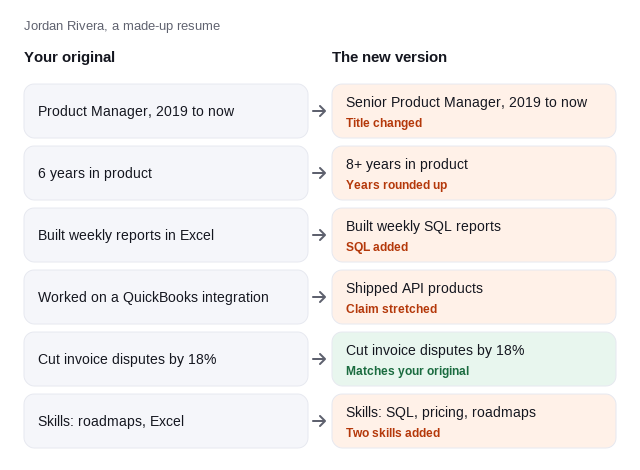
An illustration of the kinds of changes to catch, not real ChatGPT output. The resume is made up. Job titles, employers and dates
These should match your original exactly. Watch for a title that's grown a level, or a date that's moved.
Years of experience
If the job asks for 8+ years and you have 6, the new version should still say 6. Years come up a lot: about 6 in 10 of the 1,070 job postings from Blynk's searches, mostly for product roles, state a number of years of experience.
Every number
Each percentage, dollar amount and count should be one you gave it. Anything new is a guess, however reasonable it sounds.
Skills and tools
Read the skills line and every bullet for a tool or skill you haven't used. The job's own must-haves are the ones to watch, because they're right there in the chat.
Lines that sound like the posting
Using the job's words is good when the work behind them is yours. CareerOneStop says to use a posting's exact terms only for skills you really have. If a line reads like the posting and you can't name the fact behind it, put your own line back. Our guide to resume keywords goes further.
The interview test
Could you talk about every line for two minutes in an interview? If not, cut it or change it back.

ChatGPT resume prompts that backfire, and what to ask instead.
Popular prompts often ask for the very thing you don't want. Here's the pattern, and the fix.
Ask for this
- "Use only facts from my resume and my answers."
- "Quote the line of my resume behind each change."
- "If a result has no number, write [needs number] and ask me."
- "List what the job asks for that I don't have, under Gaps."
- "List everything in the new version that isn't in my original."
- One chat per job, and your own check at the end.
Not this
- "Make my resume sound impressive." It asks for polish, not proof.
- "Add metrics to every bullet." Without your numbers, it has to guess.
- "Add the skills this job asks for." That's asking it to write in your gaps.
- "You're a recruiter with 30 years of experience." A role doesn't give it facts about you.
- "Is my resume good?" or "Does this sound AI-written?" OpenAI says its answers on authorship aren't reliable evidence.
Questions about ChatGPT resume prompts, answered.
Is it a good idea to run your resume through ChatGPT?
Yes, if you keep it to your facts and check what comes back. CareerOneStop says using AI to write your resume is legitimate, as long as you edit the draft and "only include true information about you". The two real risks are made-up lines and generic wording. Prompts that forbid adding facts, and a line-by-line check, deal with both.
Can ChatGPT create a resume?
It can write one. CareerOneStop notes that ChatGPT's free basic version will create resumes. What you get is text with light formatting, as Coursera's guide explains, so you pick the layout and finish it yourself. Start with prompt 1 above, which has it interview you first, then paste the result into a simple one-column template.
What is the 7 second rule in resume?
It isn't a fixed rule. It comes from a 2018 Ladders study, which found that recruiters' initial screen of a resume averaged 7.4 seconds, up from 6 seconds in an earlier study. The study doesn't say how many recruiters took part, as an ERE article pointed out in 2020. What it means for your prompts: keep your real job title at the top of each role, and have ChatGPT put the result that fits this job right under it.
What are the 3 C's of a good resume?
There's no single definition. Champlain College's career office uses Clear, Consistent and Concise. That means strengths that stand out in seconds, the same style for dates and formatting throughout, and one or two pages. With ChatGPT, consistent is the one to watch. Check that it hasn't changed how your dates or titles are written.
Can recruiters tell if I used ChatGPT?
Sometimes. OpenAI says even ChatGPT can't reliably tell whether text was written by AI. In a survey of 600 US hiring managers for TopResume, a resume-writing company, 33.5% spotted the AI-generated resumes among four they were shown, and 19.6% said they'd reject a candidate whose resume or cover letter was AI-generated. What does get noticed is sameness: CareerOneStop says employers sometimes get near-identical AI resumes from different people and reject them. Our advice: real details from your own work are what make it sound like you.
What is the best ChatGPT prompt for a resume?
There isn't one prompt that does it all well. The ones built to keep it accurate give ChatGPT the job and your real resume, and set clear rules: use only my facts, keep my titles, dates and numbers, and list gaps. They also ask for the source of each change. Prompt 3 above does all of that, and prompts 2 and 7 on either side of it help you catch what it gets wrong.
How do I stop ChatGPT making things up on my resume?
You can't stop it completely, but you can make it much easier to catch. Tell it to use only your resume and answers, to quote the line behind each change, and to write [needs number] instead of guessing. Then ask it to list everything that's new, and check every title, date, number and skill yourself.
Is it safe to upload my resume to ChatGPT?
Safer with the right settings. Take out your phone number and address, paste the text rather than the file, and turn off "Improve the model for everyone" in Data controls, or use a Temporary chat. OpenAI says Business, Enterprise and Edu workspaces aren't used for training by default; on Free, Plus and Pro, you have to turn it off. Even Temporary chats may be kept for up to 30 days for safety, OpenAI says.
Where these facts come from.
Checked on November 11, 2026. The prompts and the advice are ours; facts about other companies come from their own pages, and OpenAI's help pages show the date each was last updated. The job-posting counts are Blynk's own: 190 job postings, mostly senior product roles, read line by line between November 2 and 11, 2026, each line labelled required, preferred or neither by the posting's own words; and 1,070 distinct postings from Blynk's searches, mostly for product roles, first seen October 31 to November 11, 2026, checked for a stated number of years of experience.
- How to tailor your resume to a job description
- The best AI resume tailoring tools, compared
- Resume keywords: how to find the right ones
- Blynk vs ChatGPT for your resume
- ChatGPT prompts for a cover letter
- How to use Claude in your job search
- OpenAI Help: does ChatGPT tell the truth? (updated October 2026)
- OpenAI Help: data controls in ChatGPT (updated November 10, 2026)
- OpenAI Help: Temporary Chat in ChatGPT (updated October 2026)
- OpenAI Help: memory in ChatGPT (updated October 2026)
- OpenAI Help: uploading files to ChatGPT (updated November 2026)
- OpenAI Help: GPTs in ChatGPT (updated November 2026)
- Anthropic: reduce hallucinations
- CareerOneStop: write your resume for current hiring practices
- TopResume: AI in hiring survey, 2025
- Jobscan: ChatGPT resume prompts, tested against ATS
- Coursera: how to use ChatGPT to write your resume
- Ladders: eye-tracking study, 2018 (archived copy)
- ERE: is the 6-second resume scan a myth?
- Champlain College: preparing your resume
- Blynk: find jobs and tailor your resume
- Blynk: ATS check
- Blynk pricing
