
ChatGPT cover letter prompts that use your real experience. Eight to copy, in order, and a way to check the letter.
If you've asked ChatGPT for a cover letter and got one that sounds like everyone's, or says you did things you didn't, the prompt is usually the problem. ChatGPT writes a better letter with more of you and less room to guess. Here are eight prompts for one letter, in order.

The short answer
- Give ChatGPT the job posting, your resume and one or two real results, and tell it to use only what's in your resume.
- Work in short prompts, in order: what the job wants, which of your lines match it, then a short letter in plain words.
- Then read every sentence against your resume and cut what you can't back up. OpenAI says ChatGPT can sound confident even when it's wrong.
On this page
Why ChatGPT cover letters go wrong, and what fixes each one.
Four things people run into when they ask ChatGPT for a cover letter, and which prompt on this page deals with each.
“It said I'd done things I've never done.”
The job posting sits in the same chat as your resume. So a requirement from the posting can come back as something you did (our reading). OpenAI's own help page, updated in October 2026, says ChatGPT "can produce incorrect or misleading outputs".
Fix: Have it match before it writes. Prompt 2 pairs each thing the job asks for with a line of your resume, or marks it Missing.
“It sounds like a robot.”
Ask for "a compelling cover letter" and you get the same polish as every other letter (our reading). What makes yours different is detail only you have: a real result, a real reason for this company.
Fix: Ask for plain words, and pick the first line yourself. Prompt 3 bans the stock phrases. Prompt 4 asks for five openers to choose from, and prompt 5 starts from your own reason, in your words.
“It wrote a whole page.”
Coursera's guide, citing the University of Virginia, says a cover letter should generally be less than 400 words. OpenAI's own cover letter guide shows asking ChatGPT to cut a draft down to 150 words.
Fix: Give it a number. Prompt 3 asks for about 250 words. Prompt 8 asks it to fit a form's limit.
“It just repeats my resume.”
Your resume already lists what you've done. Our advice: the letter is for what the resume can't say, like why this role, why this company, and the one or two results that matter most here.
Fix: Choose the results, and give it the company's own words. Prompts 2 and 5 do this.
Before you paste anything into ChatGPT, three things for a cover letter.
Each takes a minute. The settings come from OpenAI's own help pages, checked on November 12, 2026.
Leave the letter's header out
A cover letter's header holds your name, address, phone number and email. None of the prompts need them. Take them out of your resume before you paste it, and add the real header yourself at the end.
Paste text instead of uploading files
You'll be pasting three things: the job posting, your resume and a page from the company's site. Pasting them as text lets you see exactly what you're sharing. It also saves your uploads: OpenAI's help page on files, updated in November 2026, says Free users can upload 3 files a day.
Use a Temporary chat, or turn off training
OpenAI says that on Free, Plus and Pro, sharing your chats to improve its models is on by default (its data controls page, updated November 11, 2026). On the web, open Settings, then Data controls, and turn off "Improve the model for everyone". Or start a Temporary chat, which OpenAI says isn't used for training, though it may keep a copy for up to 30 days for safety. Our guide to ChatGPT resume prompts covers each setting step by step.
ChatGPT cover letter prompts to copy, from the job posting to the final check.
Use one new chat for each job. Copy the prompts in order and fill in the [square brackets]. Prompts 1, 2, 3 and 7 are the core; use 4, 5, 6 and 8 when you need them. They're plain instructions, with nothing that only works in ChatGPT.
Prompt 1. Read the job before it writes anything
Paste the full job posting where it says. It tells ChatGPT to sort what the job asks for, in the posting's own words.
Read the job posting below. Don't write a cover letter yet.

List what the job asks for. For each item, quote the posting's own words, and say whether the posting calls it required, preferred, or doesn't say.

Then name the 3 things it mentions most often or puts first. Don't decide for yourself which ones matter most.

The job posting
[Paste the full posting here]
Prompt 2. Match the job to your real experience
Same chat. It tells ChatGPT to find a line of your resume for each of those 3 things, or say there isn't one.
Now read my resume below. Still don't write the letter.

For each of the 3 things you named, find the line of my resume that shows it best, and quote it word for word. If nothing in my resume shows it, write Missing. Don't stretch a line to make it fit.

Then ask me up to 3 questions about results I could add. Use my answers as facts, and nothing else.

My resume
[Paste it here, with your name, phone, email and address taken out]
Prompt 3. A ChatGPT prompt for a cover letter that sticks to your resume
The one that writes the letter. It tells ChatGPT to build every claim from the lines it quoted and your answers.
Write a cover letter for this job, using only the lines you quoted from my resume and my answers to your questions.

Follow these rules.
- Every sentence about me must come from a quoted line or one of my answers. Don't add skills, tools, titles, dates or numbers.
- If something is Missing, don't claim it. Leave it out, or name my nearest real experience in one honest sentence.
- Keep it to about 250 words, in 3 or 4 short paragraphs.
- Use plain words, the way I'd say them out loud. Don't use thrilled, excited to apply, passionate, dynamic or proven track record.
- Write [My name] where my name goes. Don't make up a name for the hiring manager.
- End with one line asking for a conversation.

The job and the company
[Job title, company name]
Prompt 4. Five first lines to choose from
Our advice is to pick the first line yourself, since it sets the tone for the rest.
Give me 5 different first sentences for this letter.
- Each one names the role and starts with one real result or reason from my resume or my answers.
- Don't start with I am writing, I am thrilled or I am excited.
- Keep each one under 30 words.
- Don't add anything that isn't in my resume or my answers.

Put them in a numbered list, so I can choose one.
Prompt 5. Why this company, from the company's own words
Paste text from the company's own site, plus one reason of your own. It tells ChatGPT not to bring in facts from anywhere else.
Below is text from the company's own website, and my own reason for applying. Use them to write 2 or 3 sentences on why I want to work there.
- Use only what this text says about the company. Don't add facts about its products, customers, size or history from anywhere else.
- Connect one thing it says to one real thing from my resume or my answers.
- Build on my reason, in my words, rather than replacing it.

The company's own words
[Paste its About page, its mission or a recent post]

My reason
[One sentence, in your own words]
Prompt 6. A version for a career change or a gap
Only if it applies. It rewrites the middle paragraph, and tells ChatGPT to name the change once and move on.
I'm changing careers, or I have a gap in my work history. Rewrite the middle paragraph of the letter with that in mind.
- Name the change or the gap once, plainly, without apologizing.
- Show which of my real skills carry over to this job, using only lines from my resume.
- Don't describe my past work in this job's terms unless I really did that work.
- Keep the paragraph under 90 words.

What I want them to know
[One or two sentences, such as why you're moving, or what you did during the gap]
Prompt 7. Make it list every claim and where it came from
Before you check it yourself. Paste your resume and the latest letter again, so it works from both.
Don't rewrite the letter. Check it.

Go through the letter one sentence at a time. For each sentence that says something about me, quote the line of my resume or the answer it comes from. If there isn't one, write No source.

Then list any sentence that uses the job posting's wording without a fact from my resume behind it.

Don't praise the letter. If every sentence has a source, say so.

My resume
[Paste it again]

The letter
[Paste the latest version]
Prompt 8. Turn it into an answer for a form question
For forms that ask a short question instead of, or as well as, a cover letter.
The application form asks the question below, with a word limit. Answer it from the letter above, in my voice.
- Stay under the form's word limit. If it doesn't give one, keep it under 100 words.
- Use one real reason for this company and one real result from my resume.
- Don't add anything that isn't already in the letter.
- Give me 2 versions.

The question on the form
[Paste it, such as Why should we hire you? (in under 50 words)]
How the best cover letter prompts work, and the thinking behind these eight.
They match before they write. Prompts 1 and 2 have ChatGPT find what the job asks for, then your resume line behind each, before any letter exists. A requirement with no match is to be marked Missing, so it doesn't quietly turn into your experience. That follows Anthropic's guide to reducing made-up answers, written for its own model, Claude. It says to use only the documents you provide, and to back each claim with a quote.
The letter is written from the matches, not the posting. Prompt 3 tells ChatGPT that every sentence about you must come from a line it quoted or an answer you gave. The posting stays in the chat for context, not as the source.
It asks instead of guessing. Prompt 2 has ChatGPT ask you up to 3 questions. A real number from you beats one it fills in.
The company paragraph comes from the company. OpenAI's help page on accuracy, updated in October 2026, says search is turned on by default. But it also says the model "may not be able to obtain relevant information from a given website", for reasons like paywalls. So prompt 5 has you paste the company's own words, plus one reason of yours.
The form question is the new cover letter. On November 11, 2026, we read the live application forms for 168 jobs in Blynk's searches, at 156 companies. 2 of the 168 forms required a cover letter.
14 of the 87 Ashby forms ask a short “why this company” or “why this role” question, and 13 of them require an answer. 10 are on forms with no cover letter box, like one that asks: “Why should we hire you? (in under 50 words)”. Prompt 8 asks ChatGPT to turn your letter into that answer. More in our guide to whether you need a cover letter.
No prompt stops every mistake. OpenAI's advice is to use ChatGPT "as a first draft, not a final source". That's why the last step is yours.
Check the cover letter ChatGPT wrote, one sentence at a time.
Prompt 7 gives you a list to start from. But a chatbot checking its own work isn't proof. As OpenAI's help page puts it, "Confidence isn't reliability." So read it yourself, with your resume and the posting open.
Start with the No source list
Every sentence prompt 7 marks No source is one to fix or cut. Then keep going, because it can miss some.
Find the sentences that sound like the posting
In a letter, this is the easiest mistake to miss (our reading). Read each sentence that matches something the job asks for, like "experience leading product launches". Then find the line of your resume behind it. If there isn't one, that sentence came from the posting, not from you. Cut it, or say what you really did.
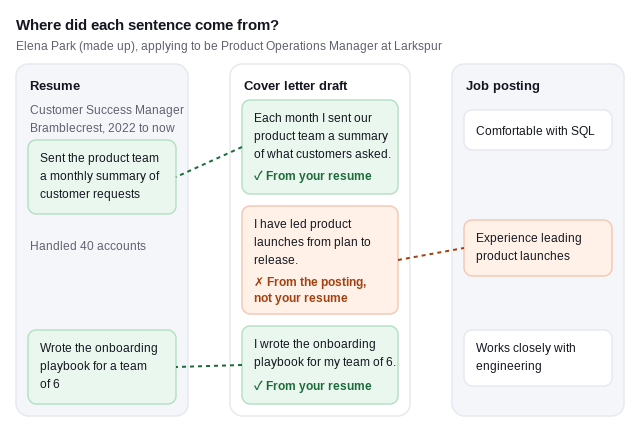
An illustration of what to look for, not real ChatGPT output. The person, the companies and the job are made up. Names, numbers and dates
Check the company's name, the job title and the hiring manager's name if there is one. Every number and every count of years should be one you gave it.
The company paragraph
Every fact about the company should be in the text you pasted into prompt 5. If it mentions a product, a customer or a milestone you didn't give it, check it on the company's site or cut it.
Read it aloud, then the interview test
Harvard's career office suggests reading your letter aloud, and keeping it in your own voice. Rewrite anything you wouldn't say. Then ask: could you talk about each claim for two minutes in an interview? If not, change it.

Cover letter prompts that backfire, and the line to use instead.
Several prompts on top-ranking pages ask for the very thing you don't want (our reading). Here's the pattern, and what to say instead.
Ask for this
- "Use only the lines you quoted from my resume and my answers."
- "If my resume doesn't show it, write Missing."
- "Use only this text about the company." Then paste it.
- "Keep it to about 250 words, in plain words."
- "Quote the source of every sentence about me."
- One chat per job, and your own read at the end.
Not this
- "Write me a compelling cover letter for this job." It asks for polish, with none of your facts to polish.
- "Highlight my experience with [the skills in the posting]." That writes the job's asks in as yours.
- "Add results and numbers to each paragraph." Without your numbers, it has to guess.
- "Research the company and tell them why I'm a great fit." OpenAI says its search can't always reach a site, and the fit is yours to show.
- "Make it sound less like AI." It changes the words, not the sameness. Your own detail does that (our reading).
Is it okay to use ChatGPT for a cover letter? What hiring managers say.
Just over half are fine with help, and some aren't. TopResume, a resume-writing company, surveyed 600 US hiring managers in May 2025. 19.6% said they would reject a candidate whose resume or cover letter was AI-generated, and 25% said cover letters should stay AI-free. 52% said using AI for proofreading or drafting help was acceptable.
No tool can prove who wrote it. OpenAI says ChatGPT itself "can't reliably determine whether text was AI-generated". Whether employers can tell, and what a 2026 cover letter should look like, are answered in the questions below.
Our reading: the risk isn't the tool. It's a letter that's generic, or says something that isn't true. The prompts and the check above are built to stop both.
Questions about ChatGPT cover letter prompts, answered.
Is it safe to paste my resume into ChatGPT for a cover letter?
Safer with the three steps in Before you paste. Leave your contact details out, paste text instead of files, and use a Temporary chat or turn off training.
Can employers tell if you use ChatGPT for a cover letter?
Many say they can. Insight Global surveyed 1,005 US hiring managers in October 2024, and 88% said they can tell when candidates use AI to help with applications, cover letters or resumes. That's their own view, not a measured detection rate. And OpenAI says ChatGPT itself "can't reliably determine whether text was AI-generated". In our reading, a letter gets noticed for sounding like everyone else's, which is why prompt 3 bans the stock phrases and prompt 2 builds it from your own lines.
Can ChatGPT write a cover letter?
Yes, as a first draft. That's OpenAI's own advice, to use ChatGPT "as a first draft, not a final source". Whether it's a good letter depends on what you give it, and prompts 1 to 3 hand it the posting, your resume and a rule to use only your facts. In our view, the rest is yours. Add a real result and a real reason for this company, then check every sentence against your resume.
What is the best ChatGPT prompt for a cover letter?
One prompt rarely does it all. The best ones give ChatGPT the posting and your real resume, set a length, and tell it to use only your facts and to say what's missing. Prompt 3 above is the one that writes. Prompts 1 and 2 before it and prompt 7 after it make its mistakes easier to catch.
How do I stop ChatGPT making up experience in my cover letter?
You can't stop it completely, but you can make it easy to catch. Have it quote the resume line behind each match and write Missing where there isn't one, as prompt 2 does. Then have it list the source of every sentence, as prompt 7 does. Last, read any sentence that sounds like the posting and find the fact of yours behind it.
What should a 2026 cover letter look like?
Short, and check the form before you write it. Coursera's guide, citing the University of Virginia, says a letter should generally be less than 400 words, and OpenAI's own cover letter guide shows a draft cut down to 150. Prompt 3 asks for about 250 words in 3 or 4 short paragraphs. Of 168 application forms we read, 2 required a cover letter, and 14 of the 87 Ashby forms ask a short “why this company” or “why this role” question. Prompt 8 asks ChatGPT to answer that within the form's own limit.
What is the rule of 3 in a cover letter, and what are the three golden rules?
Neither has one agreed meaning. Some career sites mean three parts (an opening, the fit and a close), and others mean two or three achievements that match the job, which is how Enhancv's generator builds its letters. These prompts lean on the second idea, since prompt 1 names the job's top 3 asks and prompt 2 finds your line for each. There's no standard list of golden rules either. Ours, which the prompts follow, are to write for this one job, say only what's true, and keep it to about 250 words.
What is the best AI for a cover letter? Do these prompts work in Claude or Gemini?
In our view, what you give the AI and whether you check its letter matter more than which one you use. These prompts are plain instructions, so you can paste them into ChatGPT, Claude or Gemini. In Claude, Anthropic lets you choose in your privacy settings whether chats are used for training. Google says Gemini can make mistakes and present them as fact, so the check above applies there too. For tools built only for letters, see our round-up of AI cover letter generators, or how Blynk compares with Gemini.
Should I use a cover letter GPT instead of plain ChatGPT?
Plain ChatGPT with a saved prompt is the safer bet. OpenAI's help page on GPTs, updated in early November 2026, says custom GPTs are being retired, with standard retirement scheduled for December 11, 2026. It also says a GPT that uses outside apps may send parts of what you type to another company, and OpenAI "does not audit or control" what that company does with it.
Should I tell the employer I used AI?
Follow the employer's rule, if it has one. Some publish it. Anthropic's guidance for candidates asks them to write the first draft themselves, then use Claude to refine it, and expects candidates to be transparent in following that guidance. If there's no rule, our advice: make sure every line is true and yours, so you can talk about any of it in an interview.
Where these facts come from.
Checked on November 12, 2026. The prompts and the advice are ours. Facts about ChatGPT come from OpenAI's own pages, with the date each was last updated; facts about other companies come from their own pages. The form counts are Blynk's own: on November 11, 2026, the application forms of 168 open jobs from Blynk's searches (81 on Greenhouse at 72 companies, 87 on Ashby at 84), read through each system's public job-board data. Nothing was submitted. Most are senior product roles at tech companies.
- ChatGPT resume prompts that don't make things up
- The best AI cover letter generators, compared
- Do I need a cover letter?
- How to address a cover letter
- Blynk vs ChatGPT
- How long a cover letter should be
- How to use Claude in your job search
- How to end a cover letter
- OpenAI Help: does ChatGPT tell the truth? (updated October 2026)
- OpenAI Help: data controls in ChatGPT (updated November 11, 2026)
- OpenAI Help: Temporary Chat in ChatGPT (updated November 2026)
- OpenAI Help: uploading files to ChatGPT (updated November 2026)
- OpenAI Help: GPTs in ChatGPT (updated November 2026)
- OpenAI: how to write a cover letter using ChatGPT (read November 12, 2026)
- Anthropic: reduce hallucinations
- Anthropic: guidance on candidates' AI usage
- Claude Privacy Center: is my data used for model training?
- Google: Gemini Apps Help
- TopResume: AI in hiring survey, 2025
- Insight Global: 2025 AI in hiring survey report
- Coursera: how to use ChatGPT to write a cover letter
- Enhancv: AI cover letter generator
- Harvard FAS career office: AI for resumes and cover letters
- Blynk: Auto Apply
