
How to end a cover letter. Three lines, a sign-off and your name.
The letter is done except the last few lines. “I look forward to hearing from you” feels limp, “Sincerely” feels old, and you're not sure whether to promise a call. Here's how to end a cover letter: the closing paragraph, the sign-off, your name, and closing lines to copy.

The short answer
- Close in two or three sentences: one line on why you fit this job, one asking for a conversation, and a thank-you.
- Then a plain sign-off and your full name. “Sincerely,” or “Best regards,” works for almost any job.
- Leave out new facts, demands and dates. Don't promise to call on Tuesday, and skip “Cheers” and “Take care”.
On this page
How to end a cover letter without sounding desperate, four worries, answered.
The worries that stall the last few lines, and what the advice really says.
“My ending sounds desperate, or like a template.”
Usually it's the stock lines, not you. Robert Half, a staffing firm, says “I look forward to hearing from you” won't prompt a manager to act. It suggests “I look forward to speaking with you” instead. A line about this job does more than any phrase.
What to do: Tie the last lines to this job. Then ask for a conversation.
“Sincerely sounds old-fashioned.”
It's still on almost every list we read, from Robert Half and Randstad to Resume Genius and Indiana University's career guide. We found no study of cover letter sign-offs at all. So any plain one is fine, and your time is better spent on the line above it.
What to do: Pick “Sincerely,” or “Best regards,”. Then move on.
“Do I say I'll call them next week?”
The experts split. Purdue's writing lab gives an example that promises a follow-up, and Robert Half says not to. And most job postings name no one you could call. In our count, about 1 in 100 did.
What to do: Ask for the conversation. Leave the date out.
“What goes after my name?”
It depends on how you send it. A PDF needs your typed name. A printed letter needs room to sign. An email needs your phone number and email under your name.
What to do: Check how you're sending it. The layout section below covers each case.
How to write a cover letter closing paragraph, in three moves.
Keep it to two or three sentences, as Kickresume suggests. Each sentence does one job. Starting the letter instead? See how to start a cover letter. For the middle, see what to include in a cover letter.
Remind them why you fit, in one line
Pick the strongest match from the middle of your letter and say it again in new words. Robert Half says to sum up your strengths in fresh language. MIT's career office says to restate your interest and why you're a good candidate, briefly. Don't bring in a new achievement here. Grammarly, Kickresume and Huntr all say the close is no place for new information, so move it up into the body.
The job posting (made up): Larkfield wants a product manager to make onboarding faster for its small business customers.
What the letter's middle already says: “At Pinecrest, I led the redesign of our onboarding, and new customers set up their first project in 2 days instead of 6.”
Before: “I believe I would be a great fit for this role. I look forward to hearing from you. Thank you for your time and consideration.”
After: “Getting small businesses set up fast is the work I did at Pinecrest, and it's what this role asks for. I'd welcome a conversation about how I could do the same for Larkfield's customers. Thank you for your time and consideration.”
Nothing in the after is new. It only rewords the before and points back to the middle of the letter.Ask for the conversation, not a date
Purdue's writing lab says to request an interview in some way. Ask, don't book. Resume Genius says proposing a specific meeting time can seem pushy, and Robert Half says not to demand an interview. Lines that ask without pushing: “I'd welcome a conversation about how I could help with [goal].” “I'm happy to meet whenever suits your team.” Leave salary out of it, as Career.io advises.
Thank them once, then sign off
Purdue, MIT and Indiana University's career guides all end with a thank-you. One is enough, such as “Thank you for your time and consideration.” Then write the sign-off with a comma, leave a line, and type your full name.
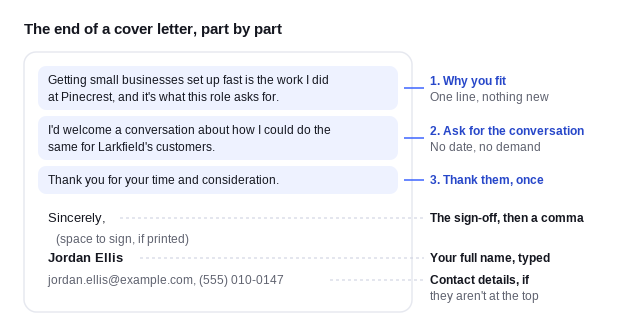
An illustration of a cover letter ending, part by part. The name, companies and contact details are made up.

Should you end a cover letter by saying you'll follow up? Where the advice splits.
Purdue's writing lab says you can. Its example closing says the writer will follow up within a week. It also says you can leave that line out and simply invite contact. If you do promise a call, make it.
Robert Half, a staffing firm, says don't. Ask for an interview politely, and don't say you'll call the office next week. Resume Genius says not to propose a specific meeting time. BeamJobs warns against demands like “I expect to hear back from you next week”.
Most postings give you no one to call. In the 1,204 job postings we read for our guide on how to address a cover letter, only about 1 in 100 named an actual person. Few say what happens next, either. In a newer count of 1,330 job postings with full text from Blynk's searches, mostly product roles at 798 companies, first seen between October 31 and November 12, 2026, only 14 laid out the interview steps, about 1 in 100.
Our advice: ask, don't book. Say you'd welcome a conversation, and make sure your contact details are on the letter. Then follow up once, by email, if you can find a person to write to. Our guide to the follow-up email after applying has the timing and the words.
Cover letter sign-offs that work, and the few to avoid.
These work for almost any job: Sincerely, Best regards, Kind regards, Respectfully, and Thank you for your consideration. Each one is on at least two of the lists we read, from Robert Half, Randstad, Resume Genius and Coursera. Put a comma after it, then your name on its own line.
“Sincerely” is the safe default. Randstad, a staffing firm, calls it the choice you can't go wrong with. In our reading, “Best regards” is just as safe.
Where the guides disagree. Grammarly recommends a plain “Best,” while BeamJobs keeps “Best” and “Regards” for less formal emails. Kickresume suggests “Warmly,” for creative or casual letters, and Huntr lists it as one to avoid. Our reading: these are matters of taste, so when in doubt, use the plainer one.
Avoid the casual ones. Robert Half warns against “Yours”, “Cheers” and “Take care”. Enhancv and Huntr add “Thanks” with an exclamation mark. Skip jokes, emojis and anything you'd write to a friend.
Applying in the UK? The National Careers Service says to end with “Yours sincerely” when you know the person's name. After “Dear Sir or Madam”, it's “Yours faithfully”.
The only data on sign-offs is about email. Boomerang, an email software company, looked at more than 350,000 email threads from online mailing lists in 2017. Emails that closed with a thank-you got a reply 62% of the time, against 46% for those that didn't. “Thanks in advance” did best, at 65.7%, and “Best” worst of the eight it compared, at 51.2%.
Read it with care. These were emails to online communities, not cover letters, and the authors say they couldn't control for who knew whom. Our reading: a thank-you in your closing paragraph costs nothing, so keep it.
After the sign-off, your name, signature and contact details.
A PDF or Word file. Write the sign-off, leave a line, then type your full name. Enhancv says a typed name is enough for anything sent digitally. Your contact details usually sit at the top of the letter. Grammarly suggests adding them under your name only when there's no header.
A printed letter. Leave room to sign in ink, then type your name underneath. Purdue's writing lab says to sign your name and print it underneath, and Enhancv suggests two to three blank lines. Indiana University's career guide allows a scanned signature too.
A cover letter in an email. End with the sign-off and your typed name. Then add your phone number, email and LinkedIn link, as Kickresume's email example does. The rest of the email is in our guide on how to email a resume.
A text box on the application form. Many forms let you type or paste the letter in. Our advice: end it the same way, with the sign-off and your typed name. Leave out an address block, since the form already has your details.
How common the typed box is. On November 12, 2026, we read the public application forms of 211 open jobs in Blynk's searches. On Greenhouse, 77 of 89 forms had a cover letter field, and every one offered a typed box as well as a file upload. Ashby and Lever forms mostly wanted a file, or nothing. Our guide on how long a cover letter should be has the rest of that count.
Cover letter closing paragraph examples, ready to copy.
Each one is a closing paragraph, a sign-off and your name. Swap the [square brackets] for real details from your letter and the job posting. Use only what's already true and already in your letter.
The standard close
For almost any job. It points back to your strongest match.
[The work the posting asks for] is the kind of work I did at [Company], most recently when I [the result you described above]. I'd welcome a conversation about how I could do the same for [Their company]. Thank you for your time and consideration.

Sincerely,
[Your full name]
Asking for an interview, plainly
When you want the ask to be clear, without setting a date.
I'd like the chance to talk about how my [skill from the posting] could help [Their company] with [goal from the posting]. I'm happy to meet whenever suits your team, by video or in person. Thank you for considering my application.

Best regards,
[Your full name]
A career change
When your experience comes from another field.
My years in [old field] taught me [skill the new role needs], and it's the skill this [job title] role leans on most. I'd welcome the chance to talk about how it carries over to [Their company]. Thank you for reading my application.

Sincerely,
[Your full name]
No experience yet
For a first job or an internship, built on a class, project or volunteer role.
In [class, project or volunteer role], I [what you did that matches the posting]. I'd like to bring the same care to [Their company] as a [job title], and I'd welcome the chance to talk. Thank you for your time.

Best regards,
[Your full name]
Moving for the job
When you're relocating and want them to know when you can start.
I'm moving to [City] in [month] and can start from [date]. I'd welcome a conversation about the [job title] role, by video before I move or in person after. Thank you for considering my application.

Sincerely,
[Your full name]
Someone referred you
When a person at the company suggested you apply.
[Referrer's name] thought my work on [project] would fit what your team is building, and after reading the posting I agree. I'd welcome the chance to talk more about it. Thank you for your time.

Best regards,
[Your full name]
The end of an email
When the email itself is your cover letter.
Thank you for considering my application. My resume is attached, and I'd welcome the chance to talk about the [job title] role.

Best regards,
[Your full name]
[Phone number]
[Email address]
[LinkedIn link]
A short close for a form box
When you're typing the letter into a box on the application form.
I'd welcome a conversation about how my [strongest match] could help your team. Thank you for your time.

Sincerely,
[Your full name]
Cover letter closing mistakes, and what to write instead.
The small things that make an ending sound pushy, flat or careless.
Do
- Restate your strongest match in new words.
- Ask for a conversation, and make sure they can reach you.
- Thank them once.
- Match the sign-off to the tone of the letter.
- Type your full name under the sign-off.
- Check the company's name and your contact details one last time.
Don't
- Add a new achievement. Grammarly says the close is no place for new information.
- Promise to call on a set day. Robert Half advises against it.
- End on “I look forward to hearing from you” and nothing else.
- Sign off with “Cheers”, “Take care” or “Yours”.
- Bring up salary. Career.io says to leave it out of the close.
- Apologize for what you lack. Coursera says to stay positive and confident.
Questions about how to end a cover letter, answered.
What do I end a cover letter with?
A short closing paragraph, a sign-off and your name. The paragraph is two or three sentences: one on why you fit this job, one asking for a conversation, and a thank-you. Then “Sincerely,” or “Best regards,”, a blank line and your full name. Add your contact details under your name if they aren't at the top of the letter.
What is a good closing statement for a cover letter?
One that asks for the next step and ties it to this job. For example, “I'd welcome a conversation about how I could help [Company] with [goal from the posting].” MIT's career office ends its sample by looking forward to speaking further. Robert Half prefers “I look forward to speaking with you” to “I look forward to hearing from you”, which it says won't prompt a manager to act.
What are 7 effective ways to end a cover letter?
Seven moves come up across the guides we read: restate your best match in new words, tie it to the company's goal, ask for a conversation, make sure they can reach you, thank the reader, use a plain sign-off, and type your full name. You don't need all seven in every letter: two or three sentences and a sign-off is enough. The examples to copy show how they fit together.
Should you end a cover letter with “Sincerely”?
Yes, it's the safest choice. Almost every guide we read lists it, and Randstad, a staffing firm, calls it the choice you can't go wrong with. “Best regards,” and “Kind regards,” are just as acceptable. In the UK, the National Careers Service says “Yours sincerely” when you've used the person's name, and “Yours faithfully” after “Dear Sir or Madam”.
What to say instead of “I am excited to apply”?
At the end of the letter, swap the feeling for a reason. Instead of “I'm excited about this opportunity”, name what draws you: “Your plan to [goal from the posting] is the work I want to do next.” Or keep it simple: “I'd welcome the chance to talk about the role.” The first line of the letter has its own guide, on how to start a cover letter.
What are 5 common cover letter mistakes?
At the end of a letter, these five come up in the guides we read: adding a new achievement in the close (Grammarly), promising to call on a set day (Robert Half), ending on “I look forward to hearing from you” and nothing else (Robert Half), a casual sign-off like “Cheers” (Robert Half), and leaving your name off below the sign-off (Enhancv). For the rest of the letter, see what to include in a cover letter.
What is the rule of 3 in a cover letter?
There's no one rule, and we found no study behind it. Most often it means three paragraphs, and the third is the close. Eastern Florida State College's career blog, for example, uses that last paragraph to thank the employer, give your contact information and say you'd welcome an interview. That's the same job this page gives the closing paragraph, in two or three sentences.
Can employers tell if you use ChatGPT for cover letter?
Many say they can. Insight Global surveyed 1,005 US hiring managers in October 2024, and 88% said they can tell when candidates use AI to help with applications, cover letters or resumes. That's their own view, not a measured rate, and OpenAI says ChatGPT itself “can't reliably determine whether text was AI-generated”. Endings are where stock lines pile up, so make yours about this job. Our guide to ChatGPT cover letter prompts has a check for that.
What makes a killer cover letter?
There's no formula. Our reading of the guides: it's written for one job, every line is true, and it's short. The middle does most of the work, and our guide on what to include covers it. The ending's job is smaller: remind them why you fit and ask for a conversation. If you're writing a lot of them, Blynk can write a cover letter for each job, written for the role, not copied from the last one.
Should I say I'll follow up in my cover letter?
You can, but only if you will. Purdue's writing lab gives an example that promises a follow-up within a week, and says you can leave it out. Robert Half says not to say you'll call next week. Most postings name no one to call, so our advice is to ask for a conversation and send one follow-up email later. Our guide to the follow-up email after applying has the timing.
Where the facts come from.
Checked in November 2026. The advice is ours, and we say so where it's given. Closing and sign-off advice comes from the career offices and guides named in the text, read on their own pages. The email sign-off figures come from Boomerang's own post. Blynk's counts are its own. Postings, November 13, 2026: 1,330 job postings with full text from Blynk's searches, mostly for product roles (1,281 have “product” in the title), at 798 companies, first seen October 31 to November 12, 2026. Each was searched for a section on the interview process, the hiring process, what to expect or next steps, and every match was read by eye. A list of interview stages counted. A benefits, AI-tool or scam notice under such a heading didn't. The count of postings that name a person comes from our guide on how to address a cover letter, and the form counts from our guide on cover letter length.
- How to start a cover letter
- What to include in a cover letter
- How to address a cover letter
- How long a cover letter should be
- Follow-up email after applying
- ChatGPT cover letter prompts
- Purdue OWL: cover letter closings
- MIT Career Advising & Professional Development: how to write an effective cover letter
- Indiana University career guide: the cover letter closing
- National Careers Service (UK): covering letter
- Robert Half: how to close a cover letter
- Randstad USA: how to end a cover letter
- Resume Genius: how to end a cover letter
- Grammarly: how to end a cover letter
- Coursera: how to end a cover letter (updated May 15, 2026)
- Enhancv: how to sign a cover letter
- Kickresume: how to end a cover letter (updated September 29, 2026)
- Huntr: how to end a cover letter
- BeamJobs: how to end a cover letter (January 23, 2026)
- Career.io: how to close a cover letter
- Boomerang: email sign-offs and response rates (January 31, 2017)
- Insight Global: 2025 AI in hiring survey report
- OpenAI Help: does ChatGPT tell the truth?
- Eastern Florida State College: how to write a cover letter in 3 easy paragraphs
- Blynk Auto-Apply
