
How to email a resume. And send it without second-guessing.
If someone just asked you to “send over your resume”, or a job posting says to email it, the email itself can feel like a test. Here's what to write, which file to attach, the subject line to use, the clicks in Gmail and Outlook, and six sample emails to copy.

The short answer
- Write a subject line with the job title and your name. Then write three to five short sentences: the role, one or two reasons you fit, and that your resume is attached.
- Attach one PDF named with your name, like First-Last-Resume.pdf, unless they ask for Word. Send it from a personal email address, and send yourself a test first.
- If the job has an apply form, use the form. Email your resume when someone asks for it, the posting says to, or there's a person to send it to.
On this page
Should you email your resume, or use the application form?
Most guides for job seekers assume the job asked for an emailed resume. Most of the jobs we checked don't. In 1,272 job postings from Blynk's searches, mostly for product roles, we found only 2 that gave an email address to send a resume to. Another 4 said resumes sent by email wouldn't be reviewed. So before you write anything, work out whether email is right for the situation you're in.
“The job posting has an Apply button.”
That's the employer's own application form, and it's how most of the jobs we checked want your resume. A few postings say outright that an emailed resume won't be reviewed. Read the whole posting, though, because a university career office points out that an Apply button can sit next to an instruction to email the hiring manager. If you'd rather not fill in every form yourself, Blynk fills in the form on the employer's site, uploads your files and submits it, and you approve each one first.
What to do: Apply on the form. If there's a person you can write to as well, send them a short note after you apply.
“A recruiter asked me to send over my resume.”
This is the clearest case for email. They asked for it, they already know who you are, and they're waiting for the file. Make it quick and simple for them, and respond in the same thread.
What to do: Reply, don't start a new email. A line or two, with your resume attached as a PDF.
“The posting says to email my resume.”
In Blynk's sample this was rare, but those searches were mostly for product roles. Postings in other fields, industries and countries may ask for it more often. When one does, the details matter: the address, the subject line and the documents it lists.
What to do: Follow its instructions exactly. Then use the six steps below.
“Won't emailing it get me past the ATS?”
Some guides say so. But Jobseeker, a resume site, notes that some employers upload emailed resumes into their applicant tracking system by hand. And some postings in Blynk's sample wouldn't review emailed resumes at all.
What to do: Use email to reach a person, not to skip the form. For a note to the hiring manager after you apply, see our follow-up email guide.
How to send your resume by email, in six steps.
This is how to send a resume by email to a company, a recruiter or a hiring manager. First, read the job posting or the message that asked for it. Follow any instructions exactly. That means the address, the subject line format, the file type and any questions they want answered.
Write a subject line for the job application email
A clear subject line is the first impression: put the job title and your full name in it, so the recipient knows what it is before they open it. Add the job ID if the posting has one. If someone referred you, put their name first. Our advice: keep it to about 60 characters, short enough to read on a phone. Avoid a vague subject line like “Resume” or “Job application”.
Try “Application for Office Coordinator, Maya Ortiz”. Not “Resume” or “Hello”. There are ten more subject lines below, by situation.Start with their name, or a plain greeting
If the posting, the person or the company website gives a name, use it in your salutation: “Dear Ms. Delgado,” or “Hi Ana,” if they wrote to you first by first name. With no name, “Dear Hiring Manager,” is fine; either way, keep a professional tone, with no emojis and nothing too casual. The same rules apply as for a cover letter greeting, in our guide on how to address a cover letter. To find a name, see how to find the hiring manager, or paste the job link below.
Write three to five short sentences
Mention the most important information first: which position you're applying for and where you came across it. Give one or two true reasons you fit, such as relevant work experience, skills or achievements that match the job description. Then say your resume is attached, and ask for an interview or a short call; that's your call to action. As one university career office puts it, the email is a brief introduction, not a full cover letter.
How long? The guides disagree, from no more than 100 words (career.io) to 120 to 180 (Michael Page), and none cites a study. Our advice: three to five sentences, roughly 60 to 150 words. It's often read on a phone, and the resume does the rest. To say it's attached, “My resume is attached” is plain and clear. “Please find attached my resume” works too; it's just stiffer.Attach one PDF, named with your name
Save your resume as a PDF unless they ask for Word, so your formatting looks the same on every screen. Make sure you can highlight its text, because a scan or an image of a resume may not be read by hiring software. Use your first and last name in the file name, like Maya-Ortiz-Resume.pdf, not resume_final_v3.pdf. Attach one file, plus a cover letter or additional documents only if they asked for them. Never send a zip or a folder of photos, since Gmail blocks some file types even inside a zip.
Sign off with your phone number and LinkedIn
End with a closing line and a professional sign-off, such as “Best regards,” “Sincerely,” or “Thank you,” and your full name. Under it, your signature adds your phone number, a link to your LinkedIn profile or portfolio, and your city if location matters for the role. Send it from a personal email address built on your name, and avoid using your current employer's account. Jobseeker's guide says to skip work email addresses, and we agree: that account isn't yours.
Send yourself a test, then send your resume
Before sending, give it one round of proofreading for spelling and grammar errors, and double-check the job title and company name. Then send it to yourself, open the attachment from the test, and make sure it's the correct file, not an old version. Attach the file before you type the recipient's address, so a half-finished email can't go out, and copy the address from the posting. The illustration below shows a finished one, with its parts labelled.
When to send it: during their working hours, in our advice. Pages that name a “best time” to send cite studies they don't name. Afterwards, keep a copy of what you sent. If you don't hear back within a week or two, our follow-up email guide covers how to ask about the status and stay polite.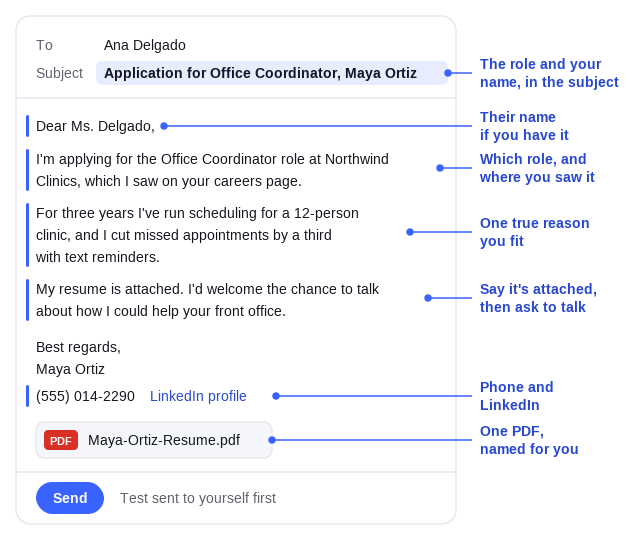
An illustration of a finished email. The names are made up.

How to email a resume from Gmail or Outlook, and the size limits that matter.
Using Gmail on a computer, click Compose, then click Attach at the bottom of the message. Choose your resume and click Open. Gmail's limit is 25 MB of attachments for personal accounts. Over that, Gmail removes the attachment and shares it as a Google Drive link instead. On a work or school account, the administrator sets the limits.
In Outlook, start a new message. In the new Outlook, open the Message tab and select Attach File in the Insert group. In classic Outlook, it's Attach File in the Include group on the same tab. In Outlook on the web, select Attach, then Browse this computer, or drag the file into the message.
Outlook's limit is 20 MB for Outlook.com and other internet accounts, and 10 MB by default for business (Exchange) accounts. That counts the email and the attachment together.
Your resume should be nowhere near those limits. You'll read rules like “keep it under 5 MB”, or Kickresume's warning that a file over 10 MB “might be considered suspicious”, with no source behind them. The only real limits are the email providers'. In our reading, a resume made of text is a small file. If yours runs to several megabytes, it probably holds images, which hiring software may not read either.
These steps are for a computer. Gmail's help page also has steps for Android and iPhone. The steps and limits come from Google's and Microsoft's help pages, checked on November 12, 2026.
How to email a cover letter and resume, in the body or attached.
If you're attaching a cover letter and a resume, what goes in the email body? The guides split, and no survey settles it. Indeed says the cover letter can go in the body or as an attachment. NEIU's career office and Jobseeker say to attach both as PDFs. Michael Page, a recruiter, says keep the email brief and let the cover letter explain.
Our advice: if the posting asks for a cover letter, attach it as a second PDF, named like your resume: Maya-Ortiz-Cover-Letter.pdf. Keep the email to three or four sentences, and don't paste the letter in again. If nobody asked for a cover letter, the short email does that job on its own.
Not sure you need one? Our guide Do I need a cover letter? has a one-minute check. If the posting asks you to paste the letter into the email instead, do that, and start it with the same greeting you'd use on the letter.
Email subject lines for a job application, by situation.
What's a good subject line for an email asking for a job? One that says the job and who you are, in plain words, so recruiters and hiring managers can tell what it is at a glance. Pick the situation you're in, then copy one of the examples. If a posting gives its own subject line format, always use that instead.
When the posting asked you to email it
The standard job application subject line.
Application for [Job title], [Your full name]
[Job title] application from [Your full name]
When there's a job ID or reference number
Copy the ID exactly as the posting shows it.
Application for [Job title], [Job ID], [Your full name]
[Job ID] [Job title], [Your full name]
When someone referred you
Put their name first, so it's the first thing they see.
Referred by [Their full name], [Job title] application
[Their first name] suggested I write about the [Job title] role
When a recruiter or contact asked for it
Replying? Keep their subject line. Starting a new email? Use one of these.
Resume for [Job title], as requested
[Your full name], resume for the [Job title] role
To the hiring manager, after you apply on the form
One short note once your application is in. Our follow-up guide has more.
Applied for [Job title], [Your full name]
[Job title] application, a note from [Your full name]
Sample emails for sending your resume, ready to copy.
Swap the [square brackets] for your details, and keep every claim true. The second of these email templates is a filled-in sample email, if you'd like to see how a finished one reads. For a recruiter you haven't met, see how to reach out to a recruiter, and for a stranger about a job that isn't posted, see our cold email guide.
Job application email template, when the posting says to email it
Subject line “Application for [Job title], [Your full name]”. Attach your resume as a PDF.
Dear [Name or Hiring Manager],

I'm applying for the [Job title] role at [Company], which I saw on [where you saw it]. [One true reason you fit, ideally the thing the posting asks for most.] [A second reason, if you have one.]

My resume is attached. I'd welcome the chance to talk about the role.

Best regards,
[Your full name]
[Phone number]
[Link to your LinkedIn profile]
Job application email sample, filled in
Subject line “Application for Office Coordinator, Maya Ortiz”. The names are made up.
Dear Ms. Delgado,

I'm applying for the Office Coordinator role at Northwind Clinics, which I saw on your careers page. For three years I've run scheduling for a 12-person clinic, and I cut missed appointments by a third with text reminders.

My resume is attached. I'd welcome the chance to talk about how I could help your front office.

Best regards,
Maya Ortiz
(555) 014-2290
LinkedIn profile
A recruiter or interviewer asked for your resume
Reply in the same thread, the same day if you can, with the PDF attached.
Hi [First name],

Thanks for your time today. As you asked, my updated resume is attached. [One line on anything you said you'd follow up on, such as your start date or a project you mentioned.]

I look forward to hearing about next steps.

Best,
[Your full name]
[Phone number]
A contact will pass it on
To the friend or colleague who offered. Give them a short note they can forward as it is.
Hi [First name],

Thanks again for offering to pass my resume on for the [Job title] role. It's attached as a PDF. If it helps, here's a short note you could forward.

[Your full name] is interested in the [Job title] role. [One true result that fits the role.] Their resume is attached.

Thanks so much,
[Your first name]
With a cover letter attached
When the posting asks for both. Attach two PDFs, named like First-Last-Resume.pdf and First-Last-Cover-Letter.pdf.
Dear [Name or Hiring Manager],

I'm applying for the [Job title] role at [Company]. My resume and cover letter are attached as PDFs. In short, I [one true result that fits the role].

Thank you for considering my application. I'd be glad to talk whenever suits you.

Best regards,
[Your full name]
[Phone number]
[Link to your LinkedIn profile]
To the hiring manager, after you apply on the form
Your application is in, and this puts a person behind it. Subject line “Applied for [Job title], [Your full name]”.
Hi [First name],

I've just applied for the [Job title] role on your team through the careers site, and I wanted to write to you directly too. [One true result that fits what the posting asks for most.]

I've attached my resume in case it's useful. Would a short call be helpful?

Thanks,
[Your full name]
[Link to your LinkedIn profile]
PDF or Word for an emailed resume? Send the file they ask for.
A PDF, unless they ask for Word. Most guides say so, including NEIU's career office and Michael Page, a recruiter, and a PDF document looks the same on every screen. Indeed lists Word and PDF as the top two formats employers want, so if a recruiter asks for a Word file, send a .docx. Uploading to a form instead? Send what the upload box asks for; our ATS-friendly resume guide covers which files hiring systems read.
Two red flags on a resume you can fix before you send. Plenty of red flags are in the writing. Two are about the file, and an email puts both in front of the reader. A PDF that's really a scan or a photo may not be read by hiring software, so check that you can highlight a line of it. And a file called resume_final_v3.docx looks like a draft, so name it after yourself.
Emailing a resume, do this, not that.
The most common mistakes in a job search email are small, and each one is easy to fix before you press Send.
Do
- Follow the posting's instructions exactly: the address, the subject line and the files.
- Put the job title and your full name in the subject line.
- Keep the email body to three to five sentences.
- Attach one PDF named with your name.
- Send it from a personal email address built on your name.
- Send yourself a test and open the attachment.
Don't
- Send a blank email with only an attachment. A recruiter on LinkedIn called that a missed opportunity.
- Use your current employer's email account.
- Attach a zip, photos or screenshots of your resume.
- Send one email to many companies, or BCC them.
- Paste the whole resume into the body, unless they ask for plain text.
- Email your resume to get around an apply form.
Questions about emailing a resume, answered.
Is it okay to send a resume through email?
Yes, when someone asks for it, the posting says to, or there's a person to send it to. Otherwise, submitting your resume through the employer's application form is the way in, and that goes for sending it to HR too. Email HR only when a posting or a person gives you an address. In 1,272 job postings from Blynk's searches, we found only 2 that gave an email address for resumes, and 4 that said emailed resumes wouldn't be reviewed.
How to write an email for sending a resume?
Briefly introduce yourself in three to five sentences: say which role you're applying for and where you saw it, give one or two true reasons you fit, and say your resume is attached. Then ask for a conversation, and sign off with your name, phone number and LinkedIn. To say it's attached, “My resume is attached” is plain and clear, and “My CV is attached” works the same way. The filled-in sample above shows a finished one.
What should the subject line be for a resume email?
The job title and your full name, such as “Application for Office Coordinator, Maya Ortiz”. Add the job ID if there is one. If someone referred you, put their name first. If you're replying to a recruiter, keep their subject line. For most job application emails, the best subject line is plain, specific and short enough to read on a phone, not “Resume”, “Job application” or anything clever.
What format to send a resume?
A PDF, unless they ask for Word. Make sure it's a PDF whose text you can highlight, not a scan or a photo. Name it with your name, like First-Last-Resume.pdf. For an application form, send whatever file type the upload box asks for.
How do I send a resume via Gmail?
On a computer, click Compose, then click Attach at the bottom of the message. Choose your resume and click Open. Add the subject line and a short message, then send yourself a test before you send it to them. Personal Gmail accounts can attach up to 25 MB, which is plenty for a resume.
How do I send a CV on email?
The same way as a resume: a subject line with the job title and your name, a short message, and the CV attached as a PDF named with your name. What a CV means is different from place to place. In our reading, a CV in the US usually means a longer, academic resume; in many other countries, it simply means a resume. Either way, the email doesn't change, so use the filled-in sample above and swap “resume” for “CV”.
What is a professional email for a resume?
An address built on your name, such as firstname.lastname or a close variation, at a personal email provider. That's the address to put on your resume and to send from. Avoid nicknames, numbers that look like a birth year, and your current employer's account, which belongs to them.
How do I start an email professionally?
With a greeting and their name, such as “Dear Ms. Delgado,” or “Hi Ana,” if they wrote to you first by first name. With no name, “Dear Hiring Manager,” is appropriate. Then make your opening line say why you're writing (I'm applying for the Office Coordinator role), and skip openers such as “I hope this email finds you well”. If you meant the opening line of the resume itself, that's a short summary at the top: one or two lines on who you are and what you do well, matched to the job.
Should I put my cover letter in the email or attach it?
If the posting asks for a cover letter, attach it as a second PDF and keep the email short. Don't paste the whole letter in again. If nobody asked for one, a short email does the job. Guides disagree on this and no survey settles it, so this is our advice.
What is a red flag on a resume?
Plenty of things, from typos to vague claims. Two are about the file you email, and both take a minute to fix. A PDF that's really a scan or a photo may not be read by hiring software, so check that you can highlight its text. And a file named resume_final_v3 looks like a draft, so name it after yourself.
Where the facts come from.
Checked in November 2026, and the advice is ours. Gmail and Outlook steps and limits come from Google's and Microsoft's own help pages, read on November 12, 2026; neither page shows a date. What other guides recommend comes from those guides. The posting counts are Blynk's own: 1,272 job postings with a full description from Blynk's searches, mostly for product roles, from 756 companies' career sites and job boards, first seen between October 31 and November 11, 2026. We searched them for requests to email a resume and for notes refusing emailed ones, then read every match by eye; a request worded differently could be missed.
- Follow-up email after applying
- Cold email for a job
- How to address a cover letter
- How to reach out to a recruiter
- Do I need a cover letter?
- ATS-friendly resume
- What to name your resume file
- Gmail Help: attach files to your emails
- Gmail Help: file types blocked in Gmail
- Microsoft Support: attach files or insert pictures in Outlook email messages
- Microsoft Support: reduce attachment size to send large files with Outlook
- Indeed: how to email a resume to an employer
- Northeastern Illinois University, Office of Career Development: how to email your resume and cover letter to employers (PDF)
- Michael Page: resume email template and tips for sending your resume
- Jobseeker: emailing a resume
- career.io: how to email a resume, dos and don'ts
- Kickresume: resume email tips and samples
- LinkedIn: how to email a resume (collected posts)
- Blynk Find the Hiring Manager
- Blynk Auto-Apply
