
How to name your resume file. And what hiring software does with the name.
Your resume is finished, the upload box is open, and the file is called resume (3).pdf. Here’s the name to use, examples to copy, and what hiring systems like Lever, Greenhouse and Workday actually do with a file name, from their own help pages.

The short answer
- Use your first and last name and the word Resume, like Maya-Chen-Resume.pdf. That’s the whole pattern for most applications.
- Add the job title only if you keep different versions, like Maya-Chen-Product-Manager-Resume.pdf. Skip dates, version numbers and words like “final”.
- Name the cover letter to match, Maya-Chen-Cover-Letter.pdf, and save both as PDFs unless the posting asks for Word.
On this page
What hiring software does with your resume file name, and who actually sees it.
Many guides say the file name matters to the ATS, without naming a system or a source. So we read the help pages of five hiring systems, Lever, Greenhouse, Workday, Ashby and iCIMS, on November 12, 2026. None of the pages we read says the file name is used to rank or filter applicants. Here’s what they do say.
“Does the ATS read my file name?”
Not to find out who you are. Lever’s help page says its parser fills in your name, organization and contact details from the resume itself (dated September 28, 2026). Workday’s resume parsing fills its fields from the resume too. Greenhouse lists what makes a parse fail, such as file size, images, tables, columns and headers. The file name isn’t on that list.
What to do: Put your name at the top of the page, in the body. Greenhouse says a name in a header or text box can be missed, and iCIMS asks for your name and contact details in the body.
“Then who sees the name?”
The people who download it. Lever shows resumes to everyone following a candidate and to the interviewers on the plan. Its help page says the most reliable way to share one is to download it and send it (dated April 16, 2026), so your file can land in a team member’s downloads folder. Sometimes no one sees the name at all. Greenhouse can merge up to 30 resumes into one PDF for printing, and as we read that page, the file names don’t show there.
What to do: Name it so a stranger knows it’s yours. Your full name and the word Resume, so anyone can identify it at a glance.
“Will spaces or accents break the upload?”
Some resume sites say spaces, accents or camel case can confuse an ATS, but none of them names a system or links a source. We found one real case. On January 21, 2020, Greenhouse’s status page reported that attachments with commas in their file names were failing to upload. The workaround was to remove the commas, and Greenhouse marked it resolved the next day, January 22.
What to do: Stick to letters, numbers and hyphens. That’s our advice. It costs nothing, though no system we read says today’s uploads break without it.
“Won’t the posting tell me how to name it?”
Almost never, in our count. Most guides say to follow the employer’s naming instructions first, and you should if there is one. But Blynk read 1,417 job postings from its searches, mostly for product roles, first seen between October 31 and November 12, 2026. None of them said what to call your file. The application form itself could still ask.
What to do: Follow a rule if you see one. Otherwise, use the four steps below.
How to name your resume file, in four steps.
This works for an upload form, an email attachment or a recruiter who asks you to send it over. It takes less than a minute.
Start with your name, as it appears on the resume
Use your full name, the same first and last name that’s at the top of the page, so the file and the resume match. First name first is the usual order. Indeed suggests putting your last name first if your first name is a common one. Either works, so pick one and use it on every file.
Try Maya-Chen-Resume.pdf. Not resume.pdf, which could be anyone’s. The illustration below shows how both look in a folder of downloads.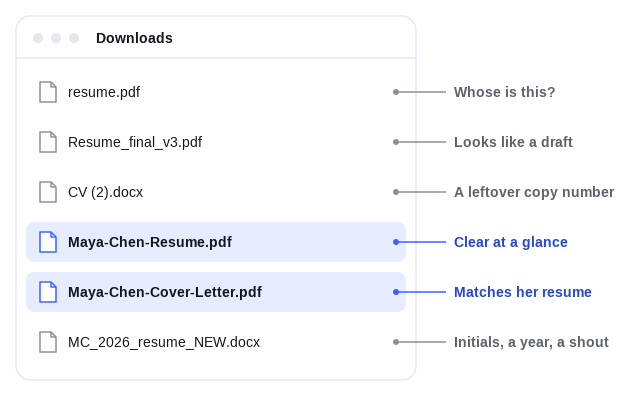
An illustration of a hiring manager’s downloads folder. The names are made up. Add the word Resume, or Cover-Letter
The document type tells the reader what the file is before they open it. CSUN’s career center gives the same pattern, your first and last name plus the document type, as in Joseph_Washington_Resume. If you send a portfolio or a list of references too, name them the same way.
Try Maya-Chen-Resume.pdf and Maya-Chen-Cover-Letter.pdf. Same name, same order, so the two files sit together in a folder.Use hyphens between words, and skip symbols
Our advice: hyphens, as in Maya-Chen-Resume.pdf, so each word stays readable. It’s the pattern our guide to emailing a resume uses too. CSUN’s career center says spaces, underscores or hyphens are all fine, and to avoid slashes. Leave out commas, brackets and other special characters, since the one upload failure we found on record came from commas.
Keep it short enough to read in full in a list of files. The 24-character limits some guides give don’t cite a source.Save it as a PDF and rename it, then check the text inside
In Word, use Save As and choose PDF as the file format. In Google Docs, choose File, then Download, then PDF. If the file doesn’t save with the right name, rename it on your computer before you submit it. Then open the PDF and try to highlight a line of text, a test Lever’s help page suggests, because its parser can’t read a resume that’s an image.
Keep it small. Greenhouse accepts uploads up to 100 MB, but it can’t parse a resume over 2.5 MB. Sending Word instead? Use the same name, ending in .docx. Our ATS-friendly resume guide covers when to choose which.

Resume file name examples, ready to copy.
Copy the pattern, then put in your own name. These are made-up names. If a posting or form gives its own naming rule, use that instead.
The everyday resume file name template
For almost every application, and the one to use if you’re unsure.
First-Last-Resume.pdf
Maya-Chen-Resume.pdf
When you apply for multiple kinds of roles
Add the job title, so you and the reader can tell the versions apart.
First-Last-Job-Title-Resume.pdf
Maya-Chen-Product-Manager-Resume.pdf
How to name your cover letter file, to match
Same name, same order, so the two files sit together.
First-Last-Cover-Letter.pdf
Maya-Chen-Cover-Letter.pdf
Maya-Chen-Product-Manager-Cover-Letter.pdf
A version tailored to one company
Only on a file you’ve tailored for that company, never on a generic one you’ll send elsewhere.
First-Last-Company-Resume.pdf
Maya-Chen-Northwind-Resume.pdf
Resume file names to avoid, and what to use instead.
Each of these takes seconds to fix before you upload.
Do
- Maya-Chen-Resume.pdf, your name and what the file is.
- Maya-Chen-Product-Manager-Resume.pdf, if you keep versions by role.
- Maya-Chen-Cover-Letter.pdf, to match the resume.
- The same pattern on every file you send for one job.
Don't
- resume.pdf. It could be anyone’s.
- Resume_final_v3.pdf. It looks like a draft.
- Maya Chen Resume (2).pdf. The (2) is a leftover copy number.
- MC_2026_resume_NEW.docx. Initials, a year and a shout.
- Maya-Chen-555-0142-Resume.pdf. Your phone number belongs inside the resume.
- Maya-Chen-Northwind-Resume.pdf, sent to a different company.
Company name, job title or date in the file name? When each one helps.
Should you put the company name in your resume file name? Not by default. People who hire, commenting on an Ask a Manager post in 2014, said a file named after their own company is no help to them. They often end up renaming it. Our advice: add the company only on a version tailored to that company, and never send that file anywhere else.
The job title can help. Some commenters added that it’s useful when a company is hiring for more than one role at once. Add it when you keep different versions, or when you apply for more than one job at the same company.
We’d leave out the date. A year or a month can make the file look old by the time someone opens it. Alison Green, who writes Ask a Manager, told readers to fix names like “resume2013”. Keep track of your versions in your own folders instead.
What resume writers say. In a 2026 Q&A from the NRWA, a group for resume writers, all eight writers said to include your name. They split on the job title, the company and the date. One noted that some recruiters say the name doesn’t matter, because their system shows the resume inside the software. Past the basics, Green’s verdict was that “no one will care what your resume file is called”.
Uploading to a form or attaching to an email, what matters more than the file name.
On an upload form, the file type and size matter more than the name. Here’s what four hiring systems’ help pages say.
Greenhouse accepts .doc, .docx, .pdf, .rtf and .txt files up to 100 MB, but it can’t parse a resume over 2.5 MB. If the parse fails, the resume is still attached. Lever takes common types such as .doc, .docx, .pdf and .txt, up to 10 MB. Workday caps attachments at 30 MB, and each employer chooses which file types it allows. Ashby allows up to 50 MB, and it processes resumes of 16 MB or less for search and autofill.
In an email, the file name shows on the attachment before anyone opens it. Use the same name, and put the job title and your name in the subject line. Our guide on how to email a resume has the steps and sample emails.
Filling in the same form for every job? Blynk fills in the form on the employer’s site, with your resume and cover letter attached in the formats the form asks for. You approve each one, and nothing is sent until you say so.
Questions about resume file names, answered.
Does the resume file name matter for ATS?
Not for ranking, as far as any hiring system says. None of the Lever, Greenhouse, Workday, Ashby or iCIMS help pages we read says the file name is used to rank or filter applicants. Lever’s parser takes your name from inside the resume. The name matters to the people who download and forward the file, like the hiring manager, so make it your name.
What are 5 common mistakes people make on their resume?
Our resume mistakes guide goes through them. One takes seconds to fix, the file itself, when it’s called something like Resume_final_v3.pdf.
What are the 7 types of resumes?
Lists differ, but every type takes the same file name, your name plus Resume, and our guide to resume sections covers what goes inside.
What is the 7 second rule in resume?
Our resume mistakes guide covers that quick first look, and the file name is seen even earlier, so make it say whose resume it is.
What are the 3 C’s of a good resume?
No one set is standard, and our resume mistakes guide covers the writing, but for the file, clear and consistent means your name plus Resume every time.
What is a red flag on a resume?
Our resume mistakes guide covers the red flags, and for the file, a name like Resume_final_v3.pdf looks like a draft.
What are four things a resume should not do?
Our resume mistakes guide has the full list. For the file name, it shouldn’t look like a draft, hold your phone number or carry another employer’s name, and the file itself shouldn’t be an image software can’t read.
Spaces, hyphens or underscores in a resume file name?
Any of the three works, says CSUN’s career center. We use hyphens, as in Maya-Chen-Resume.pdf, because each word stays readable. Skip commas, slashes and other symbols.
Should I put the date in my resume file name?
We’d leave it out, because a date can make the file look old by the time it’s read. Keep track of versions in your own folders instead.
Should my resume be a PDF or a Word file?
A PDF, unless the posting or the form asks for Word. Greenhouse, Lever and Ashby all accept both. Our ATS-friendly resume guide covers the details.
Where the facts come from.
Checked on November 12, 2026, and the advice is ours where we say so. What hiring systems do with files comes from Lever’s, Greenhouse’s, Workday’s, Ashby’s and iCIMS’s own help and status pages, with each page’s date where it shows one. What people who hire and resume writers say comes from Ask a Manager (2014) and the NRWA (2026). The posting count is Blynk’s own. We took the 1,417 job postings with a description in Blynk’s searches, mostly for product roles, first seen between October 31 and November 12, 2026. We searched them for “file name”, “filename”, “naming convention” and phrases like “name your file” or “save your resume as”, then read every match by eye. None asked applicants to name a file a particular way. The sample is postings, not application forms, so a form could still set a rule.
- How to email a resume
- ATS-friendly resume
- Free ATS resume template
- How to address a cover letter
- Resume sections
- Lever Help, understanding resume parsing
- Lever Help, adding and deleting resumes
- Lever Help, sharing resumes and files
- Greenhouse Support, accepted file types for resumes and cover letters
- Greenhouse Support, unsuccessful resume parse
- Greenhouse Support, bulk download and print resumes
- Greenhouse Status, some document uploads are failing (January 2020)
- Workday, maximum attachment size
- Workday, file types and size limits set by each employer
- Workday, resume parsing for candidates
- Ashby, application forms
- Ashby, candidate files and file categories
- iCIMS, job seeker help
- CSUN Nazarian career center, naming your resume and cover letter files (2021)
- Ask a Manager, check the name of your resume file (2014)
- NRWA, naming your resume file for recruiters (2026)
- Indeed, how to choose a resume file name
