
How does an ATS work? What happens after you press Submit.
If you've applied online for weeks and heard nothing, you've probably read that a robot throws your resume out. Here's what an applicant tracking system really does with your application, step by step, in the hiring systems' own words.

The short answer
- An ATS (applicant tracking system) is the software employers use to collect, store and search applications. The form on a company's careers site is usually the ATS.
- It reads your resume into a profile, asks the employer's screening questions, and lets recruiters search, filter and move you through stages. If it can't read your file, the file is still attached.
- Automatic rejections are rules the employer sets, mostly on your answers to those questions. None of the help pages we read describes rejecting a resume for its wording.
On this page
What an applicant tracking system is, and what it isn't.
Think of a filing cabinet with a search box. It stores every application a company gets, reads each resume into a profile, and lets the hiring team search and move people through its stages. That's the “tracking”: the employer's steps, not you.
It belongs to the employer. Lever's help says “Powered by Lever” means the company uses Lever to manage its applications, and Lever can't check your status for you. iCIMS says only the companies can act on their applicant data.
Almost every large employer has one. Jobscan found an ATS behind 487 of the 2026 Fortune 500 (97.4%), checking careers pages by hand. The “98%” you'll see matches its 2024 (98.4%) and 2025 (97.8%) editions.
Did the ATS reject me? Five fears, and what the systems say.
What the systems' own help pages say about the fears you've heard.
“A robot read my resume and rejected it.”
In the systems we checked, automatic rejection is a rule the employer writes on its own application questions (step 3 names each one). None of these pages describes rejecting you for your resume's wording.
Instead: Answer every screening question carefully and truthfully. That's where the rules live.
“Most resumes are never seen by a person.”
The scary percentage you've seen has no study behind it: Enhancv, a resume company, says it's repeated “without a single source”. The real risk is quieter. Greenhouse's own search example has the recruiter type each synonym: trainer OR instructor OR teacher.
Instead: Use the job's own words for skills you really have. Then you come up in a search.
“It came back in minutes, so a machine did it.”
Maybe. Ashby's auto-reject runs the moment you submit. But Greenhouse and Ashby both let the employer delay the rejection email, so timing tells you little (our reading).
Instead: Look back at the questions you answered. A must-have you said no to is the likeliest reason.
“The ATS gave me a low score.”
No system gives you one shared score; where one rates you, it's against the employer's criteria (see where AI fits). The percentages people ask about come from resume checkers: see our guide to ATS scores.
Instead: Read a checker's number against its own bar. It isn't the employer's number.
“Words like ‘remote’ or ‘relocate’ get me filtered out.”
The rules the vendors describe act on your answers, such as whether you'll relocate, not on single words in your resume.
Instead: Answer the location questions honestly. That's where a location rule would sit.
How applicant tracking systems work, step by step: what happens to your application.
One application, from the moment you press Apply, in the systems' own words.
You apply on the ATS's own form
That's why each company's form looks different, and why some want an account first. The form's web address tells you which system it is (see below).
It reads your resume into a profile
It copies your name, contact details, jobs, schools and dates into fields. Lever reads Word, PDF and RTF, but not images like JPG or PNG, so a PDF works if you can highlight its text. Workday doesn't fill in your skills from the file.
A failed read doesn't throw you out. Greenhouse says the resume then “has only been attached”, and the details are typed in by hand. What breaks a read is in our ATS-friendly resume guide.It asks the screening questions, and runs the employer's rules
This is where automatic rejections happen. The employer writes questions such as “Are you authorized to work in the US?” and can attach rules to the answers.
Greenhouse: rules that tag, advance or reject people based on their answers (advance and reject on its Plus and Pro plans).
Ashby: auto-reject “based on application questions”, run only when you submit.
Oracle: disqualification questions, which hold “the minimum requirements” and are mandatory to answer.
Workday: points on multiple-choice answers “to eliminate ineligible candidates”.
Lever: a ready-made workflow called “Knock out candidates based on a set of criteria”.Recruiters search and filter the profiles
Greenhouse recruiters search with AND, OR and NOT. Lever adds filters for company, job title and school, “parsed from the resume”, and years of experience “calculated based on parsed dates”. The words they search for are in our guide to resume keywords.
You move through the employer's stages
Workday's standard path runs Review, Screen, Assessment, Interview, Reference Check, Offer, Background Check and Ready for Hire, in the order each employer chooses. The status you see often shows less. Our guides to Workday application status and what “under review” means explain each one.
A rejection is a person's click or an employer's rule
In Greenhouse, a recruiter rejects someone with a reason. The email is optional, and they can “choose any delay” before it goes. If the employer sends nothing, you hear nothing.
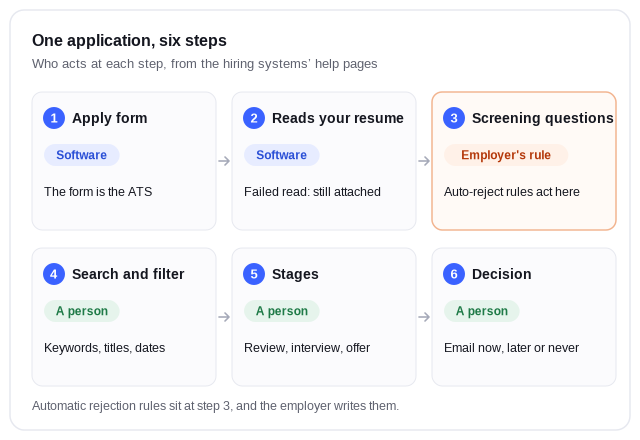
The six steps, and who acts at each one, from the systems' help pages (November 2026).

What ATS do companies use? What 685 job links showed.
We counted the hiring systems behind real job links. Of 1,477 job postings from Blynk's searches (mostly product roles, first seen October 31 to November 11, 2026), 685 linked straight to an employer's hiring system, and those links went to 27 different systems.
Three systems carried two in three. Workday had 194, Ashby 151 and Greenhouse 108 (66% together). Then came Oracle 88, Lever 34, Rippling 19 and Workable 16; the other 20 had 15 or fewer each.
These are postings, not companies. Oracle's 88 came from three employers, 68 from JPMorgan Chase. Workday's 194 came from 69 employer sites, led by banks such as Citi (32) and State Street (31). And 714 LinkedIn and job-board links hid their system, so every count is a floor.
For the largest US companies, Workday leads. Jobscan's 2026 Fortune 500 count found Workday at over 40% and SAP SuccessFactors at 12%. So the top five depends on who you count. In our links, it was Workday, Ashby, Greenhouse, Oracle and Lever.
How to tell which ATS a company uses, from the apply link.
It takes seconds, and tells you what account and form to expect.
Click through to the employer's apply page
LinkedIn and job-board links hide it. Press Apply until you reach the company's own form.
Read the web address
The part before the first slash names the system. These are the ones we saw in our count.
myworkdayjobs.com or myworkdaysite.com: Workday
jobs.ashbyhq.com: Ashby
greenhouse.io: Greenhouse
jobs.lever.co: Lever
oraclecloud.com: Oracle
icims.com, smartrecruiters.com, workable.com, bamboohr.com, rippling.com: the system it names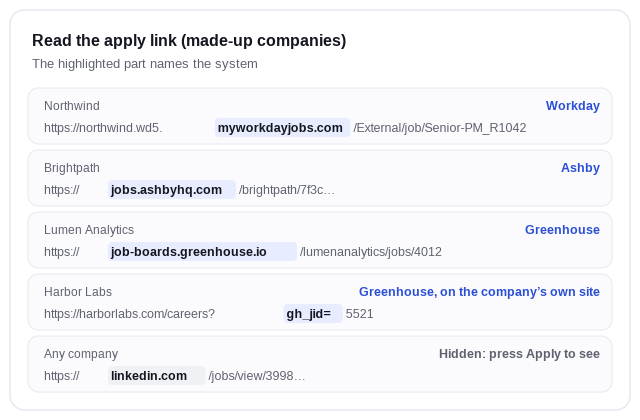
An illustration with made-up companies. On a company's own site, look for gh_jid= in the link. On a company's own site, look for gh_jid=
Greenhouse's help says it adds gh_jid= to job links on an employer's own careers page. In our count, all 33 company-site links found through Greenhouse had it.
What ATS does Amazon use? Its own careers site
Amazon's 3 postings in our count all went to its own site, amazon.jobs, whose FAQ names no applicant tracking system.

What changes from one ATS to the next, for you.
Why a new Workday account at every company. Workday's accounts (Candidate Home) sit on each employer's own career site, and an employer can require one for every application. Workday says a shared Candidate Profile, announced October 13, 2026, will be generally available in early 2027.
Greenhouse works the other way: “Your one MyGreenhouse account works with all your applications” to its employers. Oracle signs returning applicants in with an email or phone number, plus a date of birth or last name.
Files differ a little. Greenhouse accepts .doc, .docx, .pdf, .rtf and .txt. Ashby takes resumes up to 50MB, but processes only those of 16MB or less for search and autofill.
Where AI fits in an ATS now, in each vendor's own words.
Some systems now rate your fit, if the employer turns it on. Greenhouse's Talent Matching labels applicants from Strong to Limited match against skills the employer sets, and “does not automatically advance or reject candidates.” Workday's HiredScore grades applicants A to D on the job's qualifications. Ashby's AI review marks each of the employer's criteria as met or not met.
Our reading: where AI shows up, it rates you against criteria the employer wrote, and a person acts on it. There's no one score to chase.
Working with an ATS, not against it: what helps and what backfires.
Habits, not formatting rules, from how the systems above work.
Do
- Answer every screening question in full, and truthfully.
- Use the job's own words for skills you really have.
- Write job titles and dates plainly, so years of experience add up.
- Send one file whose text you can highlight.
- Keep a note of each Workday login you make.
Don't
- Guess at a must-have question. The rule acts on that answer.
- Upload a scan or photo of your resume.
- List skills you haven't used. A person reads what the search finds.
- Take silence as a robot's no.
- Send a huge file full of graphics.
Questions about how an ATS works, answered.
Why is my resume getting rejected by ATS?
Usually not for the resume itself. In the systems we checked, automatic rejections are rules on your answers to the application's questions. In Enhancv's small survey, 23 of 25 US recruiters said their system doesn't reject for formatting, content or design. The quieter risk is not coming up in a search.
How do I get my resume to pass ATS? Will my CV pass?
The systems we read set no pass mark for the resume itself. So answer the screening questions truthfully, make the file easy to read, and use the job's words for skills you have.
How do I know if my CV is ATS friendly, and what can't an ATS read?
Try to highlight a line of your PDF: if you can't, Lever says it likely can't be read. Greenhouse lists what breaks a read: images, tables, text boxes, columns, headers and footers, and files over 2.5MB. Avoid those to get close to “100%”, though no resume suits every system perfectly. Blynk's ATS Check shows how hiring software reads yours against a job.
Is 70, 72, 77 or 80% a good ATS score?
Those come from resume checkers, not the employer's ATS. Jobscan recommends 75%; Enhancv, SkillSyncer and TripleTen about 80. So 80 is good on all of them, and 70 to 77 is close: add missing words that are true for you. Any number ChatGPT gives is its own guess (our reading). More in our ATS score guide.
Which ATS do most companies use, and what are the top 5?
Among the Fortune 500, Workday, at over 40% in Jobscan's 2026 count. In the 685 links from Blynk's searches that went straight to a hiring system, the top five were Workday, Ashby, Greenhouse, Oracle and Lever, out of 27.
What ATS does Amazon use, and what is ATS in Amazon?
Amazon doesn't name the system behind amazon.jobs, and claims that it's custom-built come from forum posts. So “ATS in Amazon” just means applying there, with an application profile on amazon.jobs.
What background disqualifies you from Amazon?
Amazon's careers FAQ publishes no list, so we won't guess. In the systems we checked, the automatic stops are questions on the form, such as work authorization. Background checks come later: in Workday's standard order, after the offer.
Can employers tell if AI wrote your resume, and what's a red flag?
Sometimes, though OpenAI says even ChatGPT can't reliably tell. In a TopResume survey, 33.5% of 600 US hiring managers spotted the AI-written resumes among four. In Resume Genius's 2026 survey of 1,500, the top red flags were job-hopping (65%), heavily AI-generated materials (49%) and long or unexplained gaps (43%). Both are resume companies' surveys.
What does ATS stand for, and does it do tracking?
Applicant tracking system. The tracking is the employer's: each application's progress through the company's stages, from review to offer.
Why do I need a new account for every company?
Because each employer runs its own copy: Workday accounts sit on each employer's career site, while one MyGreenhouse account covers every Greenhouse employer. More in what changes from one ATS to the next.
Every fact about how an ATS works, from the source.
Checked in November 2026, from each system's own help pages; anything marked “our reading” is ours. The counts are Blynk's own: 1,477 job postings from our searches, mostly product roles, first seen October 31 to November 11, 2026, with the system read only from each application link's host name. Other Blynk guides counted these postings in other ways, so their numbers differ slightly.
- What an ATS-friendly resume really is
- Your ATS score, explained
- How to find the right resume keywords
- Workday application status, explained
- What “under review” means on an application
- What Workday HiredScore does
- What dispositioned means
- Lever: job seeker support
- Lever help: understanding resume parsing
- Lever help: advanced search and rediscovery
- Greenhouse help: unsuccessful resume parse
- iCIMS: job seeker help
- Lever help: automation workflow recipes
- Oracle Recruiting 24C: returning candidate sign-in
- Workday docs: questionnaires
- Ashby docs: AI-Assisted Application Review
- Greenhouse help: accepted file types
- Greenhouse help: application rules overview
- Greenhouse help: Boolean search
- Greenhouse help: reject a candidate
- Greenhouse help: Talent Matching
- Greenhouse help: MyGreenhouse FAQ for candidates
- Greenhouse help: job post URL for non-Greenhouse-hosted job posts (gh_jid)
- Ashby docs: application forms
- Ashby docs: auto-reject applications
- Oracle docs: disqualification questions
- Workday docs: Candidate Home on career sites
- Workday docs: resume parsing
- Workday docs: the job application business process
- Workday HiredScore: candidate grades
- Workday newsroom: Candidate Profile, October 13, 2026
- Jobscan: Fortune 500 ATS usage, 2026
- Enhancv: do ATS reject resumes (25 recruiters)
- Jobscan: resume scanner and match rate
- Enhancv: resume checker
- SkillSyncer: match score
- TripleTen: ATS resume checker
- Amazon: amazon.jobs FAQ
- OpenAI Help: does ChatGPT tell the truth?
- TopResume: AI in hiring survey, 2025
- Resume Genius: 2026 hiring trends report
- Blynk ATS Check
