
Workday HiredScore, explained. What the grade means, and how to show what you've got.
If you applied on a company's Workday site and read that its AI grades you, here's what Workday's own documents say. Some employers turn HiredScore on. Where they do, it grades applicants A to D, and people still decide. This guide covers what each grade means and what you can do.

The short answer
- HiredScore is a tool some employers turn on in Workday. Where it's on, it grades each applicant from A to D on how well the resume matches the job's qualifications, the basic (required) ones first.
- The grade sorts, and people decide. In Workday's documents, recruiters reject applicants and can change a grade. The one grade-based automation listed only moves top grades forward. A C or D “might still be a fit”, Workday says.
- What you can do. List the posting's must-have qualifications. Then make each one you truly have easy to see on your resume, in the posting's own words.
On this page
What Workday HiredScore is, and who turns it on.
Workday owns it. Workday announced on February 26, 2024 that it would buy HiredScore, which it called a provider of “AI-powered talent orchestration solutions”. Workday's quarterly filing says the deal closed on March 29, 2024.
The employer turns it on. HiredScore is a product for recruiters and hiring managers. In Workday's setup guide (May 2026), an implementer or administrator sets it up for the employer, which gets its login details from Workday Support. So applying on a Workday site doesn't mean you get a grade.
You can't tell from the outside. No Workday page we found describes a sign for applicants that HiredScore is on. Workday doesn't publish which employers use it either.
It isn't only on Workday. Workday's HiredScore docs (June 2023) say a recruiter's status changes sync to “your applicant tracking system (ATS) or Workday”. Our reading is that it can sit on top of another hiring system too.
What the recruiter sees. HiredScore shows recruiters a parsed version of your resume next to the job description. They can also search your original resume for keywords, Workday's docs say. For how hiring systems work in general, see our guide on how an ATS works.
What each HiredScore grade means, in Workday's own words.
HiredScore grades applicants from A to D on how well a resume matches “the skills and qualifications specified in the job description”. Here are the four grades from Workday's candidate grades page (last updated June 2023).
A. “Candidate meets all basic (required) qualifications, most preferred qualifications, and has an average qualification match above a defined threshold.” Workday doesn't publish that threshold.
B. “Candidate meets all basic qualifications.”
C. “Candidate meets most but not all basic qualifications.”
D. “Candidate does not meet most basic qualifications.”
So the basic ones matter most. Our reading of the four together. You reach a B by meeting every basic qualification. Under these definitions, the preferred ones are what lift a B to an A.
A C or D isn't the end. Workday's Spotlight page (June 2023) says candidates with grades C or D “might still be a fit for the role”. Its example is a job that asks for a master's degree and 10 years. A recruiter screens a C applicant with a bachelor's and 8 years of more relevant experience, and believes they're a better fit.
Sometimes there's no grade at all. The same page lists four cases. There was no resume, the resume was in a format it doesn't support, the job had no job description, or it was a campus or graduate job.
It's on recruiters' screens. Workday's pages show the grade on recruiters' screens. None of them describes showing it to applicants.
Does HiredScore reject you? What Workday's documents say.
The grade is there to sort. Workday's Spotlight page says grades help recruiters “prioritize screening”. Recruiters can list the most qualified first, or filter by grade.
Rejecting is a recruiter's click. Workday's candidate actions page (June 2023) has recruiters reject with an x button, one at a time or in bulk. A recruiter can also change your grade, and can add a reason, which shows as a tooltip.
The one automation listed moves people forward. Workday's feature list for HiredScore (October 2024) names Candidate Fast Lane. It can “automatically advance top-rated applicants” to the hiring manager's review. It lists no automation that rejects by grade.
People make the final call. Workday's product page (read November 2026) says “final hiring decisions always remain with the recruiter and hiring manager.”
A low grade can still cost you. Spotlight says top grades “are the most likely to reach the interview stage”. Our reading is that in a busy job, a C or D may be read late, or not at all.
A no within minutes may be a different rule. Apart from HiredScore, employers can set Workday to decline candidates on their own rules, with a reason such as “Does not meet job qualifications” (Workday course manual, July 2026). Our guide on Workday application status explains what each status means.
What changed in HiredScore in August 2026, and who it applies to.
A new way to grade. Workday's HiredScore release note of August 5, 2026 (live August 7) brings in an AI language model. It checks “each screenable qualification individually” against your parsed resume.
The basic ones still decide. In Workday's words, “Basic qualifications determine whether a candidate is graded A/B or C/D.” Meet all of them and you get an A or a B. Within those, how well you match the preferred and basic ones separates A from B, and C from D.
Recruiters see the reasons. A Fit and Gap view shows which requirements you meet and which you don't. It points to the part of your resume behind each one, from experience and education to skills, languages, certifications and your summary.
Only where the employer opts in. The note says it's only for employers who opt in, starting with a pilot on jobs they pick. After that, it covers only jobs opened on or after the employer's switch date. Older jobs keep the old grading, and so does every employer that does nothing. Employers can also switch back.
What it means for you. Our reading is that both ways grade the posting's qualifications against your resume. So the same steps work either way.
How to show each qualification HiredScore looks for, in six steps.
Our advice, built on Workday's own definitions. It works whether or not the employer uses HiredScore, because a person reads the same resume.
List the must-haves and the nice-to-haves
Copy every qualification in the posting into a list. Mark the ones it calls preferred, a plus or nice to have. Our reading is that when a posting doesn't say, you should treat the rest as basic. Missing a basic one is what drops a grade to C.
Most postings don't say which is which. Blynk checked 184 job postings from employers' Workday career sites, found in its searches for mostly product roles and first seen October 31 to November 11, 2026. Only 62 mark any qualification as preferred or nice to have. Just 2 use Workday's own words, “basic qualifications”.Find your proof for each one
Next to each qualification, write the real line from your work that shows it. Name the role, what you did and for how long. If you can't find one, mark it as a gap.
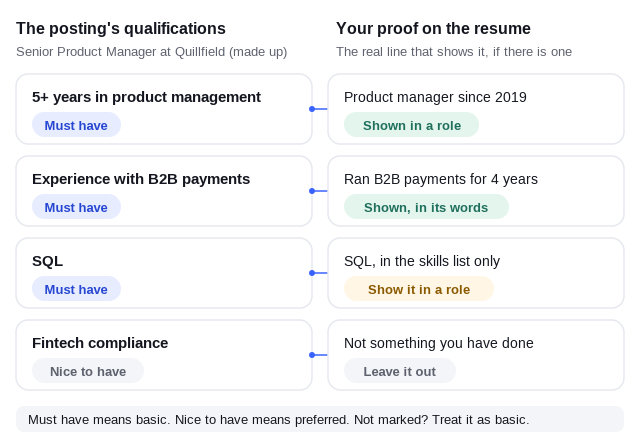
An illustration of the check you can do yourself. The posting and the employer are made up, and treating unmarked qualifications as basic is our reading. Say it in the posting's words, where they're true
If the posting says B2B payments and your resume says business customers, use its words. The newer check reads each qualification on its own, and recruiters can search your original resume for keywords. Our guide to resume keywords shows how to find the right ones.
Before. Ran invoicing for business customers at Larkfield, a payments company, for 4 years.
After. Ran B2B payments (invoicing for business customers) at Larkfield for 4 years.
Same facts, reworded to match the posting. Larkfield is made up.Put each one where you did it
In the newer Fit and Gap view, each met qualification points to the part of your resume behind it. Our advice is to show each one in the role where you did it, not only in a skills list. State years, degrees and certifications plainly. Our guide on tailoring your resume to a job walks through it.
Send a file HiredScore can read
Workday's HiredScore docs list DOC, DOCX, PDF, RTF and TXT. A resume in a format it doesn't support gets no grade at all. Our advice is a file made from a text document, not a scan, with plain headings. Our guide to an ATS-friendly resume covers the layout.
Leave out what you don't have
Don't add a qualification you lack, and don't paste the posting in hidden text. Recruiters see your parsed resume and can change a grade. In the newer view, each met qualification points to the part of your resume behind it. Our reading is that a claim with nothing behind it is easy to spot.

Think HiredScore gave you a low grade? What to do next.
You can't check it, so don't guess. Workday's docs describe no way for applicants to see a grade. You may not even have one, if the employer doesn't use HiredScore.
Check the status the employer shows you. It's the employer's own label, not a grade. Our guide on what each Workday status means sorts the ones that carry news from the ones that don't.
Write to a person. Our advice is a short note to the recruiter or the hiring manager. It puts a person's eyes on your application, whatever the grade. Here's how to find the hiring manager.
Apply where you meet the basics. Our advice is to aim at jobs where you meet every basic qualification. Ten applications that fit beat a hundred that don't.
Questions about Workday HiredScore, answered.
Does HiredScore reject applicants automatically?
Not in Workday's documents. They show recruiters rejecting applicants with a button, one at a time or in bulk. The one listed automation that acts on the grade moves top-rated applicants forward. Employers can set separate Workday rules that decline applicants, but those aren't HiredScore. Our reading is that a low grade can still mean you're read later, or not at all.
Can I see my HiredScore grade?
Not that Workday describes. Its documents show the grade only on recruiters' screens, and none describes telling applicants. So your time is better spent on the resume than on the grade.
Does every Workday employer use HiredScore?
No. HiredScore is a product each employer chooses to set up, and Workday doesn't publish which ones do. No Workday page we found describes a sign for applicants that it's on. So applying on a Workday site doesn't mean you get a grade.
What does a C grade mean on HiredScore?
Workday defines a C as a candidate who “meets most but not all basic qualifications”. On its own, it isn't a rejection. Workday's own example is a C applicant with a bachelor's degree and 8 years of more relevant experience, for a job asking for a master's degree and 10 years. The recruiter believes that applicant is a better fit.
How do I get a better HiredScore grade?
Show every basic qualification you truly have, plainly and in the posting's words. Meeting all of them is what separates an A or B from a C or D. Then show the preferred ones you have. Never add one you don't. The six steps above cover it.
Why would HiredScore not grade my application?
Workday lists four cases. You didn't send a resume, your resume was in a format it doesn't support, the job had no job description, or it was a campus or graduate job. The files it lists are DOC, DOCX, PDF, RTF and TXT.
Does HiredScore read PDF resumes?
Yes. Workday's HiredScore docs list PDF along with DOC, DOCX, RTF and TXT. Our advice is a PDF saved from a text document, not a scan, so the words can be read.
Is there a HiredScore login for applicants?
No Workday page describes one. HiredScore is for recruiters and hiring managers, and the employer gets its login from Workday Support. As an applicant, you sign in on that employer's own Workday careers site. Our guide on Workday application status shows how.
Is a HiredScore grade the same as an ATS score?
No. A HiredScore grade is a letter from A to D on the job's qualifications, and recruiters see it. An ATS score is a resume checker's estimate, made by the checker, not the employer. Our guide on what an ATS score means explains those numbers.
Is HiredScore fair?
Workday's product page (November 2026) says gender and race are “never factored into scoring or grading”, and that it tests for bias. Its Responsible AI page reports an outside review of Workday's own use of it, on applications for its New York area jobs from September 2025 to February 2026, that found “no evidence of disparate impact”. The same page says results can vary with each employer's setup and human review.
Where the facts come from.
Checked on November 12, 2026. Every fact about HiredScore comes from Workday's own documents, pages and filings, each dated where we use it. The advice is ours, and so is anything marked as our reading. The posting counts are Blynk's own. We checked 184 job postings from employers' Workday career sites, found in Blynk's searches (mostly product roles) and first seen October 31 to November 11, 2026. A posting counted as marking preferred qualifications if it used words such as preferred qualifications, nice to have, a plus or bonus points. Postings that only say a degree is preferred inside a sentence weren't counted, and one employer supplied 20 of the 62. The counts say nothing about which employers use HiredScore.
- Workday application status, explained
- How does an ATS work?
- What an ATS score means
- How to tailor your resume to a job description
- Workday docs, candidate grades (updated June 23, 2023)
- Workday docs, Spotlight (updated June 23, 2023)
- Workday docs, candidate actions (updated June 23, 2023)
- Workday docs, candidate profiles and resume files (updated June 23, 2023)
- Workday release note, August 5, 2026 (updated August 7, 2026)
- Workday feature descriptions, HiredScore AI for Recruiting (updated October 18, 2024)
- Workday implementation guide, setting up HiredScore (updated May 29, 2026)
- Workday course manual, the Job Application business process (updated July 10, 2026)
- Workday, AI recruiting product page (read November 12, 2026)
- Workday, responsible AI and bias mitigation (read November 12, 2026)
- Workday announces intent to acquire HiredScore (February 26, 2024)
- Workday quarterly report, Form 10-Q, acquisition of HiredScore (closed March 29, 2024)
- Blynk Find Jobs, tailoring
- Blynk homepage, tailoring
