
Workday application status, explained. What each one means, and what to do next.
If you applied on a company's Workday site and keep logging in to the same "In Process", you're not alone. That label is set by the employer, not by Workday, and it often tells you less than it seems. Here's what each status means, which ones carry real news, and what to do while you wait.

The short answer
- The status is the employer's label, not a verdict. Each company sets up Workday its own way, so "In Process" can mean the first review at one employer and interviews at another.
- Only a few statuses carry news: an interview or a task to finish, an offer, and the closed ones (Not Selected, No Longer Under Consideration, Completed or Inactive). Anything else means still open.
- Silence isn't a no. Some employers send no notice when your status changes. Check that company's Candidate Home, write to a person after a week or two, and keep applying.
On this page
Why Workday statuses confuse everyone, and what's really going on.
Five things people ask about their Workday status, and what's behind each one.
“It's said In Process for three weeks.”
Workday lets each employer rename its steps for candidates. Workday's own training manual gives an example: instead of Review, Screen or Interview, the candidate sees "In Progress". So one label can cover the first look and the final interview.
What to do: Read it as "still open". On its own, it isn't good or bad news.
“Is this a rejection?”
Not on its own. When an application closes, the label changes, often to Not Selected or Completed, and it may move to an Inactive list. But some employers don't tell you. At UW-Madison, a change to your status sends you no notice at all.
What to do: Learn the few labels that mean closed. They're grouped below.
“Why did my status go backwards?”
Workday's manual calls the hiring process dynamic: candidates "can enter steps or change statuses at various points". A recruiter can add a step, or the job can be paused and restarted. At UW-Madison, a paused job keeps the status you had before.
What to do: Don't read it as a step down. Workday's own manual says statuses can change at various points.
“The job is gone, but I'm still under consideration.”
A job posting can come down while the job itself stays open. Fidelity's postings say the window closes "when the position is filled or unposted". Wells Fargo's say a posting may come down early because of the number of applicants.
What to do: A missing posting isn't a no. Wait for a closed label or a message.
“My login doesn't work.”
Your Candidate Home account belongs to one employer's career site. Workday's guide for employers has candidates sign up on that employer's own site. So a password from one company won't work at the next.
What to do: Sign in on that company's own careers site. The steps are below.
How to check your Workday application status in Candidate Home.
Candidate Home is the page on each employer's career site that lists your applications and their status.
Go to that company's own careers site
Each employer runs its own Workday career site. In Blynk's sample, every one had an address ending in myworkdayjobs.com or myworkdaysite.com. The quickest way back is the link in your confirmation email, or the job link you applied from. Workday.com is the software company's own site, not your application.
Why so many accounts? Of 1,477 job postings from Blynk's searches, 184 came from Workday career sites, more than from any other employer hiring system. Those 184 came from 68 different employers' sites, and each site keeps its own Candidate Home.Sign in with the email you applied with
Roche's help page says your account email must match the email on your application, or the two can't be linked. If you signed up with Google or Apple, sign in the same way. Workday notes that Google and Apple then handle your password reset.
Open Candidate Home and find the role
You'll see your applications, each with a status. At Roche, the list shows both active and inactive applications. At UW-Madison, closed ones move to an Inactive tab. Look for tasks too: employers can send questionnaires, interview booking, e-signatures and tests through your account.
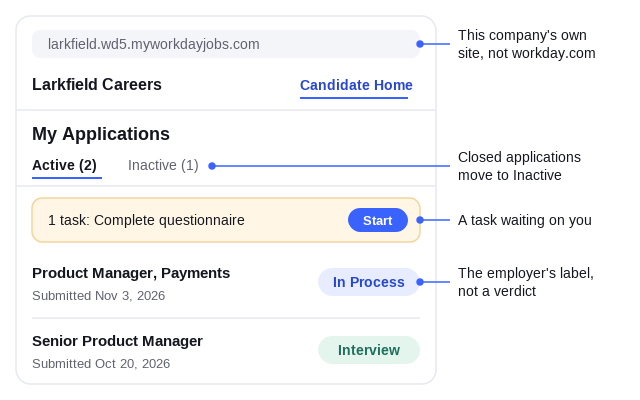
An illustration of a Candidate Home page. The employer is made up, and each employer's page looks a little different. Locked out? Reset it on that site
Reset your password from that employer's own sign-in page. The rules vary by employer. At the University of Wisconsin System, 5 failed sign-ins lock the account for 30 minutes, and a reset link expires after 2 hours. Recruiters there can't change your email or password for you.
Know what's coming in 2027
On October 13, 2026, Workday announced a Candidate Profile. You save your details once and reuse them when you apply to companies that use Workday. It's due in early 2027. Employers keep their own career sites and questions, and the announcement doesn't say it will show your statuses in one place.

How a Workday job application moves, from Review to Ready for Hire.
Behind every status is the employer's own hiring process. Workday's manual for recruiters lays out its steps like this.
Review
In Workday's standard process, a job application starts at Review. A recruiter, or a rule the employer set up, decides if it moves on. Employers can move or decline candidates on their own rules, with a reason such as "Does not meet job qualifications".
Screen, Assessment and Interview
These are the middle steps an employer can use: a first screen, a test, and interviews. The order isn't fixed. Workday's manual says candidates can enter steps or change status at various points.
Reference Check, Offer and Background Check
These are the late steps, along with an employment agreement to sign. If your status names one of them, you're near the end.
Ready for Hire
Workday's process ends here. What you see along the way is a label the employer picked for each step. Recruiters can also delay the notice they send you, so a message may come after the change. Other hiring systems use other names; our guide on what "under review" means covers them.
Statuses that mean "still open", and what each one tells you.
Submitted, or Application Received. Your application arrived. At Public Health Ontario, Received means it was "successfully received". At UW-Madison, you see Submitted for the whole first review, so it can sit there a while.
In Process, or In Progress. Still active, and that's all it promises. At UW-Madison it covers every active step after the first review, interviews included. At the University of Washington it means the application is under review. There's more on this one below.
Under Consideration, or Under Review. Still active. At Public Health Ontario, Under Consideration means its hiring team is reviewing your application. Other employers use the words for other steps.
An employer's own words. Some employers write their own labels. At the University of Washington, Sent to Dept means your resume went to the hiring manager. That one is a step forward.
Screen or Assessment. Some employers show the real step name. Check your email and Candidate Home for a task, such as a questionnaire or a test, and finish it soon.
Pending. No Workday or employer page we found defines it. Read it as still open until something changes.
Statuses that carry real news, good or bad.
Interview, or Interviewing. You've reached the interview step. Look for the invitation in your email, or as a booking task in Candidate Home. At employers that show In Progress instead, you won't see this label at all.
Offer, Background Check or Ready for Hire. These are the late steps of Workday's process. If you see one, you're near the end.
Not Selected, or No Longer Under Consideration. Closed: the employer has moved on. The University of Washington sends you a notice when this happens. UW-Madison sends none.
Completed, Process Completed or Inactive. Closed, but not always because of you. At UW-Madison, every decline except a withdrawal shows Completed, and so does a job the employer cancelled. Either way, this application is over.
Withdrawn, or Withdrew. The application was pulled. At Roche, you can withdraw from Candidate Home, under Actions.
Not Selected within minutes? Employers can set Workday to decline candidates on their own rules, with a reason such as "Does not meet job qualifications". Our reading: a no that fast most likely came from a rule like that, not from a person reading your resume.
What "In Process" means on Workday, at three real employers.
The employer defines it, not Workday. Workday's manual tells employers they can show "In Progress" in place of Review, Screen or Interview, and that the change applies across their whole site. You may see In Process or In Progress; the employer pages we read all say In Progress. Either way, it's a label the employer chose.
At UW-Madison, you see Submitted while your application is in review. Every later active step shows In Progress, including interviews, tests and the employment agreement. Moving between steps inside a stage doesn't change what you see.
At the University of Washington, In Progress means the application is under review. A separate label, Sent to Dept, means it went to the hiring manager.
At Public Health Ontario, the help page lists In Progress after Under Consideration. It means you're being considered, and the page adds "We will update you shortly." That help page dates from 2020.
What it means for you. At the employers we read, In Process or In Progress is never a rejection on its own, but it can't tell you if a person has read your resume. Our reading: if it went from Interview back to In Process after a final round, the employer may have moved you to a step it labels that way. It isn't a sign either way.
What "Under Review" means on Workday, and whether it's a good sign.
It's still open, and that's good. Under Review and Under Consideration both mean the employer hasn't closed your application. Neither one promises that a person is reading it today.
The order varies. At Public Health Ontario, Under Consideration means the hiring team is reviewing, and is listed before In Progress. At the University of Washington, "under review" is what In Progress means. So one employer's Under Review can be another's first step.
How long does it last? No employer or Workday page we found gives a time. It lasts as long as that employer's review takes, which can be weeks.
Not on Workday? Greenhouse, Lever, LinkedIn and other systems use the phrase in their own ways. Our guide on what "under review" means on a job application covers them.
How long Workday applications take, and when to follow up.
Hiring often takes more than a month. SHRM's 2026 benchmarking brief puts the median time to fill a non-executive job at 39 calendar days. That's the whole hiring process for one job, not the wait after your application.
The job posting rarely says. Of the 184 Workday job postings in Blynk's sample, only 20 say when applications close, and 11 of those 20 come from one bank. So you usually can't tell from the posting how long to wait.
No rule for the wait exists. The waits you'll see online, like 5 to 7 business days, have no source we could find. So here is our advice, marked as ours.
Our advice. Give it a week or two, then write to a person, not the portal. The steps below cover the rest.
What to do while you wait, in five steps.
Our advice. None of it needs the portal to change.
Finish any task in Candidate Home
Employers can send questionnaires, tests and interview booking through your account. Check once for anything waiting, and finish it. Then stop checking every day.
Write to a person after a week or two
A short note to the recruiter or the hiring manager does more than one more look at the portal. Our guides show how to find the hiring manager and what to say in a follow-up email after applying. Or paste the job link into Blynk's hiring manager finder, which works for jobs you've already applied to.
Keep applying to jobs you fit
One status shouldn't pause your search. Keep a few good applications going each week, each one made for its job.
Keep your own record
Write down the role, the date, the email you used and the company's careers link. The portal can lag behind the decision, and emails get buried. A simple job application tracker is enough.
Decide when to move on
Our rule of thumb: after a month with no change and no reply, count it as closed in your plan. Don't withdraw unless you've taken another job. If they come back, you're still in.
How to apply for jobs on Workday, without losing track.
About to apply? A few minutes of care now saves the login hunt later.
Apply on the employer's own career site
Start from the company's careers page. If you found the job on a job board, look for the company's own posting and apply there.
Use one email for every account
Employers choose whether you need an account to apply. Our advice: use the same email for every Workday application, so you always know which one to sign in with.
Check every field it fills in
If the site offers to fill the form from your resume, read every field before you go on. Fix job titles and dates that came out wrong.
Answer the screening questions with care
Answer them truthfully and in full. Employers can set rules that decline candidates on their answers, so a rushed answer can end it early.
Save the confirmation email
It has the link back to that employer's Candidate Home. At Roche, for example, you can create or sign in to your account from it.
Questions about Workday application status, answered.
What are the application statuses in Workday?
There's no single list, because each employer picks what candidates see. Common ones are Submitted or Application Received, In Process or In Progress, Under Review or Under Consideration, Interview, Offer, Not Selected, Completed or Inactive, and Withdrawn. Only the interview, offer and closed ones carry real news.
What are the stages of an application on Workday?
In Workday's standard process, an application starts at Review. It can pass through Screen, Assessment, Interview, Reference Check, Offer and Background Check, and it ends at Ready for Hire. Employers rename or hide these steps for candidates, so your status may not match the step you're really at.
How do I check my application on Workday?
Sign in on that employer's own careers site with the email you applied with, and open Candidate Home. The link in your confirmation email is the quickest way back. A Workday login from one company won't work at another.
Does Workday tell you if your application is rejected?
It depends on the employer. The University of Washington sends a notice when you're no longer under consideration. At UW-Madison, a status change sends no notice at all, so you'd only see Completed under Inactive. Silence isn't a no, and a no isn't always sent.
Does Workday automatically reject applications?
Workday is the employer's system, and the employer sets its rules. Employers can set Workday to decline candidates on those rules, with reasons such as "Does not meet job qualifications". That's one way a Not Selected can arrive within minutes.
What does "Process Completed" mean on a Workday job application?
Your application is closed. At UW-Madison, every decline except a withdrawal shows Completed, and so does a job the employer cancelled. So you weren't picked, or the job didn't go ahead. Either way, this one is over.
How long does it take to hear back from a job application on Workday?
There's no set time; it's up to the employer. By SHRM's 2026 benchmark, filling a non-executive job takes 39 days at the median. And only 20 of the 184 Workday postings in Blynk's sample say when applications close. Our advice: write to a person after a week or two, and keep applying.
How do I know if an offer is coming?
Our reading: the clearest signs come from people, not the portal, such as a recruiter asking for references or a start date. On Workday, a status naming Reference Check, Offer or Background Check means you're near the end. A change from Interview to In Process means little on its own.
Can my manager see my applications on Workday?
It depends on your employer's settings and policy, so ask HR before you apply inside your company. In the university guides we read, an internal application goes to the recruiter first, and the hiring manager reviews it later.
Is there one place to see all my Workday applications?
Not from Workday today: each employer's Candidate Home shows its own applications. Workday's Candidate Profile, due in early 2027, saves your details for Workday employers, but its announcement doesn't say it will show statuses. Your inbox is where employers' emails land, from the confirmation to an interview invite. That's how Blynk's job tracker keeps each application current.
Where the facts come from.
Checked in November 2026. The advice is ours. How Workday works comes from Workday's own manuals and announcement. What each status means comes from the employers' own help pages, named where we use them, and the time-to-fill figure is SHRM's. The posting counts are Blynk's own: 1,477 job postings from Blynk's searches for mostly senior product roles, first seen between October 31 and November 11, 2026. Of those, 184 came from employers' Workday career sites (68 different employers' sites), and each of the 184 was read for a stated closing date. The Fidelity and Wells Fargo lines are quoted from their postings in that sample.
- What "under review" means on a job application
- Follow-up email after applying
- How to find the hiring manager
- Free job application tracker template
- What Workday HiredScore does
- How to withdraw an application
- iCIMS application status, explained
- What dispositioned means
- Workday course manual: the Job Application business process
- Workday admin guide: candidate accounts on career sites
- Workday admin guide: social sign-in for candidate accounts
- Workday newsroom: the new Workday Candidate Profile, October 13, 2026
- UW-Madison HR: candidate view by Workday application status
- University of Washington HR: Workday candidate communications
- Public Health Ontario: careers questions (2020)
- Roche Careers: creating your candidate account
- University of Wisconsin System: Workday Candidate Home help
- Texas A&M: Workday job application process for managers
- SHRM: recruiting benchmarking brief
- Blynk Job Tracker
- Blynk pricing
- Blynk Find the Hiring Manager
