
Resume keywords. And how to show up when recruiters search.
If you've been told to "add keywords" and don't know which ones, start with the jobs themselves. The words recruiters search for are already in the postings you're applying to. Here's how to find them, where they go on your resume, and how to use them truthfully.

The short answer
- The right keywords are already in the postings you want. Read 10 to 15 of them for the same role and list the job title, skills, tools and phrases that come up most.
- Use them only for things you've really done, in your summary, your experience bullets and your skills section, in the posting's own words.
- Check each application before you send it: its job title and its top three or four asks should be on your resume, in its words, next to a result.
On this page
Five things you've heard about resume keywords, and what's really true.
Most keyword advice repeats a few claims. Here's what the hiring systems' own help pages, and real postings, say.
“The ATS rejects most resumes before a person sees them.”
The “75%” figure you may have seen has no published study behind it. Greenhouse says its Talent Matching score “does not automatically advance or reject candidates.” Most automatic rejections come from rules the employer sets on screening questions, such as Greenhouse's application rules or Workday's questionnaires. In a small survey by a resume builder, 23 of 25 US recruiters said their systems don't reject on resume content.
Check: Did you answer every screening question fully and truthfully? That's where most automatic rejections are set up.
“I need an 80% ATS score.”
There's no universal ATS score. Each checker makes up its own: Jobscan recommends 75% and says many users succeed at 65%. Greenhouse's own matching sorts applicants into words (Strong, Good, Partial or Limited match, or Needs manual review), not a percentage you ever see.
Check: Which missing words are real must-haves you've done? Add those. The number itself goes nowhere.
“Use 15 to 25 keywords.”
No one who gives that number says where it comes from. Postings for one role vary a lot: the 903 senior product postings counted below use 605 different job titles. A fixed count can't fit all of them.
Check: Does your resume cover the must-haves in most of your target postings? That's the right number, whatever it is.
“The keywords are the software skills.”
Generic lists lead with tools. In the 903 senior product postings we counted, SQL appears in 6% and strategy in 82%: at that level, the words that repeat are about leading the work. Your role may differ, which is why you count your own postings.
Check: Do your top keywords match what your postings actually repeat? Count before you copy a list.
“I added keywords and still heard nothing.”
Once your resume comes up in a search, a person reads it. A skills section crammed with every term, with nothing behind it in your experience, doesn't hold up.
Check: Is each keyword backed by something you did? A keyword inside a real result does more than one in a list.
Find your resume keywords in seven steps.
Do steps 1 to 6 once for the role you want. Then repeat step 7 for every application.
Pick 10 to 15 postings for the same role
Choose jobs you'd really apply to, at the level you're aiming for. CareerOneStop's resume guide suggests reading 10 to 15 postings and listing the requirements they mention most. Fewer than that, and one unusual posting can skew your list. The postings themselves are the best list there is, and they're free.
Start with the job title
Recruiters' tools match on it: LinkedIn Recruiter's Recommended Matches use the job post's titles, and Lever reads job titles from your resume into a filter. Titles vary more than you'd think. The 903 senior product postings below use 605 different titles, and of 544 VP-level titles, 314 say “Vice President” and 230 say “VP”. Put your target title near the top in the posting's form, and use both forms when they vary.
Example (made up): a posting for "Vice President, Product" → your headline: "Product leader, Vice President (VP) of Product".List the words that repeat, of every kind
Go through each posting and write down the hard skills (forecasting, pricing), tools (Salesforce, Figma), qualifications (a degree, a certification, a number of years), soft skills (communication) and phrases about the work (roadmap, stakeholders). Then count how many postings mention each one, or let Blynk count them for you.
Real example: across 903 senior product postings, strategy came up in 82%, roadmap in 68%, stakeholders in 48%, and SQL in 6%. The full count is below.Split must-haves from nice-to-haves
What shows up in most postings, or under "Requirements", is a must-have. What shows up in a few, or under "Nice to have" or "Bonus", comes second. Lead with the must-haves.
Match each one to something you've really done
For each keyword, write down where you've used it: a job, a project, a result. A keyword you can't talk about in an interview does more harm than good. For a must-have you don't have, there are three honest choices: learn it, say so in your cover letter if you're close, or skip that job.
Mirror the exact wording
Use their spelling and their phrase: if the posting says "stakeholder management", don't write "managing partners". Spell an acronym out once: "search engine optimization (SEO)". Greenhouse's search matches the words and phrases a recruiter types, with quotes keeping a phrase in order, and its help describes no synonym matching.
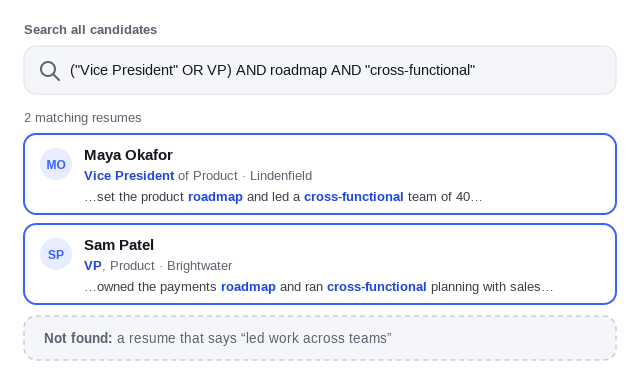
An illustration of a recruiter's keyword search in a hiring system. The names are made up. Check each application before you send it
Every posting is a little different. Before you apply, read it once more, make sure its job title and top three or four asks are on your resume in its words, and move the most relevant result to the top of each role.

Resume keywords from 903 real job postings, and what they tell you.
To show what “the words that repeat” looks like in practice, we counted. Blynk collected 903 senior product job postings from 629 companies between October 31 and November 11, 2026, and counted how many mention each word.
Leading the work: strategy 82%, roadmap 68%, leadership 62%, communication 60%, stakeholders 48%, cross-functional 47%, mentoring or leading a team 42%, executives or the board 42%.
Business results: metrics 32%, product vision 29%, revenue 29%, analytics 28%, go-to-market 23%, pricing 23%.
Qualifications: a number of years of experience 48%, bachelor's degree 29%, MBA 9%.
Methods and markets: SaaS 17%, APIs 16%, Agile 14%, customer research or discovery 14%, data-driven 14%, B2B 14%, experimentation 10%, KPIs 10%, OKRs 4%.
Tools (rare): SQL 6%, Jira 5%, Python 3%, Figma 3%, Tableau 2%, Amplitude 1%, Mixpanel and Looker 1% each.
AI: about 4 in 10 ask for it in the requirements part (297 of the 688 postings that have one).
At senior levels, keywords are about leading the work. Strategy, roadmap and stakeholders came up far more often than any tool. So they belong in your experience bullets, next to a result, not in a skills list.
Tools are rare here. SQL, the most-named of the tools we counted, is in 55 of the 903 postings. A generic list that leads with software would point a product leader the wrong way.
Your role will be different. These are one role family's postings, and a mention isn't always a requirement: company descriptions count too. That's why the method is to count your own 10 to 15.
A keyword tally sheet, ready to copy.
Paste it into a note or a spreadsheet and fill it in as you read. Fill in the [square brackets].
Keyword tally
Use it for steps 1 to 5, once per role.
Role | [Job title]
Postings read | [Number]

Keyword | Postings that mention it | Must-have? | Where I've done it
Job title as the postings write it | [ ] of [ ] | Yes | [My current or target title]
[Skill or tool] | [ ] of [ ] | [Yes / No] | [Job, project or result]
[Skill or tool] | [ ] of [ ] | [Yes / No] | [Job, project or result]
[Skill or tool] | [ ] of [ ] | [Yes / No] | [Job, project or result]
[Phrase] | [ ] of [ ] | [Yes / No] | [Job, project or result]

To learn next | [Must-haves I can't back up yet]
Where resume keywords go, kind by kind.
From the top of your resume down: each kind of keyword and the place it does the most.
The job title: at the top
Put the posting's form of the title in your headline or summary line. Your past job titles stay as they were: never rename a past job to match. Lever reads job titles from your resume into a filter recruiters can search by, so a clear title helps them find you.
Your summary: the two or three most-asked strengths
Pick the two or three strengths most of your target postings ask for that really describe you, and say them in the postings' words. After the title, it's the first thing a person reads, so it's where a quick skim lands.
What you led and delivered: inside your experience bullets
Phrases about the work, such as roadmap, stakeholders or go-to-market, go inside a result: an action verb, the keyword, then what changed. That's where a search finds the word and a person sees the proof.
Before (made up): "Worked with other teams on the roadmap."
After: "Led a cross-functional roadmap with sales, design and engineering, cutting the time from idea to launch from 9 months to 5."Soft skills: shown, not listed
Communication is in 60% of the senior postings we counted, but "excellent communication skills" proves nothing. Show it in a bullet instead. A soft skill doesn't need the posting's exact phrase the way a tool or a title does: what convinces the person reading is the proof.
Instead of "Strong communicator" write "Presented the product roadmap to the board every quarter." (made up)Tools and hard skills: a plain skills section
List them plainly, in the posting's spelling, with the acronym and the full term once. Where you really used a tool, name it inside a bullet too, so the skill has proof behind it.
Degrees, certifications and years: written exactly
Write degree and certification names the way the posting writes them: a bachelor's degree is in 29% of the senior postings we counted, an MBA in 9%. Show your years through clear start and end dates, because Lever works out years of experience from the dates it reads on your resume.
Action verbs (led, built, cut, grew) start each bullet. They carry the keyword and the result to the person reading. University career centres keep long lists of them, such as MIT's and Western Michigan's (both in the sources below).
How recruiters search an ATS, and what it means for your keywords.
It's a search box, not a judge. Greenhouse lets recruiters search all their candidates by keyword and shows a snippet of where the words appear in each profile. Lever's search highlights the matches. Your resume comes up when its words match what the recruiter typed.
Exact words count. Recruiters can combine words with AND, OR and NOT, use quotes for an exact phrase, and add * for word endings (in Greenhouse, Java* finds Javascript). Greenhouse's help describes no synonym matching. The illustration in step 6 shows what that means for a resume that says the same thing in other words.
Filters work on what the system read from your resume. Lever turns your resume into fields, such as companies, job titles and education, and works out your years of experience from your dates. Recruiters filter on those, plus skills, location and answers to application questions. So clear titles and clear dates matter as much as the words.
Screening questions do the rejecting. Greenhouse's Auto-Reject rules act on answers to the employer's own questions, such as a band of years of experience plus a city, a license or a location, and can send a rejection email. Workday's questionnaires score answers “to eliminate ineligible candidates.” If a no arrives minutes after you apply, a rule like this is one way it happens.
Then a person decides. In Workday, a reviewer reads the resume and cover letter and chooses to move the candidate forward or decline. LinkedIn Recruiter works the same way on profiles: a Keywords filter searches the whole profile, and Recommended Matches draw on the job post's titles, locations and skills.
Keywords done right, and how to beat the ATS without tricks.
There's no trick that beats an ATS. What works is being easy to find and easy to read: the posting's words, a plain layout, and complete answers.
Do
- Use each keyword where you can back it with a result.
- Use the posting's spelling and wording, acronyms included.
- Put the target job title near the top, in the posting's form.
- Answer every screening question and form field fully and truthfully.
- Keep the layout plain: one column, standard section headings, nothing important in the header or footer. The ATS-friendly resume guide has the full list.
- Reach a person too: find the hiring manager and send a short note about the role.
Don't
- Repeat the same keyword in every line. A person reads it after the search.
- Hide keywords in white text or tiny type.
- Paste the posting into your resume.
- List a skill you can't talk about in an interview.
- Chase a checker's score to 100. Each checker's score is its own; fill real gaps instead.
Questions about resume keywords, answered.
How do I not get rejected by the ATS?
Answer every screening question fully and truthfully: that's where most automatic rejections are set up, through rules like Greenhouse's application rules and Workday's questionnaires. Then use the posting's words for what you've really done, so a recruiter's search finds you, and keep the layout plain. The ATS-friendly resume guide covers the formatting.
Is a 70% ATS score good? What about 77% or 80%?
There's no universal ATS score; each checker makes its own. Jobscan suggests aiming for 75% and says many users succeed at 65%. Employers don't see your checker's number, and Greenhouse's own matching uses words such as "Strong match", not a percentage. Use any score to find missing must-haves you've really done, and add those.
What are good words to put on a resume?
The posting's own words for things you've really done, led by an action verb and followed by a result. University career centres such as MIT's and Western Michigan's keep long lists of action verbs. In the 903 senior product postings we counted, the most repeated words were strategy, roadmap and stakeholders.
What is the 7 second rule in resume?
It comes from Ladders' 2018 eye-tracking study: recruiters' first skim of a resume averaged 7.4 seconds, and resumes with clear section and job headers did well. It's a first glance, not the whole review, and a small study. So put the job title and your top keywords where a skim lands: the top of the page and the start of each bullet.
What are the 3 C's of a good resume?
There's no single standard. Mercer University's are clear, concise and clean, where clear means the resume addresses the qualifications the job asks for, which is exactly what keywords do. Dickinson College's are clear, consistent and concise.
What are the 5 P's of a resume?
There's no official list. For keywords, what matters is the words your target postings repeat, and a real result behind each one.
How many keywords should a resume have?
There's no right number. The "15 to 25" rule you may have seen comes with no source, and postings vary: the 903 senior product postings we counted use 605 different job titles. Cover the must-haves that appear in most of your target postings, where you can back them with real experience, and stop there. If a line reads like a list of terms, it has too many.
Can I just use ChatGPT to add keywords?
It can suggest where keywords might fit in a resume you paste in, but OpenAI says it can produce incorrect or misleading answers and sound confident when it's wrong. Check every line, and delete anything you haven't done.
How do I check if my resume has the right keywords for a job?
Read the posting next to your resume and tick off each must-have, or use a checker. Blynk's ATS Check is free: it reads your resume against the exact job and shows the keywords you have and the ones you're missing.
Should my LinkedIn profile use the same keywords?
Yes. LinkedIn Recruiter's Keywords filter searches the whole profile, and its Recommended Matches use the job post's titles and skills, so the same words help recruiters find you there. In a cover letter a person reads it, so use your top two or three keywords in real sentences.
Sources, and where to read more.
Checked in November 2026. The advice is ours; facts about Greenhouse, Lever, Workday, LinkedIn and the checkers come from each company's own pages. The keyword counts are Blynk's own: 903 senior product job postings from 629 companies, from company career sites and job boards, first seen between October 31 and November 11, 2026, one per company and job title. We counted postings that mention each word anywhere; the AI figure uses the requirements part only. A mention isn't always a requirement, and other roles will differ.
- ATS-friendly resume: what it means
- How to tailor your resume to a job description
- Blynk vs CareerOneStop
- Blynk vs Jobscan
- ATS scores, explained
- Using ChatGPT on your resume, safely
- What product manager postings ask for
- How to find jobs that match your resume
- CareerOneStop: write your resume for current hiring practices
- Greenhouse help: search resumes for keywords
- Greenhouse help: search candidates using Boolean queries
- Greenhouse help: application rules overview
- Greenhouse help: Talent Matching
- Lever help: using advanced search and rediscovery
- Workday: questionnaires
- Workday: recruiting subprocesses
- LinkedIn: how to use LinkedIn Recruiter
- Jobscan: match rate guidance (homepage)
- Enhancv: does ATS reject resumes (a survey of 25 US recruiters)
- HR Dive: eye-tracking study shows recruiters look at resumes for 7 seconds
- Mercer University: the 3 C's of resume writing
- Dickinson College Career Center: guide to writing a resume
- MIT CAPD: resume action verbs
- Western Michigan University: resume keywords
- OpenAI Help: does ChatGPT tell the truth
- Blynk Insights
- Blynk ATS Check
- Blynk: tailoring
- Blynk pricing
