
What does “under review” mean on a job application? And when a status really tells you something.
You applied a week or two ago, and the portal still says “under review”. Is that good news, bad news, or nothing at all? Here's what the label means on each hiring system, in each system's own words, and what to do while you wait.

The short answer
- Usually, “under review” just means your application is in and still open. Systems like Greenhouse give every new application a label like it, such as “Active”. It isn't a yes or a no.
- Only a few statuses carry news: an interview, an offer, or a no. And the portal can lag behind: a rejection email can arrive while the label hasn't changed.
- So trust your email over the portal. After 1 to 2 weeks, follow up with a person. Keep applying to the next job you fit while you wait.
On this page
Why “under review” tells you so little, and what's really going on.
Four worries people have about this status, and what to do about each.
“Is it a good thing if my application is under review?”
It's neutral. On some systems, it's simply the label every application gets. MyGreenhouse shows every application as “Active” by default. At UW-Madison, which uses Workday, a new application shows “Submitted” for the whole review stage. And on Indeed, “Employer reviewing applications” is set by Indeed itself, and means the employer hasn't reviewed yours yet.
What to do: Read it as “still open”. Good news comes from a person, or from a label like “Interviewing”.
“Has anyone actually looked at it?”
The label alone can't tell you. Greenhouse says companies decide which updates to share, and not every internal step is shown. Employers differ, too. In 1,272 job postings from Blynk's searches (mostly senior product roles, first seen October 31 to November 11, 2026), at least 15 employers say AI tools may help review or screen applications. At least 5 say a person reviews every one.
What to do: Look for a sign only a person makes. A “viewed” notice on LinkedIn or Indeed, or an email from someone with a name.
“It's said under review for weeks.”
Portals aren't always updated after a decision, and they rarely tell you when they are. Greenhouse marks an application “Inactive” after the rejection email is sent, or 4 days after the rejection date if none is sent, and the candidate isn't told. At UW-Madison, a status change sends no notice at all.
What to do: Trust your email over the label. A reply from the company beats any status on a screen.
“I don't know whether to wait or move on.”
None of the hiring systems' help pages we read gives a typical review time, and very few job postings say when you'll hear back. Waiting on the label can cost you weeks.
What to do: Follow up once, and keep applying. Write to a person after 1 to 2 weeks, and send the next good application meanwhile.
Job application status meanings, from received to offer.
Labels vary, but most fall into five groups. Here's what each group usually means, and the best example of each that a system publishes.
Application received, submitted or applied
The system has your application. That's all. On Indeed, “Applied” means your application was submitted. Think of it as a receipt, not a review. If you never got a confirmation email, check your spam folder, then the company's careers site.
Under review, in review or in progress
Your application is still open. On systems like these, this is where every application sits until something changes. At UW-Madison, “In Progress” covers every active stage after the first one, interviews included. So a phone screen may not change the label at all.
Also seen as: “Active” on MyGreenhouse, “Pending” on Wellfound, “Reviewing applications” on USAJOBS.Under consideration
Employers choose their own labels, so this one sits at different stages in different places. Advice pages disagree on it: some say it comes after an interview, others that it's the first label you see. Our reading: treat it like “under review”. Still open, and not a sign either way.
Interviewing, offer received or hired
This is real news. On Indeed, “Interviewing” means you got an interview, and it can be set by you or by the employer. Usually, someone will have contacted you to arrange it, so the label is the record, not the news.
Not selected, no longer under consideration, closed or inactive
The application is over. Indeed uses “Not selected by employer” when the employer rejected it, and “Job closed” when the posting closed. MyGreenhouse shows “Inactive”. At UW-Madison, a decline shows as “Completed”. Indeed also switches to “Response seems unlikely” when the employer has hired enough people, or after at least two weeks with no activity.
Greenhouse, Indeed, LinkedIn and other application statuses, in each system's own words.
You apply through many different systems, and each one has its own labels. Of 1,477 job postings from Blynk's searches (mostly senior product roles, first seen October 31 to November 11, 2026), Blynk found at least 184 on Workday career sites, 114 on Greenhouse, 106 on Ashby, 88 on Oracle, 29 on Lever, 14 on SmartRecruiters, 14 on Rippling, 13 on Workable and 10 on BambooHR. At least 15 more systems had 1 to 5 each, and 185 came through LinkedIn. Here's what the main ones say about their statuses.
Greenhouse application status: Active, Inactive or Not sharing updates
If the company turns statuses on, MyGreenhouse shows your application as “Active” by default. It turns “Inactive” when the company closes it, for example when it's no longer considering you. “Not sharing updates” means the company doesn't share them. Greenhouse says it can't see a company's internal hiring decisions and won't share your status. For news, it sends you to the company.
Indeed: 11 statuses, and who sets each one
Indeed is the clearest about this. Some statuses are set by the employer: “Application viewed” (they reviewed it), “Employer reached out” and “Not selected by employer”. Some are set by Indeed: “Applied”, “Employer reviewing applications” (they haven't reviewed yours), “Response seems unlikely” and “Job closed”. You or the employer can set “Interviewing”, “Offer received” and “Hired”. You set “No longer interested”.
Worth knowing: employer statuses usually show only for jobs posted on Indeed. If the job sent you to another site to apply, you may not see them.LinkedIn: application viewed and resume downloaded
For Easy Apply jobs, LinkedIn may tell you when the poster opened your application or downloaded your resume. That's a sign a person looked. But LinkedIn says plainly that a view or a download doesn't guarantee a message, an interview or an offer.
Workday: each employer sets its own steps
Workday statuses depend on how each employer sets them up. At UW-Madison, the review stage shows “Submitted”, later active stages show “In Progress”, and a decline shows “Completed”, with no notice when it changes. Our guide to Workday application status covers Candidate Home and every Workday label.
Lever, Ashby, iCIMS, Oracle and Workable
Lever says it can't help you check your application status, and sends you to the company. Ashby doesn't describe candidate statuses on its own site. iCIMS points you to your job seeker dashboard, which lists each job you applied to with its status. For questions, it says to contact the company. Oracle lets candidates check status through a digital assistant, after a code sent to their email. Workable also says to contact the hiring company directly.
Wellfound and USAJOBS: what their statuses say about time
On Wellfound, “Pending” means the company hasn't decided yet, and it expires after two weeks with no action. On USAJOBS, “Reviewing applications” means the job announcement has closed and the agency is reviewing. It stays until the hiring process is complete. USAJOBS says it has no control over the status itself.
How to check your job application status, wherever you applied.
There's no single place to look. Check these five, in this order.
Sign in to the company's careers site
Use the account you made when you applied. That login may work for that company only, so ten applications can mean several logins. On iCIMS, look for your job seeker dashboard. On Oracle sites, the assistant asks for a code sent to your email.
Check MyGreenhouse once for every Greenhouse application
If the company uses Greenhouse, one MyGreenhouse account covers your applications to every company with jobs listed there. Sign in at my.greenhouse.com with your email, and Greenhouse sends you a single-use code. You'll only see updates if the hiring company chooses to share them.
Open the job board you applied on
LinkedIn lists the jobs you applied to in its Jobs area. Indeed's is called My Jobs, and some of Indeed's own statuses show only in its mobile app. If the board sent you to the company's site, the company's portal is the one to check.
Search your email for the company's name
Decisions often arrive by email before the portal changes, and some systems never tell you when a label changes. Search for the company's name, and check your spam and promotions folders too. Confirmation emails are often sent from a no-reply address, which is easy to miss.
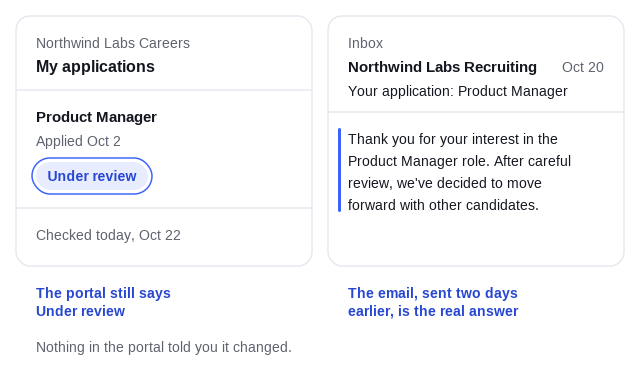
An illustration: the same application in a careers portal and in your inbox. The names are made up. Keep your own list
Write down each job, where you applied, the date, the link and who you wrote to. Then a status that hasn't moved in two weeks stands out. Our free job application tracker template is ready to copy.

How long “under review” lasts, and why nobody can tell you.
None of the hiring systems' help pages we read gives a typical review time. Greenhouse, Lever, iCIMS and Workable all send you to the company that's hiring. The timelines on advice pages, from 1 to 3 weeks to 4 or more weeks meaning a quiet no, come without a source we could find.
The only clocks are the platforms' own. Indeed switches to “Response seems unlikely” after at least two weeks with no activity. Wellfound's “Pending” expires after two weeks. USAJOBS shows “Reviewing applications” until hiring is complete.
Job postings rarely say either. Blynk read 1,272 job postings with a full description from its searches (mostly senior product roles, first seen October 31 to November 11, 2026). Only 16 say anything about when or whether you'll hear back, from 9 employers. That's about 1 in 80. Three employers give a time: two aim to reply within 5 business days, and one within 2 weeks if your profile is a match.
Is there a day of the week when rejections come? We found no reliable published data on that, so we won't guess. What we do know: the label can trail the decision. If no rejection email is sent, Greenhouse marks the application “Inactive” 4 days after the rejection date.
So don't wait on the label. Our advice: give it 1 to 2 weeks, then follow up once with a person. If the posting gives a timeline, wait until just after it.
What to do while your application is under review, in four steps.
Waiting isn't a plan. These four steps are.
Follow up with a person after 1 to 2 weeks
Asking is fine. Greenhouse, Lever, iCIMS and Workable all say status questions go to the company. Our advice: send the recruiter one short note after 1 to 2 weeks, or write to the hiring manager after 3 to 5 working days. Our follow-up email guide has the timing and seven templates.
Find who to write to
Skip the no-reply address. Does HR decide who gets hired? Usually not alone: Indeed describes the hiring manager as the team leader who makes the final hiring decision, and the recruiter as the person who helps find and screen applicants. Our guide on how to find the hiring manager shows where to look. Or paste the job link, and Blynk picks the two people most likely to read your note, with their work email.
Keep applying to jobs you fit
Ten applications that fit beat a hundred that don't. While one sits under review, spend the time on the next job you'd actually be good at, with an application made for it.
Know when to move on
Our advice: if your note to the recruiter, and one to the hiring manager, get no reply, stop writing and move on. The same goes if the job closes, or Indeed says a response seems unlikely. Keep the door open, though. A polite thank-you after a no costs one minute.
Questions about “under review” and other statuses, answered.
Does under review mean approved?
No. It means nobody has decided either way yet. MyGreenhouse shows every application as “Active” by default, and Indeed's “Employer reviewing applications” means the employer hasn't reviewed yours yet. Approval looks like a person asking to talk to you.
Is your application being under review a good thing?
It's neutral. It means your application is still open, not that anyone has decided. On some systems it's the label every application gets: MyGreenhouse shows “Active” by default, and at UW-Madison (Workday) a new application shows “Submitted”. Good news is a person contacting you, or a label like “Interviewing”.
How long does a job application stay under review?
None of the hiring systems' help pages we read gives a typical time. The only published clocks are the platforms' own: Indeed shows “Response seems unlikely” after at least two weeks with no activity, and Wellfound's “Pending” expires after two weeks. Only about 1 in 80 of the job postings Blynk read say when you'll hear back. Give it 1 to 2 weeks, then follow up with a person.
Can an application under review mean rejected?
Yes, it can look unchanged after a decision. Greenhouse marks an application “Inactive” only after the rejection email is sent, or 4 days after the rejection date, and doesn't tell the candidate. At UW-Madison, a decline shows as “Completed” with no notice. If an email says no, trust the email.
What does “Under Review” mean in Workday?
It depends on the employer, because each one sets up its own Workday steps. At UW-Madison, for example, the review stage shows “Submitted” and later stages show “In Progress”. Our guide to Workday application status covers every Workday label.
What are the stages of application status?
Most labels fall into five groups: received (submitted, applied), in review (under review, in progress, under consideration), interviewing, offer (offer received, hired), and closed (not selected, no longer under consideration, job closed). Indeed's list of 11 statuses is the clearest published example.
What does it mean if my application status says interviewing?
That you got an interview, or have one coming. On Indeed, “Interviewing” can be set by you or by the employer. Usually a person will already have contacted you to arrange it. If they haven't, check your email and spam folder.
What does “application received” mean?
The system has your application, and that's all it tells you. On Indeed, “Applied” means your application was submitted. It's a receipt, not a review, and it's usually the first label you see.
What does “in progress” mean on a job application?
Your application is still open. At some employers it covers a lot: at UW-Madison (Workday), “In Progress” covers every active stage after the first, interviews included. So it can mean anything from “in the pile” to “after your phone screen”.
What are signs you will get the job?
No status promises it, but some signs come from a person: an interview request, an offer, or a note asking for references. On LinkedIn, a view or resume download notice shows someone looked, though LinkedIn says it doesn't guarantee a message, interview or offer. On Indeed, “Interviewing” and “Offer received” are real movement. “Under review” on its own isn't a sign either way.
Where the facts come from.
Checked in November 2026. The advice is ours. What each status means comes from each system's own help pages, and Workday's example from UW-Madison's HR guide. The Workable and USAJOBS help pages wouldn't load for our tools, so their lines come from the pages' own search summaries. The counts are Blynk's own: 1,477 job postings from Blynk's searches, mostly senior product roles, from company career sites and job boards, first seen between October 31 and November 11, 2026. The system counts are where Blynk found each posting, so they're a floor. Of the 1,272 with a full description, each was searched for any line about hearing back, and for lines about AI or people reviewing applications, then checked by eye; those counts are floors too.
- Workday application status, explained
- Follow-up email after applying
- How to find the hiring manager
- Free job application tracker template
- What shortlisted means
- What not retained means
- What dispositioned means
- Indeed Career Guide: hiring manager vs. recruiter
- Greenhouse Support: MyGreenhouse FAQ for candidates
- Greenhouse Support: MyGreenhouse application tracking
- Greenhouse Support: candidate inquiries about application status
- Indeed Help: My Jobs, managing applied jobs
- LinkedIn Help: application views and resume downloads
- Lever: job seeker support
- iCIMS: job seeker help
- Oracle Recruiting: external candidates check application status
- Workable: how can I track the status of my application
- Wellfound Help: status of applications
- USAJOBS Help: application status
- UW-Madison HR: candidate view by Workday application status
- Blynk Job Tracker
- Blynk Find the Hiring Manager
- Blynk pricing
