
Resume templates in Google Docs, free, and which three are one column.
If you already write in Google Docs, you don't need another site's sign-up. Docs has five free resume templates. Here's where they are, what we found inside each one, a plain template to copy, and how to set it up and download it on a computer or phone.

The short answer
- Google Docs has five free resume templates. On the Docs home screen, click Template gallery at the top right, then pick a resume. When we looked, the resumes had their own row. File, New, From a template is a different list.
- For online applications, pick a one-column one: Coral, Spearmint or Modern Writer. Swiss and Serif are built as tables. When we pulled the text out of Serif's PDF, skills lines landed inside the Experience section.
- Send a file, not the link. Choose File, then Download, then PDF or Microsoft Word, whichever the upload form asks for.
On this page
Four snags with Google Docs resume templates, and the fix for each.
These come up again and again on Reddit and on Google's own help forum. Each one has a quick fix.
“The resume templates aren't there.”
Most people look under File, then New, then From a template. Google's help says that menu inserts templates like proposals, roadmaps and class notes into a document. The resumes are somewhere else. On Google's own help forum, 164 people marked this exact question as theirs too.
Fix: Start from the Docs home screen. Template gallery is at the top right. The steps are below.
“It looked fine until I uploaded it.”
A layout can look neat on screen and still read out of order. Greenhouse, a hiring system, lists columned layouts, complex tables, and contact details in a header, footer or text box among the causes of a failed resume parse. Two of Google's five resume templates are built as tables.
Fix: Use one column. Coral, Spearmint, Modern Writer, or the plain template on this page.
“My old resume's formatting comes with it.”
Copy text from an old resume and its fonts, sizes and spacing come too. Google Docs has a shortcut for this: Paste without formatting. Press Ctrl + Shift + V, or ⌘ + Shift + V on a Mac.
Fix: Paste as plain text, then style it. The setup steps are further down.
“Do I just share the Google Docs link?”
Our advice: no. A link can ask the reader for access, and it can change after you send it. Google Docs downloads both PDF and Word files. Greenhouse accepts .doc, .docx, .pdf, .rtf and .txt files, and Lever reads Word and PDF.
Fix: Upload the file the form asks for. It takes two clicks: File, then Download.
How to find the resume templates in Google Docs, on a computer or phone.
These steps come from Google's own help pages, checked on November 12, 2026. The pages show no date of their own. Where a detail comes from Google Docs' own screens instead, we say so.
On a computer: open the Template gallery
Go to Google Docs. At the top right of the home screen, click Template gallery. Click the resume template you want; when we looked, the resumes were in their own row. Google's help says a copy of the template opens. Give your copy a name, like “Jordan Lee resume” (our advice).
Not under File, New
Inside a document, File, then New, then From a template opens a different list. Google's help says those templates, like blog posts, proposals and class notes, get inserted into the document you're in. You won't find the resumes there.
If you can't see Template gallery
It can be hidden. On the Docs home screen, open the Menu, then Settings, and turn on “Display recent templates on home screens”. Google also says templates come in 22 listed languages, and that some template features are only available for work or school accounts.
On a phone or tablet: New, then Choose template
In the Google Docs app on Android, iPhone or iPad, tap New in the bottom corner. Tap Choose template, then tap the one you want. We didn't check whether the app's list includes all five resumes. If yours doesn't, start the resume on a computer, then keep editing it on your phone (our advice).
Keep a clean master copy
Once your resume is done, keep it as your master. For each job, choose File, then Make a copy, give it a name and choose where to save it. Then edit the copy for that job (our advice). Your master stays clean.
Which Google Docs resume templates are ATS friendly? The five, one by one.
Most pages say “two of them are two-column”. We looked inside. On November 12, 2026, we opened each built-in template's public files, view only, and pulled the text out of each PDF with a standard text tool. That tool isn't an applicant tracking system, and every system reads a little differently. So this shows what a layout can do, not what any one employer's system will do.
Swiss: one big table
Swiss is a single table, 5 rows by 2 cells, with section names in the left cell and the content in the right. Your name and contact details are in the top row. It uses Lato and Raleway, five divider images, and a “ㅡ” mark before each heading. Its text came out in order in our test, but it's still a table, and Greenhouse lists complex tables among the causes of a failed parse. For an online form, we'd pick a one-column template.
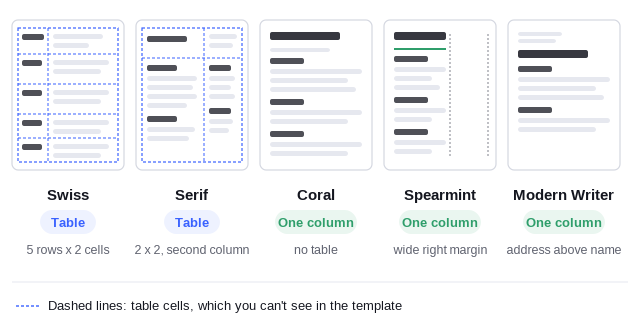
An illustration of how each template is built, from our check on November 12, 2026. Not screenshots. Serif: a two-by-two table, and the text came out mixed
Serif is a table of 2 rows by 2 cells, in Merriweather and Open Sans. Your name sits on the top left and your contact details on the top right. Below, Experience, Education and Projects fill the left column, and Skills, Awards and Languages fill the right. When we pulled the text out of Serif's PDF, it read “Experience”, then “Skills”, then a job title, a skills line and the dates, with Awards between two jobs. Skip Serif for online forms.
Coral: one column, with a “Hello” to delete
Coral is one column with no table, and your contact details sit in the body of the page. It uses Lato and Playfair Display. The name line reads “Hello”, then “I'm Your Name”. Delete “Hello” and “I'm”, and keep just your name (our advice). Its text came out in order in our test.
Spearmint: one column, with a wide right margin
Spearmint is one column with no table, in Proxima Nova, with a green divider image. Its right margin is 2.25 inches, against 1 inch on the left. If your lines wrap too soon, choose File, then Page setup, and set the right margin to match the left. Its text came out in order in our test.
Modern Writer: one column, with the address first
Modern Writer is one column with no table. It puts your address above your name and uses four fonts: Source Code Pro, Roboto Condensed, Oswald and PT Mono. Its divider image carries a description, “A long, thin rectangle to divide sections of the document”, and that line shows up in the plain text right after your name. In the PDF's text, the bullet marks came out apart from their lines. Move your name to the top, and delete the divider images (our advice).
What all five get right, and the one thing to change
All five use real Heading 1 styles for section names, and leave the page header and footer empty, so your contact details aren't hidden there. Every PDF we downloaded held real text, not an image, with its fonts embedded. But none uses a font on MIT's career office list: Arial, Calibri, Cambria, Georgia, Helvetica or Times New Roman. Switch to one of those. Our guide to the best font for a resume explains the choice and the size.

A plain resume template for Google Docs, ready to paste in.
This is the same template as our free ATS resume template guide, so the two pages agree. Click Copy, open a blank document in Google Docs, and press Ctrl + Shift + V (⌘ + Shift + V on a Mac) to paste it as plain text. Then follow the setup steps below.
Plain resume template for Google Docs (blank)
For most people. Fill in the brackets, newest job first, and delete any line you don't need.
[YOUR NAME]
[Job title you're going for]
[City, State] · [phone] · [email] · [linkedin.com/in/you]

SUMMARY
[Two lines on who you are and the result you're best known for.]

EXPERIENCE
[Company Name] · [City, State]
[Job Title] · [Mon Year] – [Mon Year or Present]
- [What you did, and what changed because of it.]
- [What you did, and what changed because of it.]
- [What you did, and what changed because of it.]

[Company Name] · [City, State]
[Job Title] · [Mon Year] – [Mon Year]
- [What you did, and what changed because of it.]
- [What you did, and what changed because of it.]

SKILLS
[Skill], [Skill], [Tool], [Full Name (Acronym)], [Language]

EDUCATION
[Degree], [School] · [Year]
Plain resume template for a first job or a career change
Education and projects first, for when your work history is short or in another field. Good for students.
[YOUR NAME]
[Job title you're going for]
[City, State] · [phone] · [email] · [linkedin.com/in/you]

EDUCATION
[Degree], [School] · [Year or Expected Mon Year]
- [Relevant course, award or result.]

PROJECTS
[Project Name] · [Mon Year] – [Mon Year]
- [What you built or did, and what came of it.]
- [The tools you used, in the job description's words where true.]

EXPERIENCE
[Company Name] · [City, State]
[Job Title] · [Mon Year] – [Mon Year]
- [What you did, and what changed because of it.]

SKILLS
[Skill], [Skill], [Tool], [Language]
Set up your resume in Google Docs, so it reads cleanly and fits the page.
Six settings, from Google's own help pages. Do them once on your master copy, and every copy you make keeps them.
Use Pages, not pageless
Choose File, then Page setup, then Pages. Google's help says pageless format “continuously scrolls without page breaks”, and that it can't have headers, footers, page numbers or columns. A resume needs page breaks you can see, so you know where page one ends. Our guide to resume length covers one page or two.
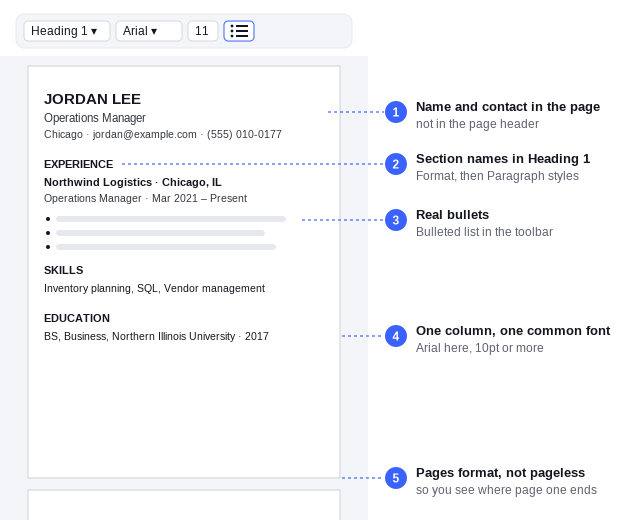
An illustration of the plain template set up in Google Docs. The person and companies are made up. Set the paper size and margins
In the same window, the Pages tab sets the orientation, paper size and margins. Click “Set as default” to use them in every new document. Pick Letter for US jobs (our advice).
Make each section name a real heading
Select a section name, like EXPERIENCE. Choose Format, then Paragraph styles, then Heading 1. Do the same for each section. Real headings give the file a clear structure, and Greenhouse lists resumes without clear sections among its parse problems.
Use one common font
Select all the text, then pick a font from the font list in the toolbar. Choose Arial, Calibri, Cambria, Georgia, Helvetica or Times New Roman, the fonts MIT's career office names, at 10pt or more. “More fonts” in the same list adds others, but a common one is the safe choice.
Turn the hyphens into real bullets
Select the lines that start with a hyphen. Click Bulleted list in the toolbar, or choose Format, then Bullets & numbering. Then delete the hyphens.
Keep one column, and your contact line in the page
If a template has columns, choose Format, then Columns, then 1 column to remove them. Don't move your contact line into the page header with Insert, Page elements, Header: Greenhouse lists contact details in a header among its parse problems. And don't line up dates with Insert, Table. A tab or a plain “ · ” does the job.

Download your Google Docs resume as a PDF or Word file, on a computer or phone.
The employer's system gets the file you download, not your Google Doc. Here's how to get it, from Google's help pages, plus what we saw in the File menu itself.
On a computer: File, then Download
Choose File, then Download, then choose PDF or Microsoft Word. When we looked, the same menu also offered Rich Text, Plain Text and more. For a long document, Google's help gives another way in Chrome: File, then Print, then set the destination to “Save as PDF”.
On an Android phone: More, then Download
In the Google Docs app, tap More on the file, then Download. Google's help says the Android app can export DOCX, PDF, EPUB, RTF, TXT, ODT and HTML files.
On an iPhone or iPad: export a PDF or DOCX
Google's help says the iPhone and iPad app can export a DOCX or PDF file. Its help pages don't give the exact taps, so if you can't find it, download the file from a computer instead.
Send what the upload form asks for
Greenhouse accepts .doc, .docx, .pdf, .rtf and .txt files. Lever reads Word and PDF. Blynk read 1,204 job postings with a full description, and none said which resume file to send, so look at the form, not the posting. If the form doesn't say, a PDF is a safe default (our advice). Name it like “Jordan-Lee-Resume.pdf”, so it's easy to find on the other end.
Check the file before you send it
Open the PDF and try to highlight a line. Lever's help says that if you can't highlight the text, it likely can't be parsed. Then copy all the text into a plain text editor and check it reads in order. MIT's career office suggests a similar test with a .txt file. Our two-minute test walks through it.
Cover letter templates in Google Docs, and which ones match your resume.
Where they are. Open the Template gallery the same way, and scroll to Letters. When we looked on November 12, 2026, there were five. Spearmint and Swiss are labelled “Letter”, and Plum “Informal letter”. Geometric and Modern Writer are labelled “Business letter”, with a “Your Company” letterhead at the top.
A matching pair. Spearmint and Modern Writer each have a resume and a letter with the same name, so you can send a matching pair. Swiss has both too, but its letter is built as a table, like its resume. On a Business letter, replace the “Your Company” letterhead with your own name and contact details (our advice).
Or paste in a plain one. The short letter below works in any blank document, with the same font as your resume. Whether you need one at all depends on the form. Our guide on whether you need a cover letter shows how to tell in a minute.
A short cover letter template for Google Docs, to paste in.
Three short paragraphs. Swap the [square brackets] for your details, and keep every claim true and specific.
Short cover letter (about 150 words)
For an upload box or an email. Use the same font as your resume, then download it as a PDF.
[Your Name]
[City, State] · [phone] · [email] · [linkedin.com/in/you]

[Date]

Dear [Hiring manager's name, or "Hiring team"],

I'm applying for the [Job title] role at [Company]. [One thing from the job description] is work I've done for [time], and it's the reason this role caught my eye.

At [Company Name], I [one true result that matches the posting's main need, with a number if you have one]. Before that, I [a second, shorter proof that fits the job].

[One or two sentences your resume can't say, like a move, a gap, a career change, or who referred you.] I'd be glad to talk about how I could help with [a goal from the posting].

Thank you,
[Your Name]
Google Docs resume mistakes, and what to do instead.
A quick list to run down before you send. The layout rules come from the hiring systems' own help pages; the Docs settings come from Google's.
Do
- Start from Template gallery on the Docs home screen, or from a blank page.
- One column, top to bottom.
- Your name and contact details as the first lines of the page.
- Section names in Heading 1: Experience, Skills, Education.
- One common font, at 10pt or more.
- Pages format, so you can see where page one ends.
- Paste without formatting when you bring in old text.
- Download a PDF or Word file, whichever the form asks for.
Avoid
- Swiss or Serif for an online form: both are tables.
- A table to line up job titles and dates.
- Contact details in the page header or footer.
- Text boxes, icons or images in place of words.
- Pageless format for a resume.
- A Google Docs link in place of a file.
- Pasting straight from an old PDF, with its formatting.
Questions about Google Docs resume templates, answered.
Is there a resume Template on Google Docs?
Yes, five: Swiss, Serif, Coral, Spearmint and Modern Writer. On the Docs home screen, click Template gallery at the top right and scroll to Resumes. They're free with a Google account. On a phone, tap New, then Choose template.
What is the best resume Template for Google Docs?
For online applications, a one-column one. Of the five built-ins, Coral, Spearmint and Modern Writer are one column with no table. Swiss and Serif are tables, and Serif's text came out mixed in our test. Whichever you pick, switch to a common font like Arial or Calibri.
How do I create a resume in Google Docs?
Open a template from Template gallery, or paste the plain template on this page into a blank document. Set Pages format, make each section name a Heading 1, pick one common font, and fill in your details. Then choose File, then Download, then PDF. If you'd rather not format it at all, Blynk's Resume Builder builds a one-column resume from what you've done. It doesn't make a Google Doc.
Is Google Docs ok for a resume?
Yes. The employer gets the file you download, not the Doc itself, and Docs downloads both PDF and Word files. Greenhouse and Lever both read Word and PDF. If you have an old Word resume, double-click the .docx file in Google Drive to open it in Docs.
Does Google Docs have ATS friendly resume templates?
Three of its five are one column with no table: Coral, Spearmint and Modern Writer. Swiss and Serif are built as tables, and Greenhouse lists complex tables and columned layouts among the causes of a failed parse. No template can promise a pass, so test the file you download.
Can you provide me with free ATS-friendly resume templates for Google Docs?
Yes. The plain template on this page pastes straight into Google Docs, with nothing to sign up for. Harvard's career office also offers a free bullet-point template with a Google Docs copy. Of Google's own five, use Coral, Spearmint or Modern Writer.
What is the best resume template to use for ATS?
A plain one: one column, standard headings, a common font, and your contact details in the body of the page. In Google Docs, that's the template on this page, or one of the three one-column built-ins. Our free ATS resume template guide explains each part.
Can I find a free ATS template for my resume?
Yes, without paying or signing up. Copy the template on this page, use one of Google's one-column built-ins, or make a copy of Harvard's bullet-point template. Some template sites mix free and paid designs, so check what the download costs before you start typing.
Should I send my resume as a Google Docs link?
Our advice: no. Upload a PDF or Word file instead. A link can ask the reader for access, and it can change after you send it. Download the file with File, then Download, and attach that.
Can I make a resume in Google Docs on my phone?
Yes. In the Google Docs app, tap New, then Choose template. Google's help says the iPhone and iPad app can export a DOCX or PDF file, and the Android app can download one too. A computer is easier for the setup steps, like headings and page setup.
Every fact, from the source.
Checked on November 12, 2026. The Google Docs steps come from Google's own help pages, which show no date of their own; the list of download types was read from the File menu. The template check is ours: we read each of the five built-in resume templates' public files (HTML, plain text and PDF), view only, and pulled the text out of each PDF with pdftotext, a standard text tool. It isn't an applicant tracking system, and each system reads differently. The posting count is Blynk's own: 1,204 job postings with a full description, from Blynk's searches for product roles, mostly senior, first seen between October 31 and November 11, 2026. One person's searches over 12 days, not a market survey. The advice marked as ours is ours.
- Free ATS resume template, part by part
- The best font for a resume
- How many pages a resume should be
- Do I need a cover letter?
- What to name your resume file
- Google Docs help: use Google Docs templates
- Google Docs help: templates on Android
- Google Docs help: templates on iPhone and iPad
- Google Docs help: make a copy or download a file
- Google Docs help: download on Android
- Google Docs help: export from the iPhone and iPad app
- Google Docs help: export from the Android app
- Google Docs help: pages or pageless
- Google Docs help: page setup, paper size and margins
- Google Docs help: paragraph styles and headings
- Google Docs help: bulleted lists
- Google Docs help: fonts
- Google Docs help: columns
- Google Docs help: headers and footers
- Google Docs help: tables
- Google Docs help: keyboard shortcuts (paste without formatting)
- Google Docs help: work with Word files in Docs
- Google Docs Editors Community: resume template
- Greenhouse help: unsuccessful resume parse
- Greenhouse help: accepted file types
- Lever help: understanding resume parsing
- MIT CAPD: make your resume ATS-friendly
- Harvard Mignone Center: bullet-point resume template
- Blynk Resume Builder
- Blynk pricing
