
How to find jobs based on your resume. And spend your evenings on the ones you fit.
If you've been scrolling job boards and typing guesses into the search box, your resume already holds better searches. Here's how to turn it into the right titles, skills and filters, what a match score can and can't tell you, and how many requirements you really need.

The short answer
- Pull three things from your resume. Your job titles and the next one up, and the other names companies use. Your 5 to 8 strongest skills and tools. Where you can work, and at what level.
- Search each title with two or three of those skills, filter by location, level and pay, and save each search as an alert.
- Apply where you meet most of the must-haves. In about half of 1,102 postings from our searches for mostly senior product roles, something they ask for is only preferred or a plus. A score sorts jobs but doesn't predict an interview.
On this page
Why one job title search misses jobs that match your resume, and where better searches come from.
“I scroll for an hour and find two jobs worth applying to.” Job search works from words. You type a title, and the board looks for postings that use it. Indeed says its results may include jobs matching related keywords. Still, a title you write one way can miss jobs written another way.
The same job goes by many names. O*NET, a free career database, lists 10 sample titles people report for software developers, from Application Developer to Systems Engineer. Blynk saw the same in postings from its own searches. Between October 31 and November 11, 2026, its searches found 139 plain VP of product jobs, and the title was spelled 13 different ways.
Your resume already holds the better searches. The titles you've held, the skills and tools you use, your level and where you can work are what postings list too. Turn them into a few searches and a short filter list, and fewer good jobs slip past. In our reading, that's also what matching tools do with an uploaded resume. The steps below do it by hand.
How to find jobs that match your resume and skills, in six steps.
Give it an evening the first time. After that, your saved searches bring new jobs to you.
List your titles, and every other name for them
Write down each title you've held, and the one you're ready for next. Then add the other names companies use for it. O*NET's page for your occupation lists sample titles people report, and the postings you've already saved show more. Our advice is to search each name that uses different words, such as VP and Vice President, or Product and Product Management, and to skip names that differ only by a comma or “of”.
Product Manager? Also search Product Owner and Senior Product Manager. Ready for the next level? Add Group Product Manager and Director of Product.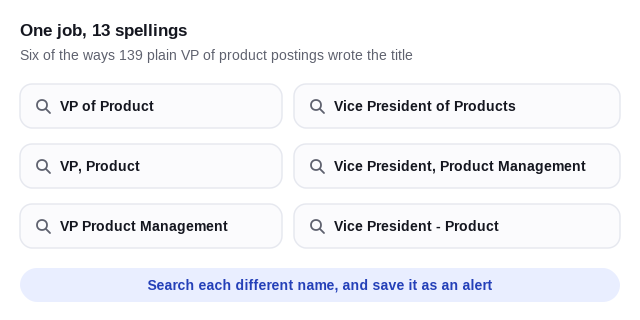
Six of the 13 spellings of a plain VP of product title in 139 postings from Blynk's searches, first seen October 31 to November 11, 2026. Pick 5 to 8 skills and tools that postings ask for
Choose the skills and tools on your resume that show up again and again in jobs you want. CareerOneStop suggests reading 10 to 15 postings and listing the requirements that come up most. Keep the ones you can back with a line on your resume, and use the posting's own words. Our guide to resume keywords shows how to find them.
From the line “Ran pricing tests on our B2B checkout” take pricing, A/B testing, B2B and checkout.Set the filters your resume already answers
Your resume tells you your level, the places you can work, and whether you want remote, hybrid or on site. Set those as filters, along with job type and the lowest pay you'd take. Indeed says you can improve its recommendations by setting pay, location and title preferences and uploading a current resume. If pay is the hard part, our guide to desired salary helps you pick a number.
Run each job search on two or three sites
Search each title with two or three of your skills, then save every search as an alert, so new jobs come to you. Use a big board such as LinkedIn or Indeed, plus one or two that fit your field. LinkedIn says its job recommendations use your profile and your Open to Work preferences, so fill those in too. Our guides to job search apps and product manager job boards compare where to look.
One title, three searches. “VP of Product” pricing. “Vice President, Product” B2B. “VP Product Management” checkout.Read the requirements before you read the pitch
Skip to the list of what the job asks for. Mark each line as required or preferred, and tick the ones your resume shows. Keep the jobs where you meet most of the required list. How many is enough is covered below.
Save the strongest few in one tracker
Pick the five to ten jobs that fit best. Put them in one list with the link, the date and what you sent. Ten that fit beat a hundred that don't, and you'll know who to follow up with. A spreadsheet works, or a tracker that updates each application from your inbox.

What jobs am I qualified for? Count the must-haves, not every line.
Most postings mix needs with wishes. Many split the list into required and preferred, or add a “nice to have” or “bonus points” section. Others mark single lines, such as a line saying a finance degree is a plus. Blynk counted this in 1,102 job postings from its searches, mostly for senior product roles, first seen between October 31 and November 11, 2026. Of those, 548 marked at least one thing they asked for as preferred, nice to have or a plus, which is about half.
The 60% rule isn't a study. You may have read that men apply when they meet 60% of the requirements, and women wait until they meet all of them. That figure comes from an internal Hewlett Packard report, quoted in Harvard Business Review in 2014, not a published study. The article's author, Tara Sophia Mohr, also surveyed over a thousand people. Those who held back believed they needed the listed qualifications to be hired in the first place.
Our rule of thumb. Apply when you meet most of the required list and can point to a line on your resume for each one you meet. Treat preferred items as a bonus, not a gate. If you miss the one thing the job is built around, such as a license or years in a field, skip it.
Changing careers, or a thin resume? Search the title you want, not the one you had, plus the skills you've really used. In our reading, a matching tool reads what's written, so it will mostly suggest your old field. Our career change resume guide shows how to put the skills that carry over first. To explore fields you haven't thought of, O*NET lists the titles people hold in each occupation.
How AI job matching works, and what a match score can and can't tell you.
They compare your resume with each posting. Each tool describes how on its own page, which we read on November 12, 2026. Jobright says it reads your experience, skills, seniority and industry, and explains the fit and the gaps. Kickresume says it scores live job openings against what's on your resume.
The scores mean different things. Remote Rocketship counts how many of a job's keywords your resume covers, up to 28 per job, and calls 70% or more a strong match. ResumeCoach labels jobs Strong, Good or Weak. LinkedIn compares your profile and resume with the posting's required and preferred qualifications and the employer's screening questions.
What a score can tell you. How closely your written resume lines up with the words in a posting. That makes it a fast way to sort 200 jobs into the 20 worth reading. Jobright calls its score a decision aid, and says it isn't a guarantee that an employer will select your resume.
What it can't tell you. It can't see anything your resume leaves out, so a skill you never listed won't match. It can't tell you whether you'll get an interview, and ResumeCoach says its score doesn't predict one. It isn't what the employer sees either, since LinkedIn says hirers don't see your job match level. We found no independent test of any matcher's accuracy, so every accuracy claim is the company's own.
If your matches look stale or off, look at both ends. Update your resume with the words you'd want to be found by, and check how often the tool removes jobs that have closed.
AI job finders and job matching sites, five things to check before you upload.
An AI job finder or job matching site runs the steps above from your uploaded resume. Check these five things on its own pages first. For the tools side by side, see our guide to the best AI tools for job search.
Does the job matcher show why a job matched, and what's missing?
A number alone doesn't help you decide. Look for the reasons behind it. Jobright explains fit and gaps in skills, industry, seniority and years. Jobscan shows a match rate and what to improve for each listing. Resume Atlas suggests job titles rather than openings, with the resume lines behind each one and one gap.
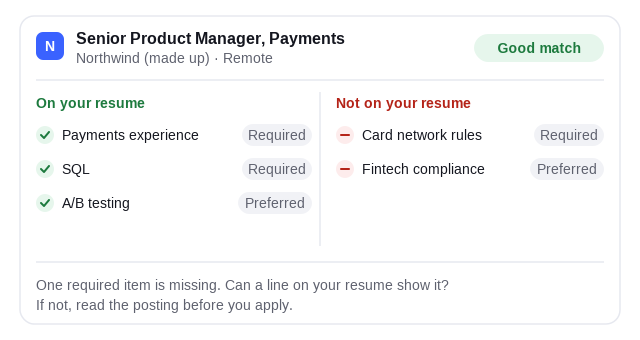
An illustration of a match that shows its reasons. The job and company are made up. Where do its jobs come from, and are closed ones removed?
Jobscan, Jobright, Kickresume and ResumeCoach don't name their job sources on their matcher pages. ResumeCoach says its listings come from real job platforms, without saying which. Ask how often listings are checked, because a job that closed last month costs you an evening.
What happens to your resume after you upload it?
Find the privacy page before you upload. Kickresume says it doesn't share resumes with recruiters or job sites, and that it's based and hosted in the EU, where GDPR applies. Remote Rocketship says it deletes the file after reading it if you're not signed in, and never sends resumes to employers. If you can't find a privacy page, don't upload.
What's free, and what needs an account?
Remote Rocketship shows your top matches without signing up. ResumeCoach says its core features are free, including search and match scores, with Premium for all results and filters. Resume Atlas is free with no sign-up, for 2 checks a day. Kickresume has a free plan, though its pricing page doesn't list the matcher in any plan. Jobright's matcher page says it offers different plans, without prices.
Does it cover the jobs you want?
Some tools focus on part of the market. Remote Rocketship shows remote jobs by default, and Jobright's location field starts at the United States. If you want on-site jobs, or jobs in another country, check that first.

Finding jobs that match your resume, do this, not that.
Do
- Search from one up-to-date resume.
- Search every common name for your title.
- Read the required list before the rest.
- Apply to the strongest few, with care.
- Read why a job matched, not just the score.
- Find the privacy page before you upload.
Don't
- Trust a score over the posting itself.
- Apply to everything a tool suggests.
- Skip a job for missing one preferred item.
- Add skills you don't have to raise a score.
- Search one name for your title and stop.
- Spend an evening on listings you haven't checked are still open.
Questions about finding jobs based on your resume.
Is it safe to upload my resume to a job matching site?
It can be, if the site says what it does with your file. Kickresume says it doesn't share resumes with recruiters or job sites. Remote Rocketship says it deletes the file after reading it if you're not signed in. On LinkedIn, hirers don't see your job match level. If you can't find a privacy page, don't upload, and leave your home address and date of birth off any resume you share.
Is there a website that finds jobs based on your resume?
Yes, several. Indeed says its recommendations use your activity, preferences and resume. Jobscan, Jobright, Kickresume, ResumeCoach and Remote Rocketship each match your resume to openings and show a score or label. On Blynk's Find Jobs, you describe your dream job or upload your resume, and every job gets a match score against your resume. Whichever you use, read why each job matched before you apply.
Can I find jobs based on my resume for free?
Yes. The six steps on this page cost nothing. Remote Rocketship shows top matches without signing up, ResumeCoach's search and match scores are free, and Resume Atlas gives 2 free checks a day. LinkedIn says Premium members get a job match level.
What is the best AI job finder?
Look for one that shows why each job matched and what's missing. It should also say where its jobs come from and how often it checks them, and what happens to your resume. Use the five checks above on any tool you try. Our guide to the best AI tools for job search compares them side by side.
Do AI job matching tools work?
They work as a way to sort. They compare the words on your resume with each posting, so they're quick at putting likely fits on top. They can't see what your resume leaves out, and none we read says its score predicts an interview. ResumeCoach says plainly that its score doesn't. We found no independent test of any tool's accuracy.
How is a match score calculated?
It depends on the tool, and most explain only part of it. Remote Rocketship counts how many of a job's keywords your resume covers, up to 28. Jobright looks at experience, skills, seniority and industry. LinkedIn compares your profile and resume with the posting's required and preferred qualifications and its screening questions.
Can I upload my resume to Indeed or LinkedIn to find jobs?
On Indeed, yes. Indeed says its recommendations use your resume along with your activity and preferences, and that uploading a current resume improves them. LinkedIn's help page on job recommendations names your profile and Open to Work preferences, not a resume. For a single job, LinkedIn's match rating uses your profile and resume.
What jobs am I qualified for with my experience?
Start with the titles you've held and the next one up, under each of their names. Then keep the jobs where you meet most of the required list and can show each with a line on your resume. Treat preferred items as a bonus. In about half of the senior product postings we counted, at least one thing was marked preferred or a plus.
Will job matching work if I'm changing careers or my resume is thin?
Usually less well, in our reading, because a matcher reads what's written. Search the title you want next yourself, with the skills you've really used, and put those skills near the top of your resume. Our career change resume guide shows how. A thin resume matches better once each skill sits in a sentence about real work.
Should I apply if I don't meet every requirement?
Often, yes. About half of 1,102 postings we counted, mostly senior product roles, mark something as preferred or a plus, so not every line is a must. The popular 60% rule traces to an internal Hewlett Packard report, not a published study. Our rule is to apply when you meet most of the required list and can show it. Skip a job if you lack the one thing it's built around.
Where the facts come from.
Checked November 12, 2026. The method and the rules of thumb are ours. Facts about LinkedIn, Indeed, O*NET, CareerOneStop and each matching tool come from their own pages on that date. The posting counts are Blynk's own. We read 1,102 job postings with full descriptions from Blynk's searches, mostly for senior product roles at about 700 companies, first seen between October 31 and November 11, 2026. A text search counted postings that mark something they ask for as preferred, nice to have, a plus or bonus points, and we checked 70 of its matches by eye. It misses softer wording such as “ideally.” The 13 spellings count only titles that are exactly VP or Vice President of Product, Products or Product Management, ignoring capital letters.
- Best AI tools for job search
- Best job search apps
- Resume keywords
- Tailor your resume to a job description
- Why am I not getting interviews
- Blynk vs Jobright
- Blynk vs Kickresume
- Blynk vs Jobscan
- The best job search engines
- LinkedIn Help, how job match ratings are calculated
- LinkedIn Help, job recommendations
- Indeed Help, search results and recommendations
- O*NET OnLine, Software Developers and their reported job titles
- CareerOneStop, write your resume for current hiring practices
- Jobright AI Job Matcher
- Jobright homepage
- Kickresume AI Job Matcher
- Kickresume pricing
- ResumeCoach Job Match
- Remote Rocketship resume job matches
- Jobscan job search
- Resume Atlas, what jobs should I apply for
- Harvard Business Review, Tara Sophia Mohr (2014)
- Blynk Find Jobs
- Blynk pricing
