
iCIMS application status, explained. What each one means, and where to check it.
If you applied on a company's iCIMS careers site and keep seeing the same "Under Review", you're not alone. The employer picks the label you see, and iCIMS shows "Under Review" for any step it didn't name. Here's what each status means, which ones carry news, and where to check.

The short answer
- The status is the employer's label, not a verdict. Each company names its own steps in iCIMS, and any step it didn't name shows as "Under Review". So that label alone can't tell you if anyone has read your application.
- Only a few statuses carry news: a further step such as an interview, an offer, and the closed ones such as Not Selected or Withdrawn. "Continue Application" means you never finished it. Anything else means still open.
- There's no single iCIMS login. Sign in on that company's own careers site with the email you applied with, check your email (spam folder too), and keep applying while you wait.
On this page
Why iCIMS statuses confuse everyone, and what's really going on.
Two worries come up again and again, and both have a plain answer.
“Is this a rejection?”
Not on its own, and silence isn't one either. A no comes as a closed label or an email, and some employers send few emails: OHSU says it may contact only the applicants it picks for an interview.
What to do: Learn the few labels that mean closed. They're grouped below.
“I applied as a guest.”
iCIMS says you can't apply as a guest, so you already have a profile at that company, under the email you used.
What to do: Find it with your email. Step 4 below shows how.
How to check your iCIMS job application status, on the employer's own site.
Your status lives on the company's careers site, not on icims.com.
Go to that company's own careers site
iCIMS says you check your status on "the career site of the company you are applying to". The quickest way back is the link in your confirmation email, or the job link you applied from. Each company's site looks a little different.
What the address looks like. In the job links Blynk's searches collect, many iCIMS sites look like careers-[company].icims.com, but some sit on the employer's own domain.Sign in with the email you applied with
Returning candidates choose Log Back In, at the top right. Some sites also offer sign-in with Facebook, Google, LinkedIn or Microsoft. Per iCIMS's help, the system doesn't allow two profiles with the same email address.
Open your Dashboard and find the job
The Dashboard link is at the top right. iCIMS says it lists every position you applied to, with each one's status, often under Past Job Submittals. A Withdraw button may appear next to finished ones. Where the employer uses it, an Offers section holds your offer letter.
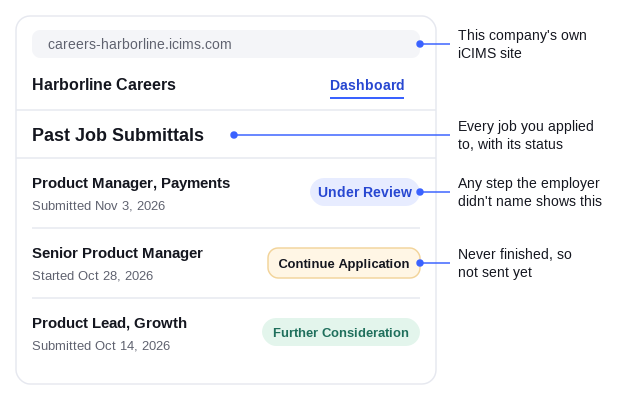
An illustration of an iCIMS Dashboard. The employer is made up, and each employer's page looks a little different. Think you applied as a guest? Find your profile
iCIMS doesn't allow guest applications, so you have a profile at that company. Enter the email you used on its site, and the system will tell you if it's attached to a profile. Then use Reset your password, and check spam for the email.
Watch your email, spam folder included
iCIMS says each company sends from its own address, and that confirmations and interview invitations can land in spam. Don't unsubscribe from all mass email: iCIMS warns you'd then miss notices about interviews.
Take questions to the company, not iCIMS
iCIMS says it "is unauthorized to update or delete job applicant data". Its help sends you to the company you applied to with any question about your status.

Where is the iCIMS portal and login? There's one on each employer's site.
There's no single iCIMS login for job seekers. When we searched for an iCIMS login or portal in November 2026, the top results were sign-in pages for employers' staff, for buyers of iCIMS apps and for iCIMS's community site. None of them shows your applications.
Your portal is the employer's careers site, where your Dashboard is. Our reading: treat each company's profile as separate. Our advice: apply everywhere with the same email, and keep each confirmation email as your way back.
iCIMS statuses that mean "still open", and what each one tells you.
Submission received, or Received Submission. Your application arrived. At OHSU, it means "Your application was successfully submitted." At Spectrum, it means you've submitted an application for the role.
Under Review. Still open. At OHSU and Spectrum, it means your application is being reviewed; at Auburn, it covers four steps, shown in the stages below.
Under Consideration. Still open. OHSU's own text for Under review says you're "under consideration for this job", so our reading is that the two are the same news.
Submitted - Under Review. No iCIMS page we found tells it apart from Under Review. Read both as still open.
Assessment. Still open, and it may need you. At Spectrum, some assessments start when you apply and can be picked up again with Continue Application. Our reading: finish it, since it's often the step holding you up.
Hidden, often with a number. A step that isn't shown to you, and not a yes or a no. More in the questions below.
Not a status: Continue Application. That button means you never finished the application. Finish it today.
iCIMS statuses that carry real news, good or bad.
Further Consideration, Interview or Interview Scheduled. A step forward. At Auburn, interview scheduling through selection for hire shows as Further Consideration, so you may never see the word Interview. Our reading: where an employer does show it, you've reached that step; look for the invitation in your email, spam folder included.
Verbal Offer, Offer, Onboarding or Hired. The late steps, in Auburn's order. If you see one, you're near the end, or there.
Pending. At Spectrum, Pending means "You have an offer pending to be viewed." Our reading: another employer could use the word for something else.
In process. At OHSU, it means "You accepted a verbal offer for this job." On many Workday sites, In Process only means still open. Same words, very different news.
Not selected. Closed. OHSU has three versions: Reviewed, not selected; Interviewed, not selected; and Not reviewed, for applications that came after the pool was narrowed. Our reading: No Longer Under Consideration means the same.
Closed, Position Filled or Inactive. No employer page we found defines these. Our reading: they describe the job rather than you, and this application is over; OHSU notes its status "will be updated soon".
Withdrawn; Contacted, no response; Interview, no show. Closed. OHSU uses all three. If you see one of the last two and think it's a mistake, write to the recruiter now.
What "Under Review" means on iCIMS, and whether anyone has looked.
iCIMS shows it by default. iCIMS's admin documentation says that any step without a label set for candidates "will display as 'Under Review'". Employers set those labels status by status.
Some employers describe a person. Spectrum says Under review means you're "actively being reviewed and considered by a recruiter or a hiring manager." OHSU says your qualifications are being reviewed. At Auburn, though, it stays Under Review even after a phone screen.
So, is it good? Yes, in that it's still open. But the label alone can't tell you whether a person has read your application yet. Our guide on what "under review" means covers other hiring systems.
The stages of an iCIMS application, at one employer that publishes them.
Each employer builds its own workflow in iCIMS. Our reading: most follow a similar order of review, screen, interview, offer and hire. Auburn University publishes its staff workflow, and what candidates see at each step.
Received, reviewed and screened
Application Received, then Reviewed by Talent Acquisition, then Screened by Talent Acquisition, after a phone screen. You see: Under Review.
Search committee review
Search Committee Review comes next. You still see: Under Review.
Interview and selection
Interview Scheduler, Interview Scheduled, Selected for Hire and the pay approvals. You see: Further Consideration.
Verbal offer
Verbal Offer Accepted and pre-screening. You see: Verbal Offer.
Offer, onboarding and hire
You see Offer, then Onboarding, then Hired.
Why your iCIMS status hasn't changed, and how long to wait.
OHSU gives three reasons. If your status hasn't changed, the hiring manager may not have reviewed applications yet, or may be waiting for more applicants. Or the job is filled, and the system "will be updated soon".
OHSU says to allow six to eight weeks to be contacted or to see a change. It's the only wait we found from a real source.
The no can come late. At Auburn, the disposition emails go out when the chosen candidate acknowledges the offer. Our reading: so a no can arrive long after the decision.
Did it go back to Under Review? Our reading: Under Review is iCIMS's default for any step the employer didn't label, so a move to one of those steps can look like a step back. It isn't a sign either way.
Other waits you'll read online, like 1 to 2 weeks or a 24 to 48 hour lag, have no source we could find.
What to do while you wait, in four steps.
Our advice. None of it needs the Dashboard to change.
Write to a person after a week or two
A short note to the recruiter or the hiring manager does more than another look at the Dashboard. Our guides show how to find the hiring manager and what to say in a follow-up email after applying. Or paste the job link into Blynk's hiring manager finder, which works for jobs you've already applied to.
Keep applying to jobs you fit
One status shouldn't pause your search. Keep a few good applications going each week, each one made for its job.
Keep your own record
Write down the role, the date, the email you used and the careers link. The Dashboard can lag behind the decision. A simple job application tracker is enough.
Decide when to move on
Our rule of thumb: once the employer's own wait has passed, or after a month with no change and no reply, count it as closed in your plan. Don't withdraw unless you've taken another job. If they come back, you're still in.
Is iCIMS a job board? What "iCIMS jobs" really means.
iCIMS is hiring software, not a job board. iCIMS describes itself as an enterprise applicant tracking system and AI-powered recruitment software. It says more than 4,400 companies in 200 countries use it, including a quarter of the Fortune 500.
So iCIMS jobs are employers' jobs. Each company posts its jobs on its own iCIMS careers site, and you apply there. Auburn University, OHSU and Spectrum are examples. Jobs at iCIMS itself are on careers.icims.com.
Is it legit? iCIMS is a real company, and its customers post their own jobs. Our advice: start from the company's own careers page and follow its link to apply.
Questions about iCIMS application status, answered.
Is it good if your application is under review?
Yes, in that it's still open: Under Review isn't a rejection. But iCIMS shows it for any step an employer didn't label, so it can't tell you whether a person has read your application yet.
Does iCIMS send rejection emails?
It depends on the employer: each company decides what to send, from its own email address. At Auburn, the disposition emails go out when the chosen candidate acknowledges the offer, which can be long after you applied.
How do you know if your application is rejected?
Look for a closed label, such as OHSU's Reviewed, not selected, or an email from the company, in your spam folder too. Silence alone isn't a no; our advice on when to move on is above.
What does the "not selected" status mean in iCIMS?
Your application for that job is closed: the employer has moved on. Our reading: it's about that one job, so the company's other roles are still open to you.
What does "hidden status" mean in iCIMS?
iCIMS's admin documentation says a hidden status shows as "Hidden (List Node ID)" instead of its name, to the people it's hidden from. Our reading: it's a step the employer chose not to show you, or a retired one. No iCIMS page says which, so it's not a yes or a no on its own.
How to check application status on iCIMS?
Sign in on the careers site of the company you applied to, using Log Back In and the email you applied with. Then open your Dashboard, which lists each job you applied to and its status.
Can I check my iCIMS status without an account?
No, and you have one already: iCIMS doesn't allow guest applications. Enter the email you used on that company's site to find your profile, then reset your password.
Is iCIMS an applicant tracking system?
Yes: iCIMS's own site calls it an applicant tracking system. You see it as the employer's careers site and your Dashboard.
Is iCIMS better than Workday?
For a job seeker, neither is better: the employer chooses, not you. Both work the same way for you, with a careers site per employer and labels the employer picks. Our guide to Workday application status covers the other one.
What does iCIMS stand for?
iCIMS's own website doesn't explain the name, and we found no iCIMS page that does. Some other sites give a long form, without a source.
Where the facts come from.
Checked in November 2026. The advice is ours, and so is anything marked as our reading. How iCIMS works comes from iCIMS's own pages; two admin articles sit behind a login, so their wording comes from search results. Status meanings come from the employers named. The address pattern comes from job links in Blynk's searches.
- Workday application status, explained
- What "under review" means on a job application
- How does an ATS work
- Follow-up email after applying
- Free job application tracker template
- How to find the hiring manager
- How to withdraw an application
- What shortlisted means
- iCIMS Job Seeker Help
- iCIMS Community: Candidate Guide to the iCIMS Talent Platform
- iCIMS Community: configuring candidate-facing status information (sign-in required)
- iCIMS Community: creating a new recruiting workflow status (sign-in required)
- iCIMS: company website
- Auburn University HR: iCIMS hiring workflows (PDF, March 2026)
- OHSU Human Resources: applying online
- OHSU Human Resources: frequently asked questions
- Spectrum Careers: application, assessment and interview process
- Blynk Job Tracker
- Blynk pricing
- Blynk Find the Hiring Manager
