
Is LinkedIn Premium worth it? A ten-minute test for your own job search.
If you keep seeing "Try Premium for $0" and wonder whether paying will get you noticed, you're not alone. We read LinkedIn's own pricing and help pages, including the fine print most reviews skip, and turned them into a quick test for your search.

The short answer
- LinkedIn Premium Career costs $39.99 a month in the US, or $239.88 a year, on LinkedIn's own page (prices last updated April 20, 2026). Several reviews still show $29.99.
- It's worth it for a short, active search if you'll use what only Premium gives, every week. That means InMail to people you can't reach another way, and applicant insights on the jobs you want.
- Otherwise the free account does most of the work. If you take the free trial, don't cancel it on day one, because LinkedIn ends a cancelled trial at once. Set a reminder two or three days before it renews.
On this page
Is LinkedIn Premium worth it? Four worries, and what LinkedIn's own pages say.
The questions people ask before they upgrade, each answered from LinkedIn's help pages, checked in November 2026.
“I keep seeing Try Premium for $0.”
The trial is real, but it has a rule most people miss. LinkedIn says that if you cancel a free trial, it ends right away, not at the end of the trial. And you can't start another free trial for at least 12 months.
What to do: Don't cancel early to be safe. Set a calendar reminder two or three days before the trial ends instead.
“Do recruiters see me more if I pay?”
LinkedIn's Top applicant page says Premium Career subscribers who apply to Top applicant jobs "receive 8x more recruiter views on average" (LinkedIn data, January 2024). The page also says they're "2.3x more likely on average to receive recruiter views" (November 2024). These are LinkedIn's own figures, with no method given. The gold Premium badge shows on your profile and next to your name in search results only if you switch it on. LinkedIn also says hirers "will not see your job match level or summary".
What to do: Pay for what you'll use. LinkedIn's recruiter view figures are for Top applicant jobs, so check that your target jobs show that label (step 2).
“Are InMails worth it?”
Premium Career gives you 5 InMail credits a month. A credit comes back only when the person accepts, declines or replies within 90 days. So think of it as 5 tries a month, refunded when people answer.
What to do: Count the people first. If you can't name five people you'd message this month, InMail isn't the reason to pay.
“Is it worth $40 a month while I'm out of work?”
Only if you'll use it hard for a short time. LinkedIn says a charge may be refundable within 7 days, and only without Premium usage. So a forgotten month is usually a paid month.
What to do: Plan one focused month. Decide what you'll use it for before the trial starts, then check at week three.
What LinkedIn Premium Career gives job seekers, feature by feature.
Premium Career is LinkedIn's plan for the active job seeker. Here are its key features in LinkedIn's words, with the rule on its help pages that decides whether it works for you.
Top Applicant jobs. These are jobs where LinkedIn says you're "among the top 50% of candidates". The label shows only when the role has at least 10 applicants and you're in the top half. It may not show if you've already applied to them all. LinkedIn's job recommendations for Premium members also weigh how likely a recruiter is to respond, based on feedback on similar jobs.
Applicant insights. On a job post, you see how many people applied, their top skills and education, and your ranking as a percentage if you're in the top half. They appear only once a job has at least 3 applicants. If the job takes applications on another site, the count is people who clicked Apply, not finished applications. LinkedIn notes the ranking is "not endorsed by the hiring company".
Top Choice. You can mark up to 3 jobs a month as your top choice, and the job poster sees it. LinkedIn says it's "available only to a select group" of Premium subscribers, on "a limited number of Easy Apply jobs", and unused ones don't roll over.
InMail. You get 5 credits a month to message people outside your network, and you can save up to 15. You can't send a second InMail to the same person until they reply. If you cancel Premium, your balance goes to zero.
The rest of LinkedIn Premium, and the one thing it does best.
Who viewed your profile. Premium shows the full list for up to 365 days, with trends and filters. You can also browse other profiles privately. Nobody, even on Premium, can see viewers who used private mode.
Unlimited personal invitations. A free account can add a note to only 3 connection requests a month. Premium lifts that limit, which matters if you're networking hard.
Advanced search filters. Premium adds advanced search filters, like jobs with fewer than 10 applicants, and an Actively hiring filter when you search for people.
AI tools. Premium also adds AI insights on job posts, resume tips against a job and help writing your profile. LinkedIn says these work in English and "may contain inaccuracies", so check what they suggest. Some features are US only.
LinkedIn Learning. Premium Career includes LinkedIn's course library, which its Premium page puts at over 25,000 courses.
What it does best, in our reading. Premium tells you where you stand against other applicants, and it gives you a way to message people outside your network. Free LinkedIn doesn't do either. If those two things would change how you search, Premium can earn its price.
What free LinkedIn already gives you, before you pay for Premium.
Much of what helps a job search is already in the free version. These come from LinkedIn's own help pages.
Job search and Easy Apply. Searching on the Jobs page doesn't count toward the free account's monthly search limit. You can save up to three job searches with weekly alerts. Our guide to Easy Apply or the company site covers how to choose for each job.
The hiring team. Some job posts show a "Meet the hiring team" section, where you can connect with and message the people listed, including the job poster.
Notes and Open Profiles. You can add a note to 3 connection requests a month. Premium members who turn on Open Profile can get messages without InMail, and free members get a limited number of those a month.
Open to Work and profile views. You can show Open to Work to everyone or to recruiters only. LinkedIn tries to hide it from your current company's recruiters, but says it can't guarantee complete privacy. You also see your three most recent viewers from the last 90 days, if your own setting shows your name and headline.
Is LinkedIn Premium worth it for job seekers? A ten-minute test for your search.
Do this before the trial period starts, with LinkedIn open. Each step uses LinkedIn's own rules, so you decide whether upgrading is worth it for your search, not someone else's.
Name the people you'd message this month
Write down who you'd send an InMail to. Then check if you could reach each one another way, through the hiring team on a job post, a connection note or a work email. InMail is worth paying for only for the people left on your list.
Our math. At $39.99 for 5 credits, each InMail try costs about $8. A credit comes back when the person answers, so replies make it cheaper. If your list has fewer than five names, InMail alone won't justify the price.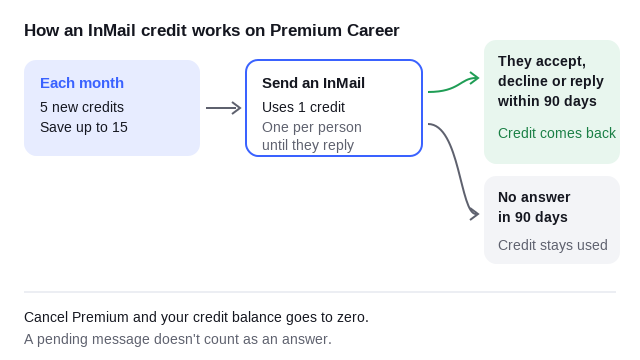
How an InMail credit comes back, from LinkedIn Help (checked November 2026). Open three target jobs and see what Premium would show
Pick three jobs you'd really apply to. Look at how many people have applied. Applicant insights appear only after 3 applicants, and Top Applicant needs at least 10 applicants, with you in the top half. If your jobs are very new or very niche, the insights may not show at all.
Check where the job takes applications. If the Apply button goes to the company's own site, LinkedIn's applicant count is people who clicked Apply, not people who finished applying.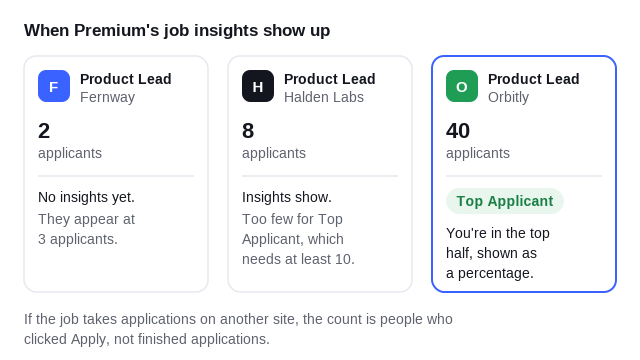
An illustration of when Premium's job insights show up. The companies are made up, and LinkedIn's layout may differ. Decide if you'll use LinkedIn Learning
If you'd take a course this month, to learn a skill your target jobs ask for or fill gaps in your experience, Learning adds real value. LinkedIn says there's no separate Learning plan for individuals, and Premium Career is the closest. If you won't open a course, leave it out of the math.
Price it against how long you'll search
Monthly is $39.99. Yearly is $239.88, billed annually, which LinkedIn calls a 50% saving. By our math, the yearly plan costs about the same as six months paid monthly. So it only saves money if you'll keep Premium for more than six months.
Start the free trial with a reminder, not a cancel
LinkedIn says cancelling a free trial ends Premium right away. It also sends a reminder email before the trial ends only if you signed up on the desktop site. So put a reminder in your calendar two or three days before the end date, and cancel at least one day before you'd be billed. Don't switch plans during the trial either, as that ends the trial and billing starts that day.
Check at week three, then keep or cancel
This is our advice. Count the InMails that got an answer, the Top Applicant jobs you applied to and any course you finished. If the list is short, cancel before the next charge. If it's working, keep it until your job hunting is over, then cancel when you're hired.


The rule in one line. Pay for LinkedIn Premium when you can name the people you'd InMail and your target jobs show insights. Otherwise, the free account and direct emails do most of the work.
Does LinkedIn Premium help you get hired? What LinkedIn's own numbers say.
LinkedIn publishes success numbers for Premium, and they're worth reading closely. Its pages give different figures, some from different years.
Getting hired. The Premium Career page says subscribers are "2.7x more likely to get hired on average" (LinkedIn data, January 2022). A LinkedIn help page says "2.6 times".
Recruiter views. The Top applicant page says Premium Career subscribers who apply to those jobs "receive 8x more recruiter views on average" (January 2024). The same page says they're "2.3x more likely on average to receive recruiter views" (November 2024).
Top Choice. The Premium Career page says Top Choice users are "2x more likely to receive a message back from a recruiter" (June 2026). Another Premium page says "43% more likely" (January 2024).
InMail and courses. The Premium pages say an InMail is "5.7x" more likely to get a reply than cold email, while a help page says "4.6x". The course library is "25,000+" on one page and "over 21,000" on another.
Our reading. None of these numbers comes with a method. People who pay for Premium are likely the most active job seekers, so the numbers can't show how much Premium itself caused. That doesn't mean it doesn't help. It means your own week-three check is a better guide than any of them.
Is LinkedIn still worth it for job seekers in 2026?
Does LinkedIn really work for job seekers? It's a big part of the job market, by LinkedIn's own count. Its about page says about 9,000 job applications are submitted on it every minute. Our advice is to use it to find the job and the people hiring, then apply the way each job asks.
Is LinkedIn still relevant in 2026? By its own count, yes. LinkedIn says it has over 1.4 billion members and 71 million companies on the site. Those are LinkedIn's figures, and the page doesn't give a date.
Why are people getting rid of LinkedIn? We found no survey that measures why people leave, so any reason you read is opinion. If the reason is the cost of Premium, you don't have to leave. You can cancel Premium and keep the free account, with your profile and connections.
What is replacing LinkedIn? We found no source showing that anything has replaced it. For a job search, the other routes work alongside it, like job boards, company career sites and a short email to the person hiring.
LinkedIn Premium InMail or an email, which reaches the hiring manager?
InMail is good for one thing. It lets you send direct messages to someone outside your network who hasn't accepted a connection request, without needing their email. For hiring managers at a company you really want, that can be worth a credit.
The other route is a short email. Find the person who's hiring, check their work email, then write a few lines about the job. You'll rarely get the address from the job post, because employers seldom list one. Of 1,477 job postings from Blynk's searches, 89 gave any email address, and only about 5 gave what looks like a person's.
Which gets more replies? We found no reliable source that compares the two, so we won't claim one wins. Our advice is to use both, with InMail for the few you can't find an address for. Our guide to finding the hiring manager shows the steps by hand.
How to cancel LinkedIn Premium before the free trial renews.
On a computer. Click Me at the top of LinkedIn, then Premium features, then Manage subscription. In the Admin Center, open Purchases, choose your subscription, then click Cancel subscription and confirm. Do it at least one day before your billing date.
On a phone. If you bought Premium through the iPhone App Store, cancel through Apple. If you bought it through Google Play, cancel in the LinkedIn app, on the desktop site or in Google Play. LinkedIn says some US and German subscriptions can be cancelled without signing in.
What happens next. A paid subscription stays active until the end of the billing cycle. A free trial ends straight away, and you can't get another one for at least 12 months. You keep your profile and connections. You lose saved InMail credits, which can't be credited back, plus the full viewer list and Learning, so another option is to downgrade instead, on desktop only.
Refunds. LinkedIn says Premium may be refundable within 7 days of the charge, without Premium usage. Apple purchases are refunded by Apple, and the EU has its own 14-day rule.
LinkedIn Premium for your job search, do this, not that.
The whole page, in one list.
Do
- Run the ten-minute test before the trial starts.
- Set a reminder two or three days before the trial ends.
- Spend InMail credits on people you've named.
- Write each InMail like a short email to one person.
- Check what's working at week three.
- Cancel when your search is over.
Don't
- Cancel the trial on day one to be safe.
- Switch plans during the free trial.
- Pay for months you don't use.
- Send the same InMail to ten people.
- Judge Premium by a number instead of your own week-three check.
Questions about LinkedIn Premium, answered.
Do recruiters see that I have LinkedIn Premium?
Only if you want them to. The gold Premium badge shows on your profile and next to your name in search results when you switch it on, and you can switch it off. LinkedIn says hirers don't see your job match level. If you mark a job as your Top Choice, the job poster sees that. LinkedIn says Premium Career subscribers get more recruiter views on Top applicant jobs, by its own figures, but its pages don't say recruiters rank or filter people by Premium.
How can I get LinkedIn Premium free, even for a year?
We found no one-year free offer on LinkedIn's pages. LinkedIn says Premium may be available to try free for one month, the length can vary by region or offer, you need a valid card, and it turns into a paid plan unless you cancel. Not everyone qualifies, for example if you've had a trial before. Partner offers are longer, like three months of Premium Career free for paid Adobe Creative Cloud members who haven't tried Premium. We found no student discount, so for students the same ten-minute test applies.
What is the 3/2/1 rule on LinkedIn?
It isn't a LinkedIn rule. LinkedIn's help pages don't mention it, and we found no official source that defines it. For a job search, the limits worth knowing are LinkedIn's own. A free account can add a note to 3 connection requests a month, Premium Career gives 5 InMail credits a month, and Top Choice lets you mark up to 3 jobs a month.
Does LinkedIn Premium help you get a job faster?
LinkedIn says so. Its Premium Career page says subscribers are "2.7x more likely to get hired on average" (LinkedIn data, January 2022), and a help page says 2.6 times. Neither gives a method, and people who pay are likely the most active searchers. LinkedIn doesn't guarantee a job or interviews. Our advice is to judge it by your own results at week three.
How much does LinkedIn Premium Career cost?
In the US, $39.99 a month or $239.88 a year, which LinkedIn calls a 50% saving with annual billing. In the UK it's £29.99 a month, in Canada C$49.99 and in Australia A$54.99. A Duo plan for two people is $59.98 a month in the US. LinkedIn calls these current prices estimates, which may not include tax. Its page says prices were last updated April 20, 2026, so older reviews showing $29.99 are out of date.
Can I cancel LinkedIn Premium anytime, and get a refund?
Yes, you can cancel at any time. A paid plan runs to the end of the billing cycle, but a free trial ends straight away when you cancel. LinkedIn says a charge may be refundable within 7 days, without Premium usage. The steps are in the cancel section above.
How many InMails do you get with Premium Career?
5 a month, and you can save up to 15. A credit comes back if the person accepts, declines or replies within 90 days, and a pending message doesn't count. You can send only one InMail to a person until they reply. For comparison, Premium Business gives 15 a month and Sales Navigator Core gives 50.
What's the difference between Premium Career and Premium Business?
Career is LinkedIn's plan for job seekers, at $39.99 a month in the US. Business is the next tier up. It costs $69.99 a month or $539.88 a year and adds 15 InMail credits a month, unlimited people search and business insights. For a job search, our reading is that Business mostly buys more InMails and searches. Sales Navigator is a tool for sales professionals, from $119.99 a month, and Recruiter Lite is a plan for recruiters.
Does LinkedIn Premium include LinkedIn Learning?
Yes, Premium Career includes LinkedIn Learning. Its Premium page says over 25,000 courses, and a help page says over 21,000. LinkedIn says there's no separate Learning plan for individuals, and Premium Career is the closest. If you'd use courses every week for professional development, that alone can make Premium worth it for you.
What do people on Reddit say about LinkedIn Premium?
Opinions are mixed, and we couldn't read the threads in full. In the search previews we saw, the success stories were mostly InMails to specific people at target companies, and Top Applicant for choosing where to apply. The common complaint was paying for months people forgot to cancel. No reliable count exists, so treat any "most people say" figure with care.
Where the facts come from.
Checked on November 12, 2026. The advice and arithmetic are ours. Facts about LinkedIn come from its own pricing, help and about pages, which can change. The job-posting count is Blynk's own. It covers all 1,477 job postings from Blynk's searches, mostly senior product roles, first seen October 31 to November 11, 2026, searched for email addresses with each match read by eye. It shows only what postings say, not which way of reaching people works better.
- How to find the hiring manager
- How to reach out to a recruiter
- LinkedIn Easy Apply or the company site
- Cold email for a job
- Blynk vs LinkedIn Premium
- LinkedIn Premium Career (prices, features and success figures)
- LinkedIn Premium, get hired faster
- LinkedIn Premium, Top applicant jobs (recruiter views)
- LinkedIn Premium, compare free and Career plans
- LinkedIn Premium Business
- LinkedIn Help, InMail credits
- LinkedIn Help, applicant insights
- LinkedIn Help, Top Applicant jobs
- LinkedIn Help, Top Choice jobs
- LinkedIn Help, job match
- LinkedIn Help, Top Applicant recommendations
- LinkedIn Help, the Actively hiring people filter
- LinkedIn Help, AI job insights
- LinkedIn Help, resume tips with Premium
- LinkedIn Help, free and Premium accounts
- LinkedIn Help, Premium Career overview
- LinkedIn Help, InMail compared with cold email
- LinkedIn Help, who viewed your profile
- LinkedIn Help, private mode viewers
- LinkedIn Help, the Premium badge
- LinkedIn Help, Open Profile
- LinkedIn Help, personalized invitations
- LinkedIn Help, the commercial use limit
- LinkedIn Help, Meet the hiring team
- LinkedIn Help, Open to Work
- LinkedIn Help, cancel your Premium subscription
- LinkedIn Help, cancelling Premium questions
- LinkedIn Help, Premium free trials
- LinkedIn Help, free trial reminder email
- LinkedIn Help, switching plans during a trial
- LinkedIn Help, Premium refunds
- LinkedIn Help, Premium Career offers and topics
- LinkedIn Sales Navigator plans
- LinkedIn, about us (members, companies, applications a minute)
- LinkedIn Help, Adobe Creative Cloud offer of Premium Career
