
LinkedIn Easy Apply or the company site? How to choose for each job, and when it matters.
If you've clicked Easy Apply on dozens of jobs and heard little back, it's fair to wonder if the button is the problem. Usually it's not the button. It's which jobs you use it for. Here's what Easy Apply sends, where it goes, and a simple way to choose for each job.

The short answer
- Easy Apply lets you apply without leaving LinkedIn, with your profile and a resume you upload. The plain Apply button takes you to the company's site or a job board. The employer chooses which one you see.
- Use Easy Apply when it's the only way in, when the posting asks for it, or for a quick try at a job that's a maybe.
- Use the company site for the jobs you want most, with a resume made for that job and, usually, room for a cover letter and the employer's own questions.
On this page
Why Easy Apply can feel like it goes nowhere, and what's really happening.
Four common frustrations with LinkedIn Easy Apply, what's true behind each one, and what to do about it.
“I click Easy Apply and never hear back.”
You're rarely alone in the pile. LinkedIn says it "does not prevent unqualified applicants from applying". It also tells employers Easy Apply brings in more applicants. A quick button brings in a lot of quick applications.
Fix: Save your best effort for jobs you really fit. A few strong applications stand out more than many quick ones.
“Does it even reach the company's system?”
It depends on the employer. Some connect their hiring system to LinkedIn, so an Easy Apply application lands there, next to everyone who applied on the company site. Others review applications on LinkedIn itself.
Fix: Read the job post before you choose. It often tells you how the employer handles applications. How to read it is below.
“The company site means doing it all twice.”
Clicking Apply can mean a new account, a new upload and the same work history typed in again. That's real effort, and it's why most people don't do it for every job.
Fix: Do it only for the jobs that matter most. Four quick checks tell you which ones those are.
“A screening question knocked me out.”
Employers can add questions to an Easy Apply job and mark them "Must-have". LinkedIn lets them automatically archive anyone who doesn't pass and send an automatic rejection email.
Fix: Answer every question honestly and completely. It may be the first thing anyone, or anything, checks.
What LinkedIn Easy Apply is, and what happens when you click it.
Easy Apply means you apply on LinkedIn itself. LinkedIn says that, depending on the employer's settings, you'll see either an Easy Apply button or an Apply button. Easy Apply lets you apply without leaving LinkedIn. The Apply button sends you to the company's website or job board.
When you click it, a short form opens over the job post. You go through a few screens, check your details, upload a resume, answer any questions, then Review and Submit. It works in a desktop browser or the LinkedIn app.
What the employer gets: your application, sent to the job poster, which may include relevant skills from your profile. You can choose whether to share your full profile. LinkedIn may also save your resume and answers to fill in later forms. If the poster is a recruiting agency, it may share your application with its other clients.
The resume is up to you. Under Resume, you can upload a new file each time (Word or PDF, under 2MB is best). LinkedIn keeps your four most recent uploads. So you can send a resume made for this job, even through Easy Apply.
To find Easy Apply jobs, use LinkedIn's own page of Easy Apply jobs.
Where an Easy Apply application goes: it depends on the employer.
This is the part most advice gets wrong, in both directions. Some say Easy Apply skips the employer's system. Others say it always lands in the same place. Neither is true for every job.
To the job poster. Unless the employer has connected its hiring system, LinkedIn sends your application to the job poster.
In the employer's own hiring system. Employers whose hiring software is connected to LinkedIn get Easy Apply applications sent straight into it. LinkedIn's Apply Connect guide says partners "receive all job applications directly into your ATS". An ATS is the employer's applicant tracking system, where it keeps every application. Lever, one such system, says the link "optionally enables 'Easy Apply' on LinkedIn".
Not every employer connects. It takes setup, and the full link needs one of LinkedIn's Recruiter plans. One clue on the job post: LinkedIn shows "Responses managed off LinkedIn" when the hiring process runs in an outside system.
When Easy Apply is the better choice, and it often is.
Easy Apply isn't something to avoid. It's the right call more often than its reputation suggests.
It's the only way in. If you can't find the job on the company's own site, Easy Apply may be the only route.
The posting asks for it. If the employer says to apply through LinkedIn, do that.
The employer is connected. Your application lands in the same system as everyone else's, so the company site adds little beyond room for a cover letter.
It's a maybe. For a job you'd consider but aren't set on, a quick, complete Easy Apply is a fair use of your time.
You get some signals back. On jobs hosted on LinkedIn, it tells you when the poster has viewed your application or downloaded your resume. Some posts also show the hiring team, so you know who to follow up with.
Can you tell if someone searched for you on LinkedIn? Partly. "Who's viewed your profile" shows a free account the three most recent viewers in the last 90 days, if your own profile viewing option shows your name and headline. Premium shows more, and viewers' privacy settings still apply. After an Easy Apply, a view from someone at the company is a small sign your application was opened.
Easy Apply or the company website: how to choose for each job, in four checks.
Run through these with the job post open. They take a minute, and they tell you where your effort is worth it.
Does the posting say how to apply?
If it does, follow it. Most don't. In 1,062 jobs from Blynk's searches for product roles, only 9 said which way to apply: fewer than 1 in 100. Eight of the nine pointed to the company's own careers site, and one said to apply on LinkedIn. So usually the choice is yours.
What does the job post show?
LinkedIn shows a few clues on some job posts. "Actively reviewing candidates" means the poster reviewed applications in the past two weeks. "Review time is typically 1 week" is the average for applicants who heard back within 30 days. "Responses managed off LinkedIn" means the process runs in the employer's own system. Not every post shows them, and no badge doesn't mean nobody's reading.
Our reading: if an Easy Apply job says "Responses managed off LinkedIn", the employer works in its own system, so Easy Apply is a fair choice there. If it says "Actively reviewing candidates", apply soon, whichever button you use.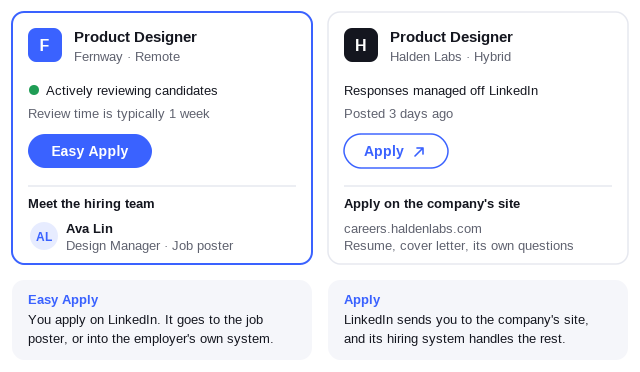
An illustration of the two kinds of job post. The companies and people are made up, and LinkedIn's layout may differ. How much do you want this job?
For your top jobs, apply on the company site, where there's usually more room for a cover letter and the employer's own questions. For the maybes, a complete Easy Apply is enough.
Can you make your resume fit this job?
This matters more than the button. Either way, send a resume made for the job, not the one you sent last week. Our guide to tailoring your resume to a job description shows how, step by step.

The rule in one line: Easy Apply when it's the only way in, the posting asks for it or the job is a maybe. The company site, with a resume made for the job, for the ones you want most.
How to find the company's career site from a LinkedIn job post.
This is how to get around Easy Apply when you'd rather apply directly. No tools needed.
Click Apply, if the post has it
The plain Apply button, without "Easy", takes you to the company's site or a job board. If it lands on the company's careers page or hiring system, that's the employer's own route.
Or go to the company's own website
Look for "Careers", "Jobs" or "Join us" in the menu or the footer. You can also search for the company's name, the word "careers" and the job title.
Know the hiring-system addresses
Many careers pages run on a hiring system with its own address, like jobs.lever.co, boards.greenhouse.io or a myworkdayjobs.com page. Those are the employer's own forms, not job boards.
Check it's the same job, and still open
Match the title, team and location. If you can't find it on the company's site, the LinkedIn post may be the only way in.
Apply there with the extras
Upload the resume made for this job, add a short cover letter if there's a field for one, and answer the employer's own questions in full. Save the version you sent with the job it went to.
If you use Easy Apply, six ways to do it well.
When Easy Apply is the right choice, these make the application as strong as a quick one can be.
Make your profile match your resume
Easy Apply can send skills from your profile, and The Muse notes that recruiters see a snapshot of your profile. If your dates or titles differ from your resume, that's the kind of thing that raises doubts. Fix it once, before you apply anywhere.
Upload the resume made for this job
Don't just reuse the last file. Upload a new one under Resume, as a Word file or PDF. It's optional, but if you send an application without a resume, LinkedIn says you can't reopen it or apply to that job post again.
Answer every screening question
Read each one and answer it honestly. Employers can mark a question "Must-have" and reject anyone who doesn't meet it, automatically.
Check everything before you press Submit
LinkedIn says you can't edit or withdraw an application once it's sent. To fix something, you'd have to message the job poster.
Share only what the application needs
There's no official list of what not to tell a recruiter, but two facts help. If the job poster is a recruiting agency, LinkedIn says it may share your application with its other clients. And LinkedIn's scam advice says real employers don't ask for payment or account details to apply. It also says to be wary of early requests for your Social Security number, bank details or ID photos.
Note the hiring team, then follow up once
Some job posts have a "Meet the hiring team" section, where you can see, connect with and message the people involved. A short note a week or so later puts a name to your application. If you know someone at the company, ask for a referral. In a study of nine large firms, referred applicants were "more likely to be hired" (Burks and others, 2015). Our guides cover how to find the hiring manager and what to write in a follow-up.
Is LinkedIn Easy Apply worth it? A straight answer, without made-up numbers.
Yes, for the right jobs. Easy Apply works: it's a real application, sent to the person or system that hires. It's worth using when it's the only way in, when the employer asks for it or is connected, and for jobs that are a maybe. It's not pointless, and it's not a trap.
Does it work as well as the company site? Nobody knows for sure. The response rates you'll find online for each route come from blogs and posts that don't say how they were measured, and they disagree. LinkedIn doesn't publish one, and we found no independent study that compares the two.
What we do know is the crowd. LinkedIn tells employers they can "Capture 2x as many applicants using Easy Apply". Its help pages also say too many applications make it "harder for recruiters to identify genuine applicants". That's why it can feel so hard to get a job on LinkedIn: a quick button means a big pile.
Why are people getting rid of LinkedIn, or calling it insufferable? We found no survey that measures why people leave it, so any reason you read is opinion. The posts we saw on Google for this search mostly complained about crowded jobs and applications that go unanswered. For a job search, you don't need to post at all: use LinkedIn to find the job and the hiring team, then choose the button.
Our reading: the button matters less than the application behind it. A resume made for the job, complete answers and a note to the hiring team help on either route.
Can you auto apply on LinkedIn? What LinkedIn's own rules say.
There are browser extensions and bots that promise to send Easy Apply applications for you. LinkedIn's rules are clear about them. Its help page on prohibited software says it doesn't permit browser extensions that "automate activity on LinkedIn's website". People who use them "risk having their accounts restricted or shut down".
Its User Agreement also says not to use bots or other unauthorized automated methods on LinkedIn. And LinkedIn says its daily Easy Apply limits exist partly to curb automation and bots.
What is lazy apply? "Lazy apply" is the name of a paid browser extension that sends automated job applications in bulk; its own FAQ describes "automated job applications" and says there's no free trial. Whatever the tool, LinkedIn's rule is the one above: software that automates activity on its website isn't allowed, and accounts that use it risk being restricted.
If you want help applying, use help that works outside LinkedIn. Blynk doesn't automate LinkedIn. It applies on the employer's own site, and you approve every application before it's sent. We compared Blynk and LinkedIn's job tools in full in Blynk vs LinkedIn Jobs.
Easy Apply and the company site: do this, not that.
The whole page, in one list.
Do
- Choose the route job by job, not once for every job.
- Use the company site for the jobs you want most.
- Upload a resume made for each job, on either route.
- Answer every screening question honestly and in full.
- Make your LinkedIn profile match your resume.
- Follow up once with the hiring team.
Don't
- Use bots or browser extensions to apply on LinkedIn.
- Send the same resume to every job.
- Press Submit before you've checked everything.
- Leave the resume off an Easy Apply application.
- Trust a response rate that doesn't say where it came from.
Questions about LinkedIn Easy Apply, answered.
Has anyone been hired from LinkedIn Easy Apply, and do recruiters look?
Yes, it happens. An Easy Apply application is a real application, sent to the job poster, and for connected employers it lands in the same hiring system as a company-site one. There are often a lot of them, and employers can use must-have screening questions to filter them first. On jobs hosted on LinkedIn, it tells you when the poster has viewed your application or downloaded your resume. Nobody publishes a hire rate for Easy Apply, so be wary of anyone quoting one.
Does Easy Apply go to the employer's ATS?
Sometimes. If the employer has connected its hiring system to LinkedIn (LinkedIn calls this Apply Connect), your Easy Apply application goes straight into it. If not, it goes to the job poster on LinkedIn. You can't always tell which, but a job post marked "Responses managed off LinkedIn" runs its process in an outside system.
Should I apply on both LinkedIn and company websites?
Usually there's no need. We found no reliable source that says applying twice helps or hurts. If the employer is connected, your Easy Apply is already in its system. If you want the company site's extras, apply there instead of through Easy Apply, not as well. And you can't take an Easy Apply back to reapply: LinkedIn says you can't withdraw one once it's sent.
Is it better to apply for a job with LinkedIn or a resume?
Use both. Easy Apply sends your application with skills from your profile, and the resume is optional. Upload one anyway, made for this job. If you send an Easy Apply without a resume, LinkedIn says you can't reopen the application or apply to that job post again.
Can I undo or edit an Easy Apply application on LinkedIn?
No. LinkedIn's help page says you can't edit or withdraw an application once it's submitted through LinkedIn. To change something, message the job poster. That's why it's worth checking the resume and every answer before you press Submit.
How many Easy Apply applications can I send a day?
LinkedIn doesn't publish the number. Its help page says there's a daily limit that resets at the end of the day (UTC), plus a speed limit that pauses very fast submissions. It may lower your limit if it sees inauthentic activity. Figures you see elsewhere, like 50 a day, aren't on LinkedIn's help page.
Is LinkedIn Easy Apply legit, and is it safe to apply?
Easy Apply is LinkedIn's own feature, so the button itself is safe. The job behind it is what to check. A verification badge on a job means the company has a verified Page and the poster has verified they work there; LinkedIn says it can't be bought. No badge isn't proof of fraud, though, and LinkedIn says not to give payment or account details as part of applying. If anything feels off, check that the job is also on the company's own careers page.
Do employers prefer Indeed or LinkedIn?
It depends on the employer, and the best data is old. SilkRoad's report on 2015 hiring at 1,200 companies, covered by SHRM, found Indeed the top outside source of interviews (52%) and hires (43%). LinkedIn had 5% of outside interviews. That shows where those employers found people, not what they prefer. For this page's choice, what matters more is applying where the employer actually reviews applications.
What are red flags on LinkedIn, and is it a red flag not to have it?
For a job seeker, two kinds. On your side: a profile whose dates or titles don't match your resume, which a recruiter sees next to your Easy Apply. On the job's side, LinkedIn's scam advice warns about requests for payment or account details to apply, and early requests for your Social Security number, bank details or ID photos. As for not having LinkedIn at all, we found no study that says employers hold it against you. You can apply on company sites without it, but Easy Apply needs an account.
What is the 4-1-1 rule on LinkedIn, and the 7 second rule in resume?
Neither is a LinkedIn rule, and the "3/2/1 rule" has no official meaning either. The 4-1-1 rule is for sharing posts: Contently described it in 2012 as four new pieces of content and one re-share for every self-serving post. The 7 second rule comes from a 2018 Ladders study: recruiters' first screen of a resume averaged 7.4 seconds. ERE notes the study doesn't say how many recruiters took part. Both point the same way: put the experience this job asks for at the top.
Where these facts come from.
Checked in November 2026. The advice is ours; facts about LinkedIn and other companies come from their own pages, and LinkedIn's pages can change. The job-posting count is Blynk's own: 1,062 jobs (1,204 postings grouped by company and title) from Blynk's searches for product roles, mostly senior, first seen October 31 to November 11, 2026, searched for lines that name a way to apply and each match read by eye. It shows only what postings say, not what happens to an application.
- How to tailor your resume to a job description
- How to find the hiring manager
- Follow-up email after applying
- The best AI job application tools, compared
- Job application questions, answered
- LinkedIn Help: apply for jobs on LinkedIn
- LinkedIn Help: apply to jobs directly on LinkedIn (Easy Apply)
- LinkedIn Help: apply for jobs with a screen reader
- LinkedIn Help: upload a resume when applying
- LinkedIn Help: Easy Apply limits
- LinkedIn Help: job post insights
- LinkedIn Help: application viewed and resume downloaded updates
- LinkedIn Help: screening questions for job posts
- LinkedIn Help: Meet the hiring team
- LinkedIn Help: verification on job posts
- LinkedIn Help: prohibited software and extensions
- LinkedIn User Agreement
- LinkedIn: Easy Apply jobs in the United States
- LinkedIn Talent Solutions: Easy Apply for Workable customers ("Capture 2x as many applicants")
- Microsoft Learn: LinkedIn Apply Connect overview
- Lever Help: enabling and using the LinkedIn Apply Connect integration
- The Muse: when you can use the Easy Apply option (2020)
- Ladders: eye-tracking study, 2018 (archived copy)
- ERE: is the 6-second resume scan a myth?
- Contently: the 4-1-1 rule for social media (2012)
- LinkedIn Help: recognize and report scams
- LinkedIn Help: who's viewed your profile, basic and Premium
- SHRM: Indeed dominates external sources of hire, survey finds (2016, SilkRoad data for 2015)
- Burks, Cowgill, Hoffman and Housman: the value of hiring through employee referrals (QJE, 2015)
- Lazy apply (lazyapply.com): FAQ
- Blynk: Auto-Apply
