
How to find someone’s email address. And know it’s right before you send.
You have a name, from a job posting, LinkedIn or a friend, and you want to write to them about a job. But their email address isn’t anywhere. Here’s how to work it out, check it and send it safely, with every tool’s facts taken from its own pages in November 2026.

The short answer
- Find one email address the company has published with a person’s name in it, and copy its pattern, such as first.last@ or first@. Then apply it to the name you have.
- Check it with a free email checker before you send. If the checker says "accept all" or "unknown", treat the address as a guess.
- Use only a work address, or one the person shared themselves, and write one short note about one job. Can’t check it? Message them on LinkedIn instead.
On this page
Why finding someone’s email address feels risky, and what’s really going on.
This page starts once you have a name and want to write to that person directly. Don’t know who to write to yet? Start with how to find the hiring manager, then come back. Four worries come up again and again.
“The job posting will have it.”
It almost never does. Of 1,477 job postings from Blynk’s searches, 89 gave any email address, and nearly all of those were shared inboxes like careers@ or accommodations@. Only 3 gave what is clearly one person’s work email.
What to do: Look past the posting. The company’s own pages are a better bet, and step 1 shows where.
“If it doesn’t bounce, it reached them.”
Not always. Some company mail servers accept mail for any address, including mailboxes that don’t exist. Hunter, which makes an email checker, says no checking tool can fully confirm delivery on these "catch-all" or "accept all" domains.
What to do: Treat accept-all as unchecked. Find a second published address, or use LinkedIn.
“I’ll just email every pattern.”
Then a stranger gets several copies of your note, or none at all. Either way it looks like a mass mailing, not a note written for them.
What to do: Send to one checked address. If it bounces, try one more pattern, then stop.
“Is this creepy, or even allowed?”
A short note to someone’s work address about a real job is a normal part of a job search. In the US, the email law the FTC enforces is about commercial messages, the ones that advertise or promote a product or service.
What to do: Keep it to a work address and one job. The section on what’s fine to send has the details.
How to find someone’s email address, in six steps.
These free methods are listed in the order that works best. Stop as soon as you have an address you’ve checked.
Check the job posting and the company’s own pages
Start with the posting, but expect a shared inbox at best, then look at the company website. Team and About pages, press releases with a media contact, and blogs and articles with an author’s name often show a real person’s work email. So do investor pages and event pages for industry conferences. A contact page or contact forms usually go to a shared inbox, so keep them as a last resort. Hunter counted about 905,000 company websites and found at least one email address on 18.7% of them, so look on purpose.
Use Google search. Type the person’s full name in quote marks, the company name and the word email, such as "Dana Ruiz" Northwind email. Quote marks are one of the search engine’s simple search operators, and they match the exact name. Or search for the company domain with an @ in front, such as "@northwind.com", to find any address it has already published. These Google searches take a few seconds.Look at the person’s own profiles and sites
Open their LinkedIn profile and check Contact info. LinkedIn says a member’s email is by default visible only to their direct connections, so for a stranger it’s usually hidden. Then check their other social profiles, such as recent tweets or posts on X, a personal website or a GitHub profile. A page for a talk, video or podcast they did may list it too. An address the person made publicly available themselves is fair to use.
Have a personal website? A WHOIS lookup on its domain may show a contact email, but ICANN says many registrars now show a stand-in address or a web form instead of the owner’s real one. Still there? Make sure their profile shows they still work at the company.Find a company email address, and read its pattern
Many companies give all their employees an address in the same shape, called the email format or email pattern, and different companies use different formats. So you don’t need the person’s own address, just one from the same company with a person’s name in it. Skip generic ones like careers@ or press@, which tell you nothing about the pattern. Two published addresses that match are better than one.
Prefer a recent source. An old press release may be outdated if that person has left. At a small startup, even a founder’s address is a good clue. Charts disagree, so trust a real address. Hunter says 49.9% of companies in its data use first@. Interseller’s count, as reported by Saleshandy, says first@ leads at small companies and first.last@ at large ones. One address the company really uses beats either.Find someone’s email by name, using the pattern
Put the name you have into the same shape. The common email formats are first.last (also written firstname.lastname), first, flast, firstl, firstlast and first_last. Use the first name as the person writes it on LinkedIn. Watch for variations like a middle initial or a hyphen in the published address, since the company may keep those too.
Let’s say you found jordan.lee@northwind.com. The pattern is first.last. The name you have is Dana Ruiz. So try dana.ruiz@northwind.com. An email permutator is a tool that lists every possible email address from a full name and a company domain. It’s useful for seeing the options, but never send to all of them.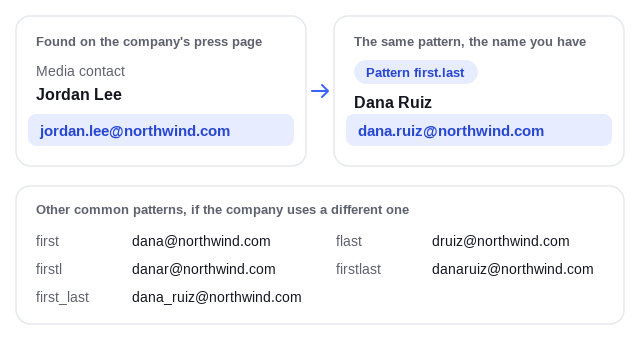
An illustration of reading a company’s pattern and applying it to a name. The names and company are made up. Check the email address before you send it
An email checker, also called an email verifier, tests an address without sending anything. It checks the spelling, looks up the company’s mail records, then asks the mail server whether that mailbox exists. Hunter’s checker gives each address a status, and each status tells you what to do next. Hunter’s free plan includes 50 credits a month.
Valid means the server says the mailbox exists, so send it. Accept all means the server takes every address, so it’s still a guess. Unknown often means the server blocked or delayed the check, so try again in a couple of days. Invalid means don’t use it. Treat the results as a strong hint, not a promise. Hunter says no verification tool can fully confirm accept-all addresses, and a valid address can still bounce, though not because the address is wrong. If you have multiple possible addresses, check each one before sending any.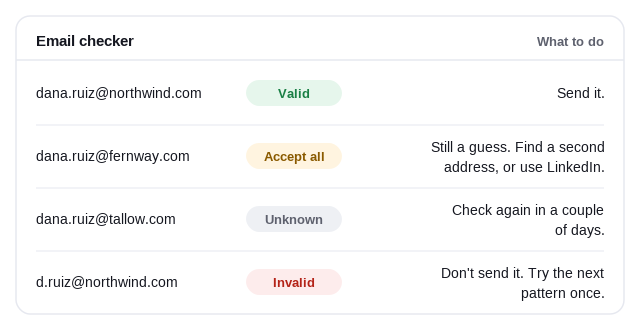
An illustration based on the result names Hunter’s checker uses. The names and company are made up. Send one short note, or switch to LinkedIn
Write to one person, about one job, from your own email address. Name the role and mention one true result that fits it. Our guide to a cold email for a job has templates to copy. If you couldn’t check the address, send a LinkedIn connection request with a short note instead of a guess.
Doing all six steps manually takes effort for each person. Or paste the job link below. Blynk finds the people hiring for the role, and checks each person’s work email before it shows them to you.


The best-known email finder tools, and what their free plans give you.
These platforms are built for sales and marketing teams, who do prospecting at scale, building lead lists, exporting contacts and running outreach campaigns. Each searches its own database of addresses. For one job search, you don’t need a paid plan, and a free one is usually enough.
Here’s what each free plan includes, from the tool’s own pricing or help page, checked on November 12, 2026. Each company makes its own accuracy claims, so we leave those out. Free credits are limited and plans change often, so look again before you sign up.
Hunter. You enter a name and the company domain, and its email finder suggests an address. Its free plan has 50 credits a month, shared by the finder, the email verifier and Domain Search, which lists addresses it has found at one company. Hunter says a search that finds no address is free.
Apollo. It lets you search people by company and job title, not just by name. The free plan gives 900 credits a year, handed out monthly, and free plans can connect Gmail accounts only.
Snov.io. Its free trial has 50 credits, renewed every 30 days.
Lusha. The free plan has up to 40 credits a month, and a verified email costs 1 credit.
Kaspr. The free plan gives 15 B2B email credits and 5 phone credits a month, plus 5 direct email credits.
Wiza. The free plan includes 20 valid emails and 5 phone numbers. Wiza’s help says these are a one-time allowance that doesn’t reset.
Several of these tools work as Chrome extensions on LinkedIn. ContactOut’s own help page says LinkedIn can’t detect its extension, but may flag an account that runs several such tools at once, or whose activity suddenly jumps, so read a tool’s help pages before you install one. Whichever finder tool you use, run the address through a checker before sending.
What to do when an email address bounces, and when it doesn’t.
A bounce is a notice that your email wasn’t delivered. Mail servers send it back automatically, and it usually says why. If it says the address doesn’t exist, the pattern was wrong for this person. Try the next most likely pattern once, and check it first. If that bounces too, stop and send a LinkedIn note instead.
No bounce isn’t proof. At a catch-all company, the server takes mail for every address, real or not, so a wrong guess can vanish without a bounce. Hunter’s help says no checking tool can fully confirm these addresses. Treat them as unchecked unless two addresses the company published follow the same pattern.
Valid isn’t a promise. Hunter’s own guide says an address marked valid can still bounce, though not because the address is wrong. An answer of unknown often means the server blocked or delayed the check, so Hunter suggests checking again in a couple of days.
Never send to every pattern at once. One person getting five copies, or a stranger at the same company getting your note, looks like spam. Sales guides worry about sender reputation, which matters when you send thousands. For one note, the real cost of guessing is that the right person never sees it.
What’s fine to send to a work email, and what isn’t.
What the US law covers. The FTC’s guide to CAN-SPAM says the law covers commercial messages, those whose primary purpose is "the commercial advertisement or promotion of a commercial product or service". It adds that the law "doesn’t apply just to bulk email", and that there’s "no exception for business-to-business email". In our reading, one personal note asking about a job isn’t advertising a product. This isn’t legal advice, and other countries have their own rules.
What the FTC calls worse. Its guide lists "harvesting email addresses or generating them through a dictionary attack" among violations with extra penalties. It defines a dictionary attack as sending to addresses "made up of random letters and numbers". That’s not the same as trying one name pattern, but it’s one more reason to send to one checked address, never to a list of guesses.
Our advice for a job search. Use a professional email, meaning the business email the company gave them, or contact information they made public themselves. Don’t use a personal email you found somewhere else, and don’t buy an email list or use a people-search site. Write from your own email, about one job, in a few sentences. And if a posting asks you not to contact anyone, don’t.
Do this, not that.
Do
- Find one address the company published, with a person’s name in it.
- Check every email address before you send.
- Treat accept-all and unknown as unchecked.
- Write from your own email, about one job.
- After a bounce, try one more pattern, then use LinkedIn.
Don't
- Send to every pattern at once.
- Assume no bounce means it arrived.
- Buy a list or use a people-search site.
- Use a personal address the person didn’t share.
- Get in touch at all if the posting asks you not to.
Questions about finding someone’s email address.
What is the difference between Gmail and email?
Email is the way of sending messages from one address to another. Gmail is one email service, made by Google, that gives you an address and an inbox. For a job search, the difference that matters is between a work address, like dana.ruiz@northwind.com, and a personal one. Write to someone’s work address, from your own.
What is the best free email service?
There’s no single best one. Gmail is one of several free services, and Google calls it a "no-cost Gmail account". For a job search, pick any service you’ll check every day, and use an address with your own name in it, such as dana.ruiz@ rather than a nickname.
What is an email ID?
It’s another name for an email address, such as dana.ruiz@northwind.com. The part before the @ is the person’s name or username, and the part after is the company’s domain. When you find someone’s work email, it’s the part before the @ you’re working out, using the company’s pattern.
Can I find an email with just a name?
Usually not with a name alone. You also need to know where they work, because work email addresses follow each company’s pattern. Email finders such as Hunter ask for the person’s full name and the company domain. So find their employer first, on LinkedIn or the company’s team page, then follow the six steps above.
How to find someone’s email address by their name for free?
Find one address the company has published, on its team page, a press release or a blog post, and apply the same pattern to the name. Then run it through a free email checker. Hunter’s free plan includes 50 credits a month, and most finders have a small free plan. If the checker can’t confirm it, message the person on LinkedIn instead.
How can I find someone’s email address?
The fastest way is to look where they or their company published it. If that fails, work out the company’s pattern from any real address and apply it to their name. Check the result before you send, and treat "accept all" as a guess. If you’re writing about a specific job, paste the job link into Blynk. It picks the two most likely to read your note, with their work email.
Can I find someone’s email address from LinkedIn?
Sometimes. Open their profile and check Contact info. LinkedIn says a member’s email is visible only to their direct connections by default, so you may need to get connected first. Members can choose to show it to more people, or to no one. Avoid browser extensions that pull contact details from LinkedIn, since one finder’s own help page, ContactOut’s, says LinkedIn may flag accounts that run several such tools at once, though it says LinkedIn can’t detect its own extension.
How do I verify an email address without sending an email?
Use an email checker. It checks the spelling, looks up the company’s mail records, and asks the mail server whether the mailbox exists, all without sending a message. A "valid" answer means the server says the mailbox exists. An "accept all" answer means the server takes every address, so it can’t be confirmed.
Is it legal to email someone I don’t know about a job?
In the US, a personal note about a job is generally fine, in our reading, but this isn’t legal advice. The FTC’s guide says CAN-SPAM covers messages whose primary purpose is to advertise or promote a commercial product or service, and that it "doesn’t apply just to bulk email". A note asking about a job isn’t advertising a product. Other countries have their own rules.
How do I find a recruiter’s email?
The same way. If you’re looking for a recruiter, start with the job post and their LinkedIn Contact info, then follow the company’s pattern and check the address. Our guide on how to reach out to a recruiter covers what to write once you have it.
Where the facts come from.
Checked on November 12, 2026. The advice is ours. Facts about the email tools, LinkedIn, Google and ICANN come from each company’s own pages, and the law from the FTC’s own guide. The posting counts are Blynk’s own, from 1,477 job postings found by Blynk’s searches, mostly product roles, first seen between October 31 and November 11, 2026. We counted every email address written in the posting text. An address counted as one person’s only when the part before the @ is a person’s name, not a team word like careers or talent.
- How to find the hiring manager
- Cold email for a job
- How to reach out to a recruiter
- Networking email template
- Blynk vs Hunter
- Blynk vs Apollo
- Hunter Help, what is an accept-all email address
- Hunter Help, the possible verification statuses
- Hunter, how email verification works
- Hunter pricing
- Hunter blog, how to find someone’s email address (its own counts)
- Hunter Email Finder
- Apollo pricing
- Apollo help, search filters
- Snov.io pricing
- Lusha pricing
- Kaspr pricing
- Wiza pricing
- Wiza Help, when do my credits reset
- ContactOut help, can LinkedIn detect the extension
- Google Search Help, refine web searches
- ICANN advisory, registrars’ use of web forms in registration data
- LinkedIn Help, visibility of your email address
- FTC, CAN-SPAM Act compliance guide for business
- Saleshandy, reporting Interseller’s count of email patterns by company size
- Google Workspace, Gmail
- Blynk Find the Hiring Manager
